Claude Code Multi-Model Setup: Opus, Sonnet and Fable
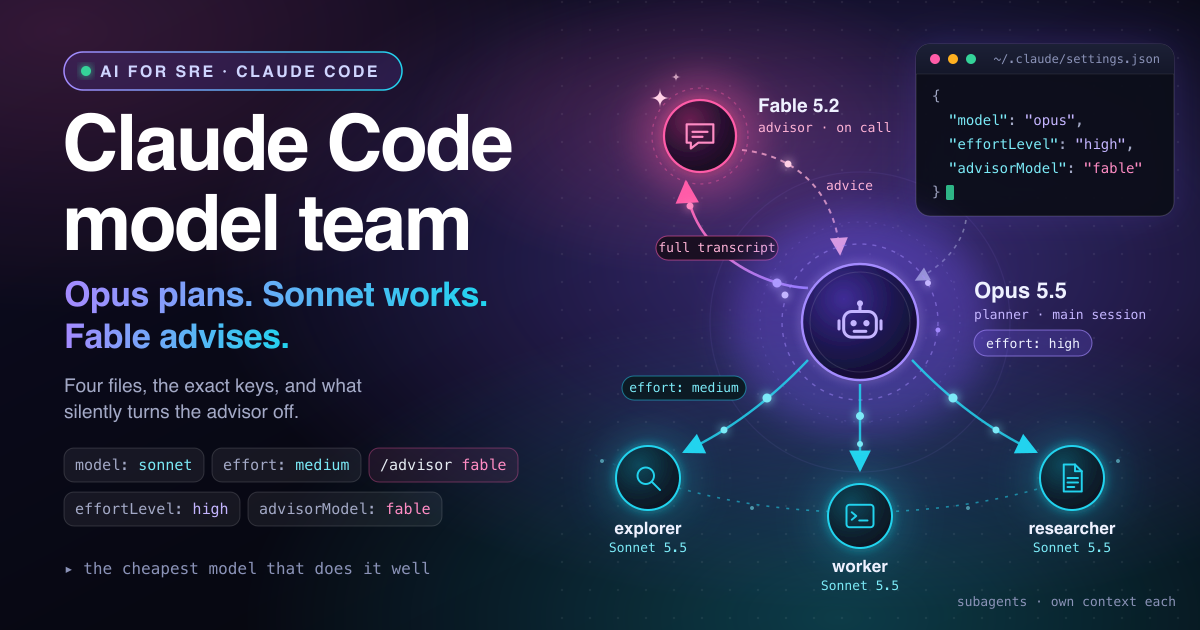
A Claude Code multi-model setup spends your most expensive model only on the hardest thinking. Opus 5.5 plans and ships on high effort. Sonnet 5.5 subagents read code, run tests and fetch docs on medium. Fable 5.2 stays on call as an advisor. By the end you'll know which four files to change, which keys go in each, and what silently turns the advisor off.
How the Claude Code multi-model setup works
This is the LLM optimisation rule an AI SRE applies to any gateway: send each request to the cheapest model that does it well. In Claude Code the main conversation is the planner. It holds the context, makes the decisions and writes the final change. Routine work goes to subagents: separate Claude instances, each with its own context window, prompt, tools and model, defined in a Markdown file.
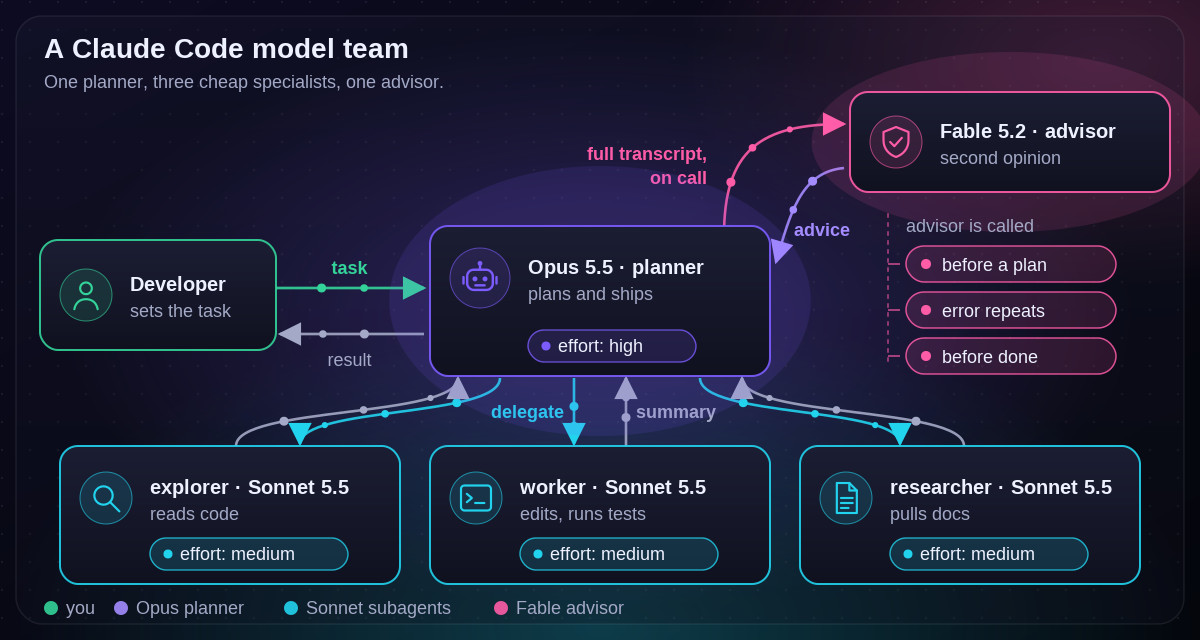
An explorer searches and reads code and returns a summary rather than file dumps. A worker makes one scoped edit and runs the tests. A researcher pulls documentation. All three run on Sonnet at medium effort, so the planner's context stays small and its tokens go to real decisions.
The advisor works differently. It's a built-in tool backed by a stronger model, turned on with the /advisor command. It takes no input: when the main model calls it, Claude Code forwards the whole conversation, every tool call and result included, and the advice comes back as the tool result. It never interrupts on its own; the main model decides when to ask. That's the same review-before-acting pattern as an AI incident copilot, applied to coding.
The four files you change
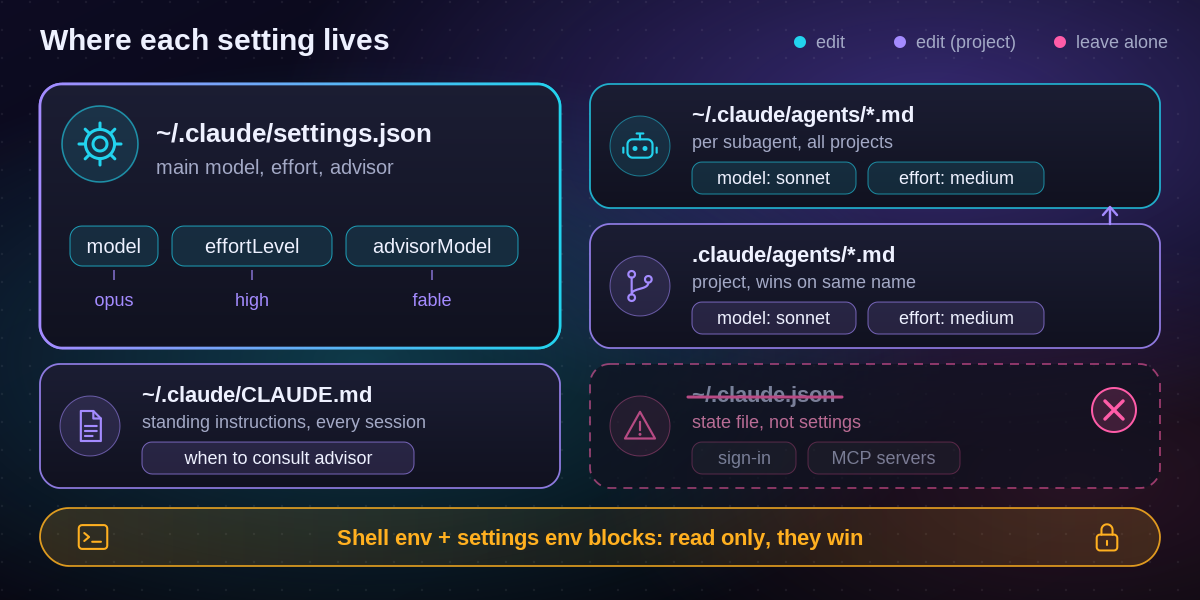
Everything lives in ~/.claude/ and your project's .claude/ folder. One common mix-up first: ~/.claude.json in your home directory is the state file Claude Code rewrites as it runs (sign-in, trusted projects, MCP servers added with claude mcp add). The keys in this post belong in ~/.claude/settings.json, as the settings reference describes.
| File | What you set | Scope |
|---|---|---|
~/.claude/agents/*.md | model, effort per subagent | All your projects |
.claude/agents/*.md | The same, committed with the repo | This project; wins over a user agent of the same name |
~/.claude/settings.json | model, effortLevel, advisorModel | All your projects |
~/.claude/CLAUDE.md | When to consult the advisor | Every session |
Environment variables override all four files; Step 3 checks them.
Step 1: Sonnet subagents on medium effort
First list both agent folders. Claude Code also ships a built-in read-only Explore agent, so you may only need a worker and a researcher. Each subagent is a Markdown file. Its YAML frontmatter sets the name, the description the planner uses to pick it, the tools, the model and the effort.
---
name: worker
description: Makes one scoped code change from a plan and runs the tests. Use for routine edits once the approach is decided.
tools: Read, Edit, Write, Bash, Grep, Glob
model: sonnet     # an alias, a full ID such as claude-sonnet-5-5, or inherit
effort: medium    # low, medium, high, xhigh or max
---
You implement exactly the change you are given. Run the relevant tests,
then reply with a summary of the diff, the test command and its result.
If the plan doesn't fit the code, stop and say why.
Save it as ~/.claude/agents/worker.md, then add a researcher beside it with tools: Read, WebSearch, WebFetch. The description matters most: the planner reads it to decide when to delegate. Leave agents that pin another model on purpose, such as a Haiku linter.
An alias such as sonnet follows the newest Sonnet; a full ID stays pinned until that model retires. The planner can override it per call, and CLAUDE_CODE_SUBAGENT_MODEL sets a default for agents without one.
Always set effort. A subagent on a different model from the main conversation doesn't inherit your session's effort; it uses that model's saved effort level or its default. CLAUDE_CODE_SUBAGENT_EFFORT sets a fallback for agents that name none. A typo such as effort: med doesn't fail: Claude Code logs a warning and ignores it.
What a subagent sees, and what it doesn't
A subagent starts with an empty context window. It gets its own Markdown instructions, your CLAUDE.md files (unless the agent sets omitClaudeMd: true) and the brief the planner writes. It never sees your conversation, and only its final reply comes back.
That loss is the point: an explorer can read 30 files and return 20 lines, keeping the planner's context small. But the result is only as good as the brief. Delegate self-contained jobs, keep design decisions with the planner, put the goal, files and constraints in the brief, and fix the reply format in the agent file. A fork keeps the full conversation, but it always runs on the main model.
Step 2: settings.json for the planner and the advisor
Next, make Opus on high effort the main model and Fable the advisor. Merge these three keys into ~/.claude/settings.json. Don't replace the file: it probably holds your permissions and hooks too.
{
  "model": "opus",
  "effortLevel": "high",
  "advisorModel": "fable"
}
model takes an alias or a full model ID (see model configuration). effortLevel accepts low, medium, high or xhigh. You can't save max here; it stays a per-session choice. A maxEffortLevel key, or a cap set by your organisation's admin, clamps anything above it.
You don't have to type advisorModel yourself. Running /advisor fable saves the same key to your user settings, and /advisor off turns the advisor off. The first time you choose Fable, Claude Code asks you to review and enable it in an interactive session, so do this once in a terminal.
Step 3: Check what turns the advisor off
The advisor can be configured and still never run. The flowchart shows Claude Code's checks in order.
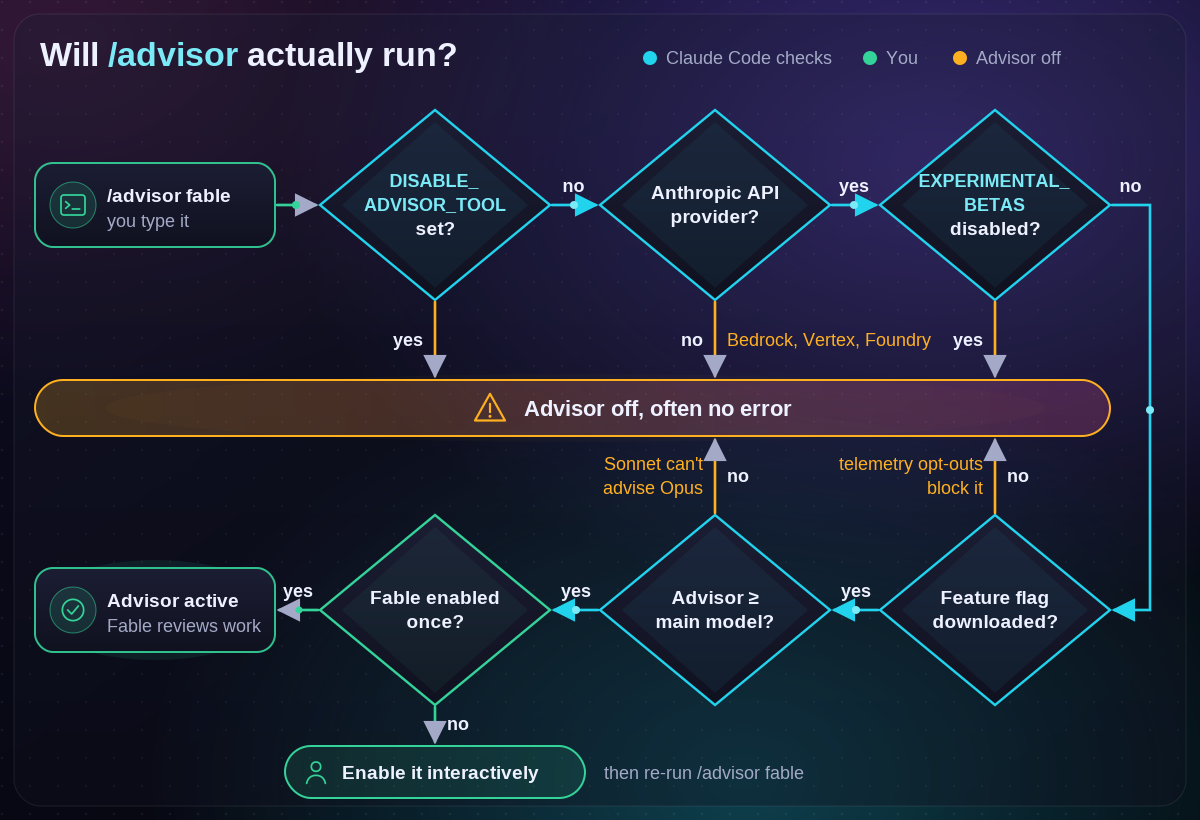
Three checks are easy to miss. The advisor needs Claude Code talking to the Anthropic API, so it's hidden on Amazon Bedrock, Google Vertex AI and Microsoft Foundry. It sits behind a feature flag Claude Code downloads at startup, and DISABLE_TELEMETRY, DO_NOT_TRACK or CLAUDE_CODE_DISABLE_NONESSENTIAL_TRAFFIC stop that download. And the advisor must be at least as capable as the main model, so Sonnet can't advise Opus.
Run this check in a normal terminal. It reads your environment and the env blocks of your user, project and macOS managed settings, and changes nothing.
# Variables that disable the advisor or override effort
env | grep -E 'CLAUDE_CODE_(DISABLE_ADVISOR_TOOL|DISABLE_EXPERIMENTAL_BETAS|DISABLE_NONESSENTIAL_TRAFFIC|EFFORT_LEVEL|SUBAGENT_EFFORT)|DISABLE_TELEMETRY|DO_NOT_TRACK'

# The same names set through settings files
grep -nE 'DISABLE_|DO_NOT_TRACK|EFFORT|advisor' ~/.claude/settings.json .claude/settings*.json \
  "/Library/Application Support/ClaudeCode/managed-settings.json" 2>/dev/null
No output from the first command is the good result. The second should show only the effortLevel and advisorModel lines you added. If CLAUDE_CODE_EFFORT_LEVEL appears, usually exported in a shell profile, it overrides effortLevel for every session and your high never applies. The environment variable reference lists the rest.
Step 4: Tell Claude when to consult the advisor
Claude Code's built-in advisor instructions already tell the model to call it before substantive work, when stuck and before declaring done. A few lines in your user memory file, ~/.claude/CLAUDE.md, make your own thresholds explicit in every project.
## Advisor and delegation
- Consult the advisor before starting a plan that touches more than a few files.
- Consult it when the same error comes back twice: am I digging in the wrong place?
- Consult it before calling a long task done, after the result is saved.
- Delegate code searches, routine edits and doc lookups to the explorer,
  worker and researcher subagents.
Keep it short: CLAUDE.md loads into every session, so each line costs tokens on every turn. The thresholds are a token budget too: each advisor call sends the whole transcript to the stronger model, so three well-placed calls in a long task beat one after every edit.
Let Claude Code make the changes
You can also paste one prompt and review the diffs, much like the workflow in a day in the life of an AI-augmented SRE. This version names the right file and the full variable list, and keeps the "no edits until I say go" gate.
Rebuild my Claude Code setup. Show every change as a diff; no edits until I say go.
1. In ~/.claude/agents and .claude/agents, find subagents that fit explorer, worker
   and researcher. Draft only the missing ones, with model: sonnet and effort: medium.
   List any that pin a different model and leave them alone.
2. In ~/.claude/settings.json (not ~/.claude.json) set "model": "opus",
   "effortLevel": "high" and "advisorModel": "fable".
3. Change nothing, but report CLAUDE_CODE_DISABLE_ADVISOR_TOOL,
   CLAUDE_CODE_DISABLE_EXPERIMENTAL_BETAS, DISABLE_TELEMETRY, DO_NOT_TRACK,
   CLAUDE_CODE_DISABLE_NONESSENTIAL_TRAFFIC, CLAUDE_CODE_EFFORT_LEVEL and
   CLAUDE_CODE_SUBAGENT_EFFORT from my shell and settings env blocks.
4. Add to ~/.claude/CLAUDE.md: consult the advisor before a large plan, when an
   error repeats, and before calling a long task done.
Claude should reply with one diff per file and the variables it found. Answer "go", then run /advisor fable once to enable Fable. If it proposes editing ~/.claude.json, stop it.
Common pitfalls
- Editing
~/.claude.jsoninstead of~/.claude/settings.json. - A stale
CLAUDE_CODE_EFFORT_LEVELin a shell profile overrideseffortLevel. - Saving
"effortLevel": "max". It isn't accepted;xhighis the highest saved level. - A weaker advisor. Sonnet advising Opus never activates.
- Telemetry opt-outs or a cloud provider hide
/advisorcompletely.
Key takeaways
- Subagent model and effort live in agent frontmatter:
model: sonnetandeffort: medium. - Main model, effort and advisor live in
~/.claude/settings.json:model,effortLevelandadvisorModel. - Subagents start with a fresh context, so the planner's brief is the whole handoff.
- The advisor is a tool the main model calls with the full transcript; it never speaks up on its own.
- Environment variables beat the files, so check them first.
Related articles
Rolling Out a JDK Upgrade to 2,000+ Jenkins Agents
A JDK upgrade reached most of a client's 2,000+ Jenkins agents in half an hour and broke builds with a misleading error. How the client's rollouts work, how Claude Code found the deleted JDK, and how they roll out now.
Kubernetes Auto-Remediation: Self-Healing with Guardrails
Wire Alertmanager to a remediation worker that grows full PVCs, rolls back stuck rollouts and evicts leaky pods, guarded by a kill switch, blast-radius and rate limits, and a circuit breaker. Then measure auto-closed alerts and MTTR.
LLM Root Cause Analysis: Correlate Logs, Metrics, Traces
Most incidents follow a change. Give an LLM the deploy history, one PromQL result, filtered logs and a trace, and it returns ranked root-cause hypotheses with evidence for and against, plus the guardrails that keep it honest.