DVC Tutorial: Version Data, Pipelines and ML Experiments
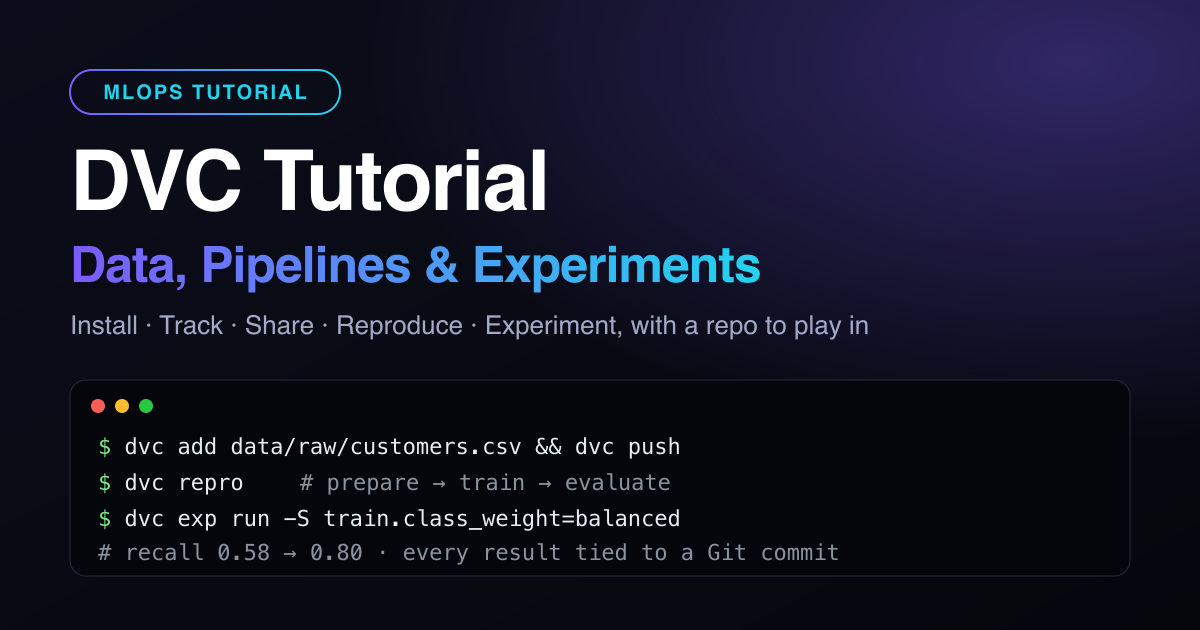
This DVC tutorial takes you from installing DVC to running ML experiments, using a real (dummy) project you can clone and break. DVC, short for Data Version Control, lets Git version your datasets and models without storing them in Git. Every command below was run against the companion repository, and the outputs are the ones you will see.
You will work through the operations a data scientist actually repeats every week:
- track a dataset and share it through a remote;
- switch between dataset versions;
- turn scripts into a reproducible pipeline;
- compare metrics and parameters;
- run and promote experiments.
What DVC does (and what stays in Git)
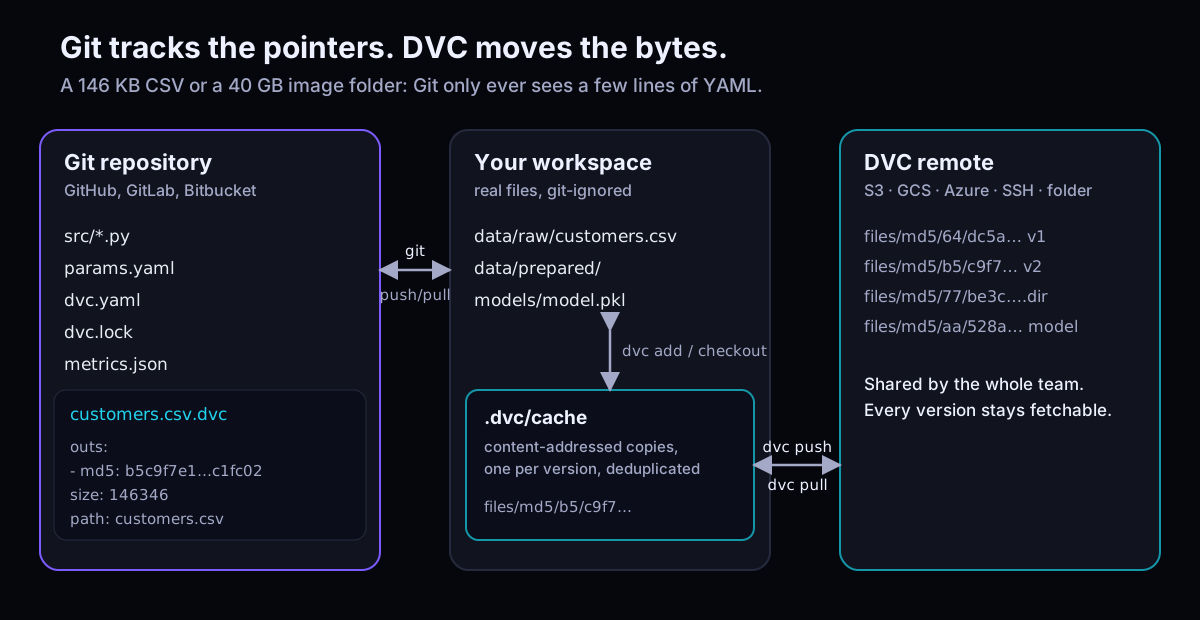
When you dvc add a file, DVC hashes it, moves the bytes into a local cache and leaves a small .dvc pointer for Git to commit, review and branch. dvc push sends the data to a DVC remote: S3, GCS, Azure, SSH or a plain folder.
So a commit pins your code, parameters, data and model together. That is the core of reproducible MLOps.
Install DVC on Windows, macOS or Linux
For this tutorial, use pip inside the project's virtual environment on any OS: requirements.txt already includes DVC, so you can skip to the next section. For a system-wide install, pick your OS:
Install DVC on Windows
# Option 1: winget (PowerShell or Command Prompt)
winget install --id Iterative.DVC

# Option 2: Chocolatey or Scoop
choco install dvc
scoop install dvc

# Option 3: pip (Python 3.9+), ideally inside a virtual environment
pip install dvc
There is also a self-contained Windows installer. Run the tutorial commands in Git Bash (bundled with Git for Windows) so cp, mkdir -p and wc -l work exactly as written.
Install DVC on macOS
# Option 1: Homebrew (recommended, works on Apple Silicon and Intel)
brew install dvc

# Option 2: pip (Python 3.9+), ideally inside a virtual environment
pip install dvc
On Apple Silicon, use Homebrew or pip. The conda package and the PKG installer only support Intel Macs.
Install DVC on Linux
# Option 1: pip (Python 3.9+), ideally inside a virtual environment
pip install dvc

# Option 2: snap (auto-updates)
sudo snap install --classic dvc

# Option 3: conda / mamba
mamba install -c conda-forge dvc
Debian/Ubuntu and Fedora/CentOS users can also add the official apt or yum repository. If your shell says dvc: command not found after a pip install, open a new terminal so it picks up the updated PATH.
Remote storage needs an optional extra, for example pip install "dvc[s3]". Other extras are [gs], [azure], [ssh] and [all]. Check the install with:
dvc version          # DVC version: 3.x (pip/brew/...) plus the remote types it supports
dvc doctor           # same report; paste it into bug reports
Get the playground project
The datsabk/dvc-tutorial repository holds synthetic telecom customer data and three small scripts. Each customer row has tenure, monthly charges, support tickets, contract type and a churn label. The main branch is plain Git, with no DVC yet.
Set up the project on Windows
git clone https://github.com/datsabk/dvc-tutorial.git
cd dvc-tutorial
py -m venv .venv
source .venv/Scripts/activate      # Git Bash (PowerShell: .venv\Scripts\Activate.ps1)
pip install -r requirements.txt
Set up the project on macOS
git clone https://github.com/datsabk/dvc-tutorial.git
cd dvc-tutorial
python3 -m venv .venv
source .venv/bin/activate
pip install -r requirements.txt
Set up the project on Linux
git clone https://github.com/datsabk/dvc-tutorial.git
cd dvc-tutorial
python3 -m venv .venv
source .venv/bin/activate
pip install -r requirements.txt
starter-data/customers_v1.csv # 2,000 customers, Jan-Jun signups
starter-data/customers_v2.csv # v1 + 1,000 July signups
src/prepare.py src/train.py src/evaluate.py
params.yaml # hyperparameters DVC will trackThe data is generated with a fixed seed, so your hashes and metrics will match this article.
Initialise DVC and track your first dataset
dvc init
git status --short
#   A  .dvc/.gitignore
#   A  .dvc/config
#   A  .dvcignore
git commit -m "Initialize DVC"

mkdir -p data/raw
cp starter-data/customers_v1.csv data/raw/customers.csv
dvc add data/raw/customers.csv
dvc add creates two small files for Git. The pointer, data/raw/customers.csv.dvc, looks like this:
outs:
- md5: 64dc5a2c208512026edcb58dbedc5c7b
  size: 97707
  hash: md5
  path: customers.csv
The second file, data/raw/.gitignore, contains /customers.csv so the real CSV never lands in Git. Commit both and tag the version:
git add data/raw/customers.csv.dvc data/raw/.gitignore
git commit -m "Track customer data v1"
git tag data-v1
Tired of typing
git addafter every DVC command? Rundvc config core.autostage trueand DVC stages its own files.
Share data with a DVC remote
A remote is where the team's data lives. To keep this tutorial credential-free, use a folder next to the repo:
dvc remote add -d localremote ../dvc-storage
git commit -am "Add local DVC remote"
dvc push
# 1 file pushed
Now play the new teammate. A fresh clone has the pointer but not the data until you pull:
git clone . ../teammate && cd ../teammate
ls data/raw          # customers.csv.dvc   (no CSV yet)
dvc pull
# A       data/raw/customers.csv
# 1 file fetched and 1 file added
cd -
For real projects, point the remote at cloud storage and keep secrets in the git-ignored .dvc/config.local via --local. To rehearse an S3 remote with no AWS bill, run an AWS emulator locally.
dvc remote add -d storage s3://my-ml-bucket/churn          # or gs://, azure://, ssh://
dvc remote modify --local storage profile my-aws-profile   # credentials stay local
Version a dataset and time-travel between versions
New data arrives: 1,000 July signups. Replace the file and let DVC tell you what changed:
cp starter-data/customers_v2.csv data/raw/customers.csv
dvc status
# data/raw/customers.csv.dvc:
#     changed outs:
#         modified:           data/raw/customers.csv

dvc add data/raw/customers.csv
git diff
-- md5: 64dc5a2c208512026edcb58dbedc5c7b
- size: 97707
+- md5: b5c9f7e12d0971ca763b88e081c1fc02
+ size: 146346A data change is now a normal, reviewable Git diff. Commit, tag and push:
git commit -am "Customer data v2: +1,000 July signups"
git tag data-v2
dvc push
dvc diff data-v1          # Modified: data/raw/customers.csv
To go back to any version, check out its pointer with Git, then let DVC swap the bytes from cache:
git checkout data-v1 -- data/raw/customers.csv.dvc
dvc checkout
wc -l data/raw/customers.csv      # 2001  (v1)

git checkout data-v2 -- data/raw/customers.csv.dvc
dvc checkout
wc -l data/raw/customers.csv      # 3001  (v2)
Checking out a whole commit or branch works the same way: git checkout <rev>, then dvc checkout.
Build a reproducible DVC pipeline
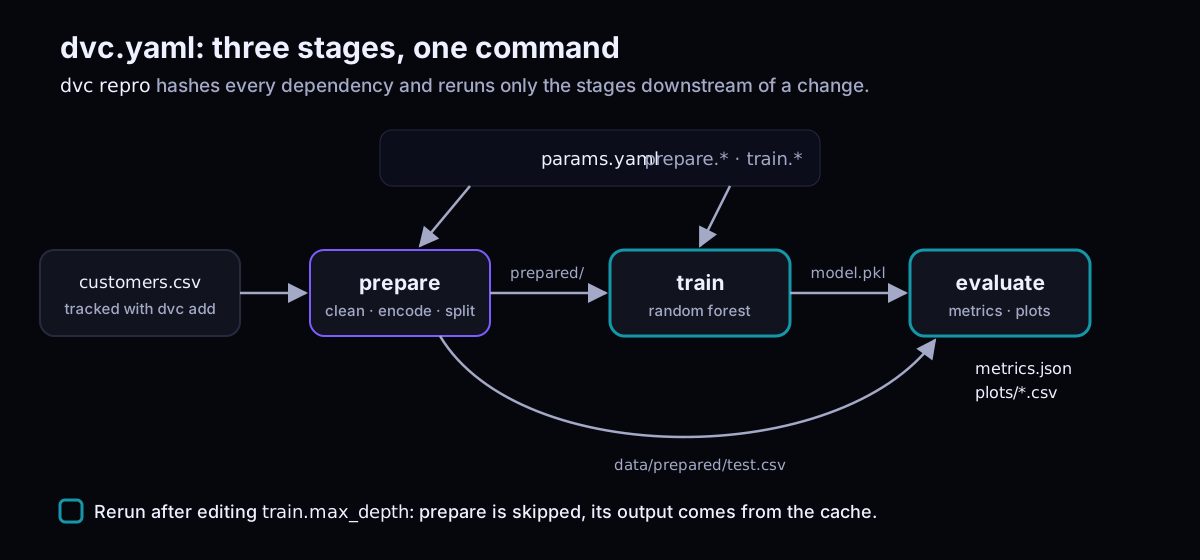
Stop running scripts by hand. Create dvc.yaml in the repo root:
stages:
  prepare:
    cmd: python src/prepare.py data/raw/customers.csv data/prepared
    deps:
      - src/prepare.py
      - data/raw/customers.csv
    params:
      - prepare
    outs:
      - data/prepared

  train:
    cmd: python src/train.py data/prepared/train.csv models/model.pkl
    deps:
      - src/train.py
      - data/prepared/train.csv
    params:
      - train
    outs:
      - models/model.pkl

  evaluate:
    cmd: python src/evaluate.py models/model.pkl data/prepared/test.csv
    deps:
      - src/evaluate.py
      - models/model.pkl
      - data/prepared/test.csv
    metrics:
      - metrics.json:
          cache: false
    plots:
      - plots/roc.csv:
          cache: false
      - plots/confusion.csv:
          cache: false

plots:
  - plots/roc.csv:
      x: fpr
      y: tpr
      title: ROC curve
  - plots/confusion.csv:
      template: confusion
      x: actual
      y: predicted
      title: Confusion matrix
Prefer the CLI? dvc stage add -n train -p train -d src/train.py -d data/prepared/train.csv -o models/model.pkl python src/train.py … writes the same YAML for you.
dvc dag              # ASCII graph: customers.csv.dvc -> prepare -> train -> evaluate
dvc repro
# Running stage 'prepare':
# > python src/prepare.py data/raw/customers.csv data/prepared
# prepared 2400 train / 600 test rows from data/raw/customers.csv
# Running stage 'train':
# trained 100 trees (max_depth=6, class_weight=None) on 2400 rows
# Running stage 'evaluate':
# {"accuracy": 0.75, "precision": 0.5833, "recall": 0.5833, "f1": 0.5833, "roc_auc": 0.8067}

dvc repro
# Stage 'prepare' didn't change, skipping
# ...
# Data and pipelines are up to date.
dvc.lock records the hash of every input and output. Commit it with the pipeline, then push the outputs so teammates can dvc pull the trained model instead of retraining:
git add dvc.yaml dvc.lock metrics.json plots data/.gitignore models/.gitignore
git commit -m "Pipeline: prepare, train, evaluate"
dvc push             # 4 files pushed
Compare parameters, metrics and plots
dvc metrics show
# Path          accuracy    f1      precision    recall    roc_auc
# metrics.json  0.75        0.5833  0.5833       0.5833    0.8067
Edit params.yaml and change max_depth: 6 to 10. DVC knows exactly what that invalidates:
dvc params diff
# Path         Param            HEAD    workspace
# params.yaml  train.max_depth  6       10

dvc status
# train:
#     changed deps:
#         params.yaml:
#             modified:           train
Only train and evaluate will rerun; prepare comes from the cache. Revert with git checkout params.yaml: experiments handle this better.
For charts, dvc plots show renders the ROC curve and confusion matrix defined in dvc.yaml to a static HTML page:
dvc plots show # open dvc_plots/index.html (the repo's .gitignore already skips it)Run and compare ML experiments with dvc exp
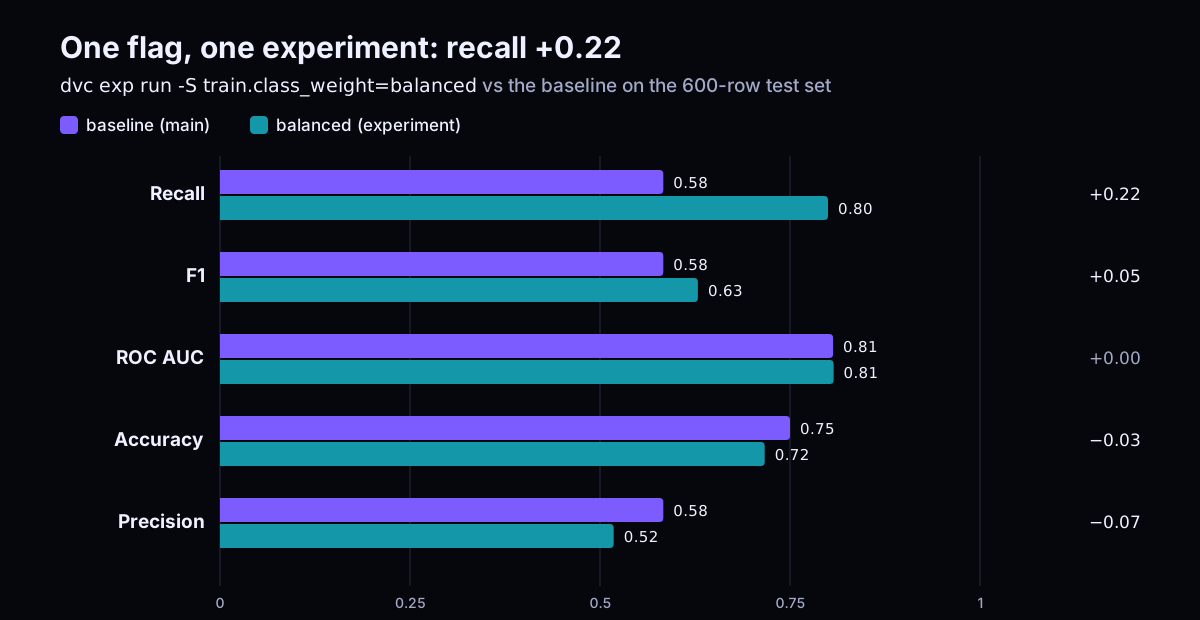
Churn models care about recall: a missed churner is lost revenue. Try balanced class weights without editing files or creating branches:
dvc exp run -n balanced -S train.class_weight=balanced
# trained 100 trees (max_depth=6, class_weight=balanced) on 2400 rows
# {"accuracy": 0.7167, "precision": 0.518, "recall": 0.8, "f1": 0.6288, "roc_auc": 0.8074}
Is it the trees, not the weights? Queue a small grid and run two at a time:
dvc exp run --queue -S 'train.n_estimators=100,300' -S 'train.max_depth=6,10' -S train.class_weight=balanced
dvc queue start -j 2
dvc queue status          # wait until every task shows Success
dvc exp show --drop 'Created|Executor|State|data/.*|src/.*|models/.*|prepare.*|train.seed|accuracy|precision'
Experiment recall f1 roc_auc train.n_estimators train.max_depth train.class_weight
main 0.5833 0.5833 0.8067 100 6 -
├── c062e1b [amuck-sang] 0.7611 0.6241 0.797 300 10 balanced
├── 09672c4 [whist-duct] 0.8056 0.6304 0.8061 300 6 balanced
├── aa7d3fc [beaky-amah] 0.7556 0.6154 0.7959 100 10 balanced
├── ca76326 [funny-inti] 0.8 0.6288 0.8074 100 6 balanced
└── 4346b07 [balanced] 0.8 0.6288 0.8074 100 6 balancedDeeper trees overfit (recall drops to 0.76). Tripling the trees buys almost nothing. The cheap balanced run wins:
dvc plots diff main balanced # both ROC curves on one chart, in dvc_plots/index.htmlPromote it. dvc exp apply writes the experiment's params, lock file and metrics into your workspace, ready to commit:
dvc exp apply balanced
git add params.yaml dvc.lock metrics.json plots
git commit -m "Use balanced class weights (recall up)"
dvc push

dvc metrics diff HEAD~1
# Path          Metric     HEAD~1    workspace    Change
# metrics.json  f1         0.5833    0.6288       0.0455
# metrics.json  precision  0.5833    0.518        -0.0653
# metrics.json  recall     0.5833    0.8          0.2167
Prefer a reviewable PR? dvc exp branch balanced exp-balanced turns the experiment into a Git branch. dvc exp push origin balanced shares it without one.
DVC tutorial cheat sheet: reuse, clean up, recap
Other projects can consume this repo's data without cloning it. The solution branch is wired to a public, read-only remote:
dvc list https://github.com/datsabk/dvc-tutorial data --rev solution -R --dvc-only
dvc get https://github.com/datsabk/dvc-tutorial data/raw/customers.csv --rev solution      # one-off copy
dvc import https://github.com/datsabk/dvc-tutorial data/raw/customers.csv --rev solution   # tracked; refresh with dvc update
Housekeeping keeps the cache small:
dvc exp remove --all-commits     # drop experiments you didn't keep
dvc queue remove --all
dvc gc -w # delete cache not used by the current workspace (add -c to clean the remote too)| Task | Command |
|---|---|
| Start using DVC in a Git repo | dvc init |
| Track a file or folder | dvc add data/raw |
| Upload / download data | dvc push / dvc pull |
| Match data to the current commit | dvc checkout |
| What changed? | dvc status, dvc diff <rev> |
| Run the pipeline | dvc repro, dvc dag |
| Compare runs | dvc metrics diff, dvc params diff, dvc plots diff |
| Try a change | dvc exp run -S key=value |
| Compare / keep experiments | dvc exp show, dvc exp apply |
| Reuse data from another repo | dvc get, dvc import |
Stuck? Compare your work with the solution branch: git checkout solution && dvc pull && dvc repro should report Data and pipelines are up to date.
Key takeaways:
- Commit
.dvc,dvc.yamlanddvc.lockwith your code; push data withdvc push. - Data changes become Git diffs you can review, tag and roll back.
dvc reproreruns only what changed, so pipelines stay fast.- Use
dvc expfor trial runs and commit only the winner.
Rolling DVC out across a team, or wiring it into CI and model serving, is where the real MLOps work starts (it is part of the AI-augmented SRE job now). See my AI and automation consulting if you want help.