What Happens When You Ask a Chatbot a Question?
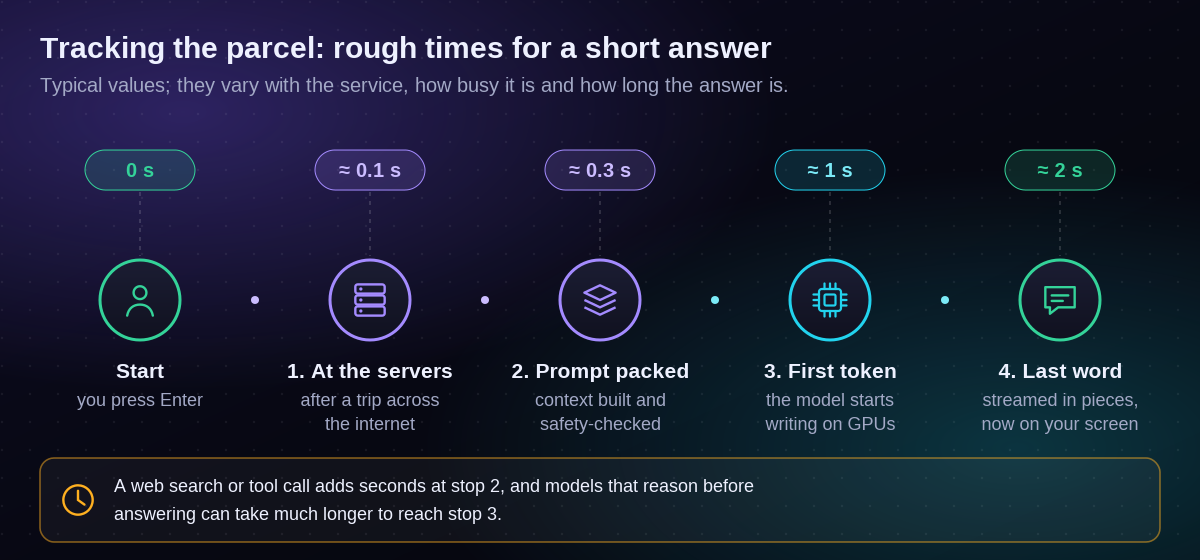
You type "What is the capital of Australia?" and press Enter. About a second later, words start to appear: "The capital of Australia is Canberra." It feels instant, but a lot happens in between. When you ask a chatbot a question, your text makes a round trip through several machines and through almost every idea in this course. This lesson follows that one question all the way.
Stop 1: from your keyboard to the servers
For the big chatbot services, the app you use, a website or a phone app, does not run the model itself. It packs your text into a request and sends it over the internet to the company's servers in a data centre. The connection uses HTTPS, the same encryption behind the padlock in your browser, so nobody along the way can read it.
Along with your words go a few details: which account you are logged in to and which conversation this is. Depending on the service, the app sends the earlier messages too, or the server looks them up in its own records. A web server receives the request and passes it on. This hop usually takes around a tenth of a second.
Stop 2: the prompt builder packs the box
The model never sees your question alone. A part of the service, which this lesson calls the prompt builder, assembles everything the model will read into one block of text. First come the system instructions: hidden text written by the company that sets the assistant's role, tone and rules, often including today's date. Then come the earlier chat and, last, your question.
If a question needs fresh or private facts, this is where lookups happen. The service may search the web or your documents and add the best passages, the RAG pattern, or let the model call tools like an agent. Then the trip between this stop and the next can go round several times. "What is the capital of Australia?" needs none of that.
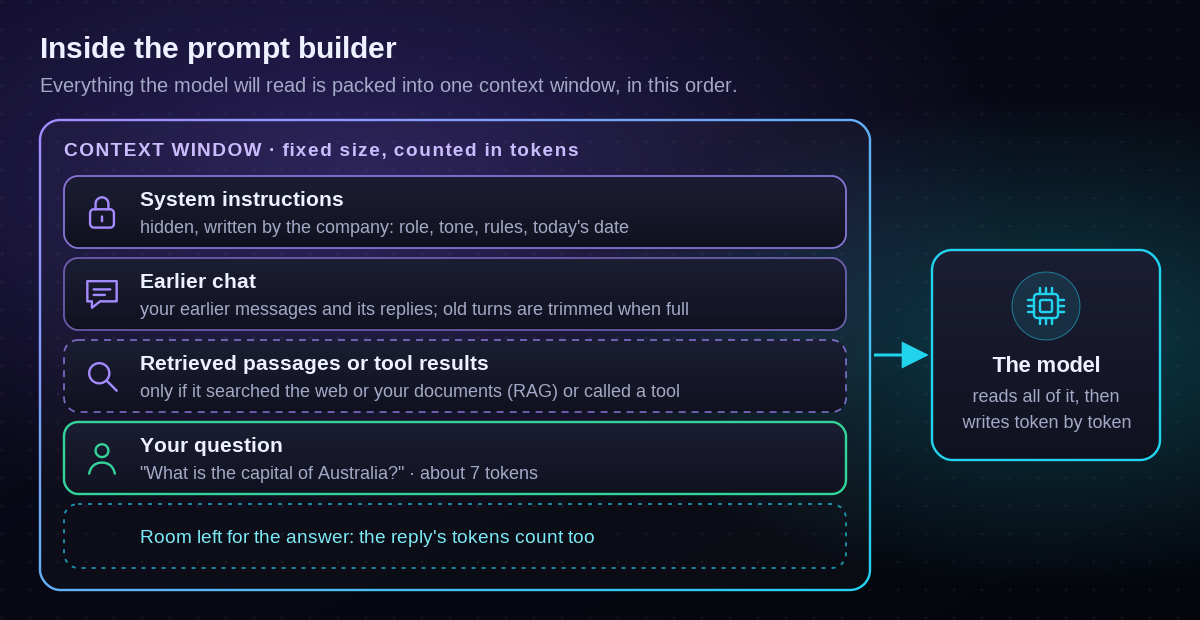
All of it must fit in the context window, so in a long chat older turns are trimmed. Many services also run a safety check here, often a separate classifier, a model that sorts text into categories such as safe or harmful. It screens your message before the main model answers it.
Stop 3: tokens in, tokens out
Now the packed text is cut into tokens, and each token becomes a number. Those numbers flow through the model, a neural network whose weights were fixed during training. This is inference: nothing is learned from your question. The frozen model simply runs, on GPUs, because the work is mostly huge grids of multiplications.
The model does not write the answer in one go. As in What Is an LLM?, it scores every possible next token, one is picked, say "The", and it is added to the text. Then the model runs again for " capital", then " of", and so on, until it produces a special token that means "stop".
For a well-known fact like Canberra the pattern is strong, so the answer is very likely right. For an obscure fact, exactly the same process can produce a confident hallucination. Nothing at this stop checks the answer against a source.
Stop 4: streaming back to your screen
The server does not wait for the whole answer. It sends each token, or a small group of them, as soon as it is made, over the connection that is still open. This is streaming, often done with a web technique called server-sent events, and it is why words appear a few at a time. You can start reading after about a second.
On the way out, many services check the reply too, and can stop or replace it partway through. Your app then turns formatting marks into bold text, lists or code boxes, and the service saves the exchange so your next message in this chat has its history.
The whole trip in one picture
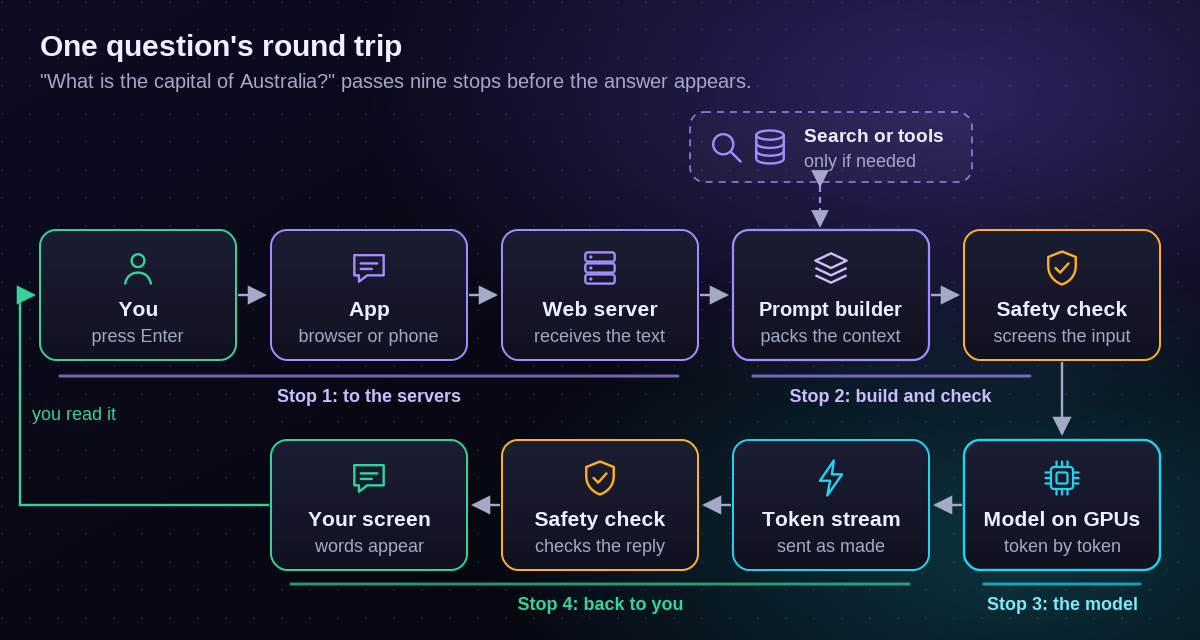
Put together, one question touches the whole course. Your text is packed with hidden instructions and history into a context window. Sometimes the service first retrieves passages using embeddings and a vector database, or runs an agent loop with tools. A frozen neural network on GPUs predicts the reply token by token, the reply streams back, and safety checks screen both directions.
Each stop is also a place where things can go wrong: a trimmed history, a missing passage, a fluent but false answer. That is why the teams behind chatbots run evals before they ship a change, and why you still check answers that matter.
Check yourself
Why do the words of an answer appear a few at a time?
The model produces the answer one token at a time, and the server streams each piece as soon as it exists.
Your question is only about seven tokens. Why can a long chat still hit the context window limit?
The window also holds the system instructions, the earlier chat, any retrieved passages and the answer itself.
Does the model learn anything from your question while answering it?
No. Answering is inference with frozen weights; the service may save your chat, but the model itself does not change.
Go deeper
- AIOps Without the Hype: What AI Improves in Observability: see which of these building blocks, from anomaly detection to natural-language queries, actually help operations teams today.