AWS vs Azure vs Google Cloud: A Beginner's Comparison
You scroll job adverts for a junior cloud role. One asks for Amazon Web Services (AWS), the next for Microsoft Azure, a third for Google Cloud. They look like three separate skills, but overlap far more than the names suggest. This lesson compares AWS vs Azure vs Google Cloud: who each provider is, which services match, what differs and how to choose.
Who the three providers are
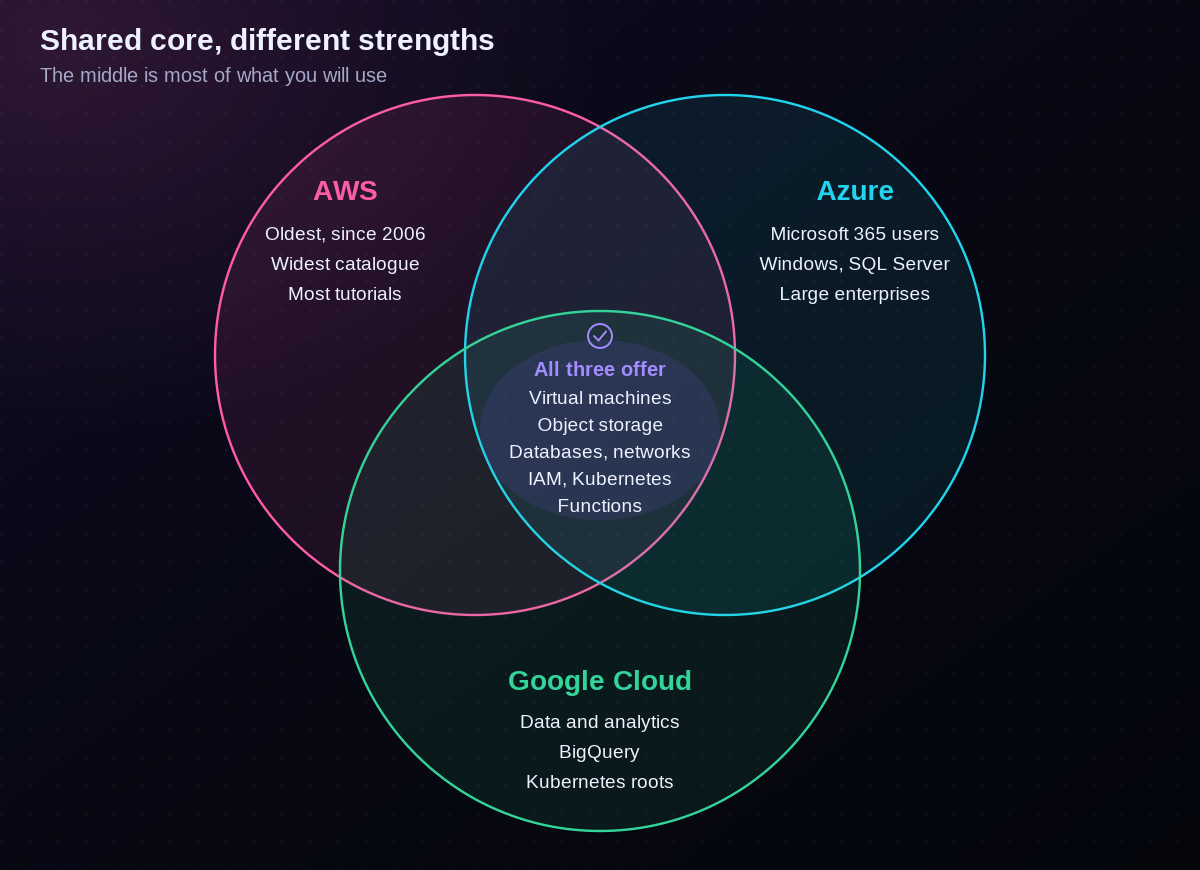
AWS, Amazon's cloud, began renting out storage and servers in 2006, so it is the oldest of the three. It has the widest catalogue of services, and many online tutorials use it.
Microsoft Azure, opened in 2010, is strong with organisations that already run Microsoft software, such as Windows Server and SQL Server. Their staff sign in to Microsoft 365 with Microsoft Entra ID, Microsoft's accounts service, and Azure uses the same accounts.
Google Cloud is known for data and analytics, such as BigQuery, a service for analysing huge amounts of data. It also has Kubernetes roots: in 2014 Google released Kubernetes as open source, free for anyone to use and change. It is software that runs containers (apps packaged with everything they need) across many machines.
In the Venn diagram, notice how big the shared middle is, from virtual machines to identity and access management (IAM), the rules for who may do what.
The same idea under three names
A virtual machine (VM), a rented computer made of software, as you saw in lesson 1, is Amazon EC2 (Elastic Compute Cloud), Azure Virtual Machines or Compute Engine. Object storage, which keeps files such as photos and backups for programs to fetch over the web, is Amazon S3 (Simple Storage Service), Azure Blob Storage or Cloud Storage.
The table adds four more rows. Functions, small pieces of code that run when an event calls them (see lesson 2), are AWS Lambda, Azure Functions and Cloud Run functions, called Cloud Functions until 2024. Managed Kubernetes means the provider runs Kubernetes' control software for you. A managed SQL database holds tables, queried in SQL (the standard database language), and the provider runs and backs it up. Read across any row: only the label changes.

The matches are not exact, though, like own-brand milk. Amazon RDS (Relational Database Service) and Cloud SQL each offer several database engines, such as MySQL and PostgreSQL, while Azure SQL Database is built on Microsoft's SQL Server, with separate Azure services for the others. Treat the table as a starting point.
Differences that matter in practice
Console and command line. Each has a website for clicking around: the AWS Management Console, the Azure portal and the Google Cloud console. Each also has a command-line interface (CLI), a program you control by typing. Listing your VMs shows the styles: aws ec2 describe-instances, az vm list or gcloud compute instances list.
Identity and access. AWS attaches policies, documents listing allowed actions, to users, groups and roles in an AWS account. Azure checks sign-in with Entra ID; then role-based access control (RBAC) gives a person or app a role at a scope, such as a resource group (a container for related resources) or a whole subscription, which holds many groups. The role covers everything inside.
Google Cloud grants roles to accounts, groups and service accounts (identities for programs) on a project, its container for related resources. The ideas match; the wiring differs. Cloud IAM comes later.
Regions. All three run dozens of regions, often in different cities and with different names. Mumbai is ap-south-1 on AWS and asia-south1 on Google Cloud, whose zones look like asia-south1-a. Azure uses names such as Central India, in Pune, and numbers zones 1, 2 and 3. Check each has a region where your users and laws need one.
Discounts. All three bill pay-as-you-go by default and cut prices if you commit for one or three years, like a loyalty scheme: AWS Savings Plans and Reserved Instances, Azure savings plans and reservations, and Google Cloud committed use discounts. Similar VMs are priced differently on each; Cloud Cost Basics comes later.
Support. Each includes free basic support for billing and account questions; technical help from its engineers needs a paid plan.
How to choose your first cloud
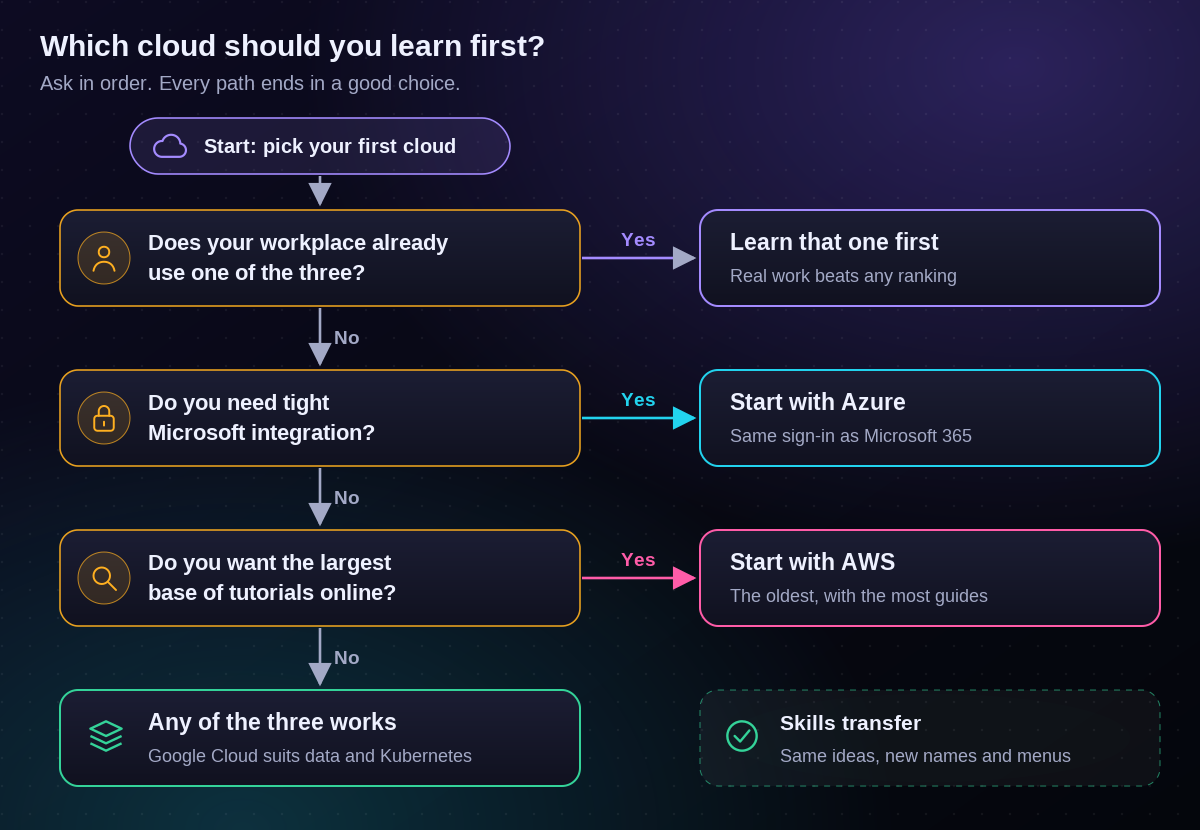
First, learn what your workplace, or the employer you want, already uses: real systems and colleagues teach more than any comparison.
Otherwise, match your needs. An organisation built on Microsoft 365 often finds Azure the natural fit. For the most help online, AWS has the largest base of tutorials. If data or Kubernetes interests you, Google Cloud is a good start. In the flowchart, notice that every path ends in a sensible choice.
Free tiers: each gives new accounts free credit or free usage, with limits and an end date. Azure, for example, gives eligible new users $200 of credit for the first 30 days and some services free for 12 months. Rules change, so read the current page. Learning material: all three publish free official training.
Whichever you pick, the skills transfer. A VM, object storage, a region and a role mean the same everywhere, so a second cloud is mostly new names and menus. Later lessons mostly use AWS examples, because LocalStack, which you will use to practise without an account, imitates AWS.
Multi-cloud, running your systems on two or more providers at once, sounds safe but adds complexity: you learn, secure, watch and pay for two of everything, and data sent between clouds is usually billed. It reduces lock-in, yet most teams pick one main provider, spread across availability zones, and add another only for a clear reason, such as a service only it offers.
Check yourself
Your workplace runs on AWS, but you like Google Cloud's data tools. Which should you learn first?
AWS: you practise on real systems with colleagues to ask, and the core ideas carry over to Google Cloud later.
Your app uses PostgreSQL on Amazon RDS. Why is Azure SQL Database probably not its match?
Azure SQL Database is built on SQL Server, so a PostgreSQL app needs Azure Database for PostgreSQL; mapping tables match the job, not every detail.
A small team plans to run every service on both AWS and Azure, just to be safe. What does that cost them?
Two of everything to learn, secure, watch and pay for, plus charges for data sent between clouds, while one provider across availability zones already survives most failures.