Capstone: Deploy a Static Website with Terraform
You have built a small portfolio page, a few HTML files, and you want it online without renting and patching a server. This capstone deploys a static website with Terraform: an S3 bucket that serves your files as web pages, created, changed and removed from code, all in LocalStack on your laptop. It uses everything since lesson 15.
Static sites and the plan
A static website is files served as they are stored: HTML pages, style sheets, images, and JavaScript that runs in the visitor's browser. Every visitor gets the same bytes. A dynamic site runs code on the server for each request, such as a PHP page or a login check. S3 runs no server-side code, so it can host only the static kind.
As lesson 6 showed, S3 already serves objects over HTTP. Turning on static website hosting gives a bucket a second address, its website endpoint, which behaves like a web server: it returns the index document, here index.html, for the root address, and an HTML error document, here error.html, for a missing page. On AWS it serves only publicly readable objects.
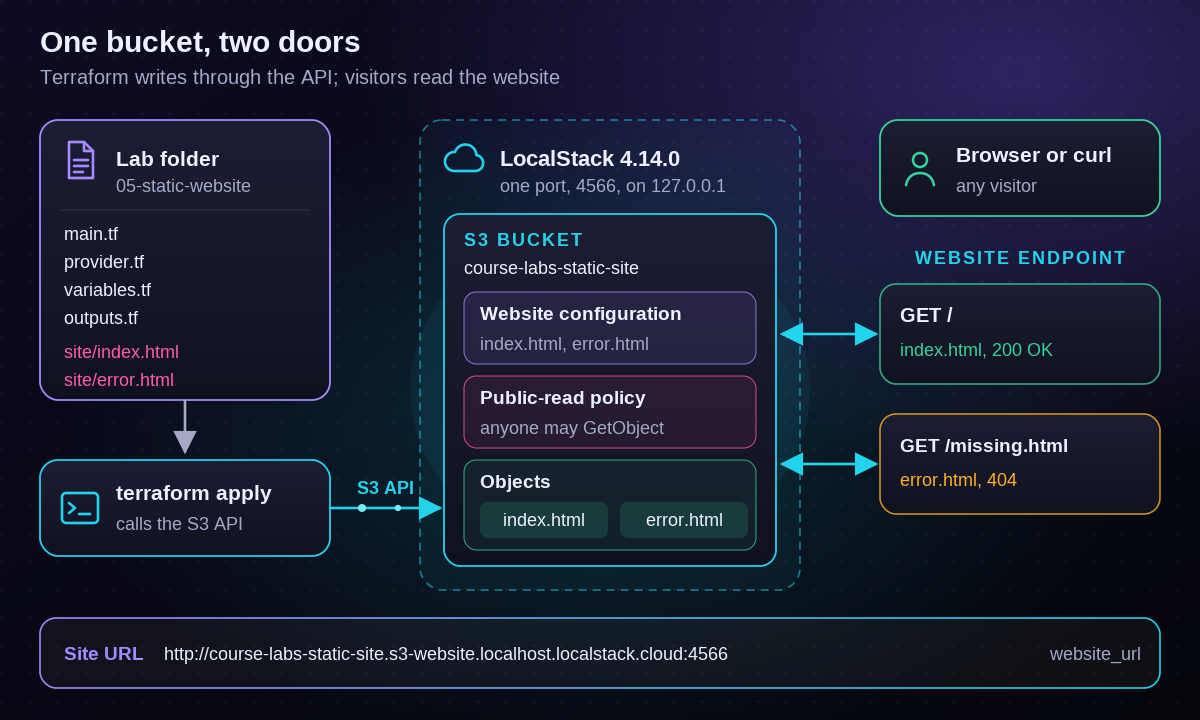
So the plan has four parts: a bucket, its public access settings loosened just enough, a bucket policy that lets everyone read objects, and the two pages uploaded as objects. In the diagram, notice that Terraform and the visitor use different doors to the same bucket, on the same port.
Writing the Terraform
The lab's provider.tf is lesson 18's: dummy keys, with S3 calls sent to localhost:4566 as set up in lesson 17. The first three resources in main.tf, without comments, create the bucket and make its objects readable:
resource "aws_s3_bucket" "site" {
  bucket        = var.bucket_name
  force_destroy = true
}

resource "aws_s3_bucket_public_access_block" "site" {
  bucket                  = aws_s3_bucket.site.id
  block_public_acls       = true
  ignore_public_acls      = true
  block_public_policy     = false
  restrict_public_buckets = false
}

resource "aws_s3_bucket_policy" "public_read" {
  bucket = aws_s3_bucket.site.id
  policy = jsonencode({
    Version = "2012-10-17"
    Statement = [{
      Effect    = "Allow"
      Principal = "*"
      Action    = "s3:GetObject"
      Resource  = "${aws_s3_bucket.site.arn}/*"
    }]
  })
  depends_on = [aws_s3_bucket_public_access_block.site]
}
Block Public Access, from lesson 12, is four switches, all on for a new AWS bucket. The lab turns off the two about bucket policies and keeps the two about ACLs, an older per-object way to grant access that it never uses. jsonencode turns an HCL value into JSON text, here lesson 12's policy: anyone may s3:GetObject, nothing more.
depends_on names resources to finish first when no reference says so. On AWS, S3 rejects a public policy while block_public_policy is still on, so the policy must wait for the settings. Next come the website configuration and the home page:
resource "aws_s3_bucket_website_configuration" "site" {
  bucket = aws_s3_bucket.site.id
  index_document {
    suffix = "index.html"
  }
  error_document {
    key = "error.html"
  }
}

resource "aws_s3_object" "index" {
  bucket       = aws_s3_bucket.site.id
  key          = "index.html"
  source       = "${path.module}/site/index.html"
  content_type = "text/html"
  etag         = filemd5("${path.module}/site/index.html")
}
path.module is the folder holding the .tf file. content_type is stored with the object and sent as its Content-Type header, which tells the browser to show HTML. etag = filemd5(…) records the file's MD5 hash, a fingerprint of its content. Terraform sees only the path in source, not the bytes, so without the hash an edited page would never be uploaded again. aws_s3_object.error does the same for error.html.
The output website_url builds the address from the bucket name, because on LocalStack the provider's own website_endpoint attribute names a real AWS host. In the diagram, notice that step 3 is the only one waiting for something besides the bucket.

Apply it and open the site
You start LocalStack and run terraform init and terraform apply as in lesson 17; the try-it below has every step. Apply creates the six resources and prints the outputs:
Apply complete! Resources: 6 added, 0 changed, 0 destroyed.

Outputs:

bucket_name = "course-labs-static-site"
website_url = "http://course-labs-static-site.s3-website.localhost.localstack.cloud:4566"
Every name under localhost.localstack.cloud points at LocalStack on your machine, and LocalStack reads the bucket name from the front of the host name. curl on that URL prints index.html as stored; a browser shows its heading. Ask for /missing.html and you get error.html with status 404.
One gap: LocalStack 4.14.0 does not check the bucket policy when it serves a website, so the site would load without it. Real AWS checks it, and answers 403 Access Denied for an object nobody may read.
Change a page, apply again
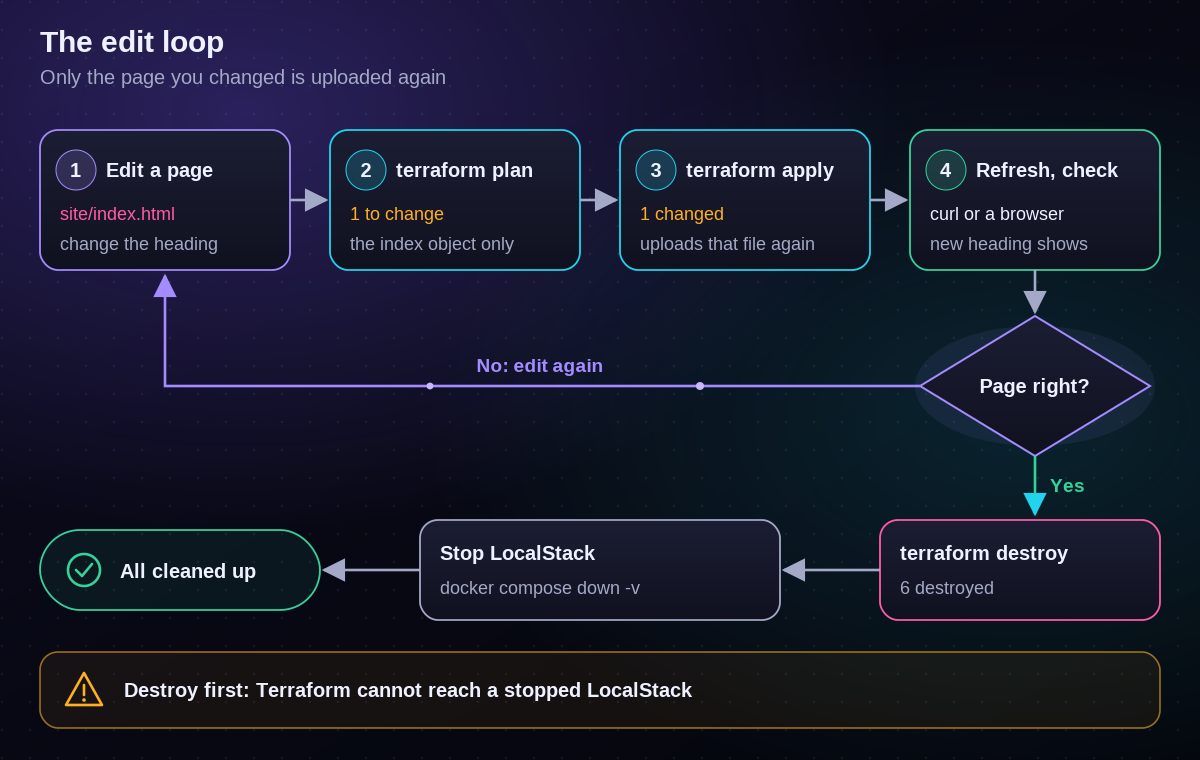
Edit the heading in site/index.html and run terraform plan. The file's hash changed, so the etag argument changed, and the provider plans to upload that one object again under the same key. Trimmed, with shortened, illustrative hashes:
  # aws_s3_object.index will be updated in-place
  ~ resource "aws_s3_object" "index" {
      ~ etag = "5a1d…" -> "9c0b…"
        …
    }

Plan: 0 to add, 1 to change, 0 to destroy.
The ~ means update in place, as in lesson 16. The bucket and error.html stay untouched because none of their arguments changed. Apply prints Resources: 0 added, 1 changed, 0 destroyed., and a refresh shows the new heading. In the flowchart, notice the loop: repeat it as often as you like, then destroy once at the end.
Taking it to real AWS
Swap the provider. Delete the dummy keys, the three skip_ settings, s3_use_path_style and the endpoints block, and give Terraform credentials from your AWS CLI configuration or environment variables, never in a file. Bucket names are unique across all of AWS, so pass your own with -var bucket_name=…, and output the website configuration's website_endpoint. If the policy is rejected, an account-wide Block Public Access setting is probably on: ask before changing it.
Add a CDN and HTTPS. S3 website endpoints do not support HTTPS. A CDN (content delivery network) keeps copies of your files on servers near your visitors; Amazon CloudFront is AWS's. A CloudFront distribution in front of the bucket serves HTTPS, on a cloudfront.net name or on your own domain with an AWS Certificate Manager certificate, which for CloudFront must be in us-east-1. Each change takes about 15 minutes to deploy.
With origin access control, CloudFront signs its requests to S3, so the bucket can stay private; that needs the bucket's normal endpoint as the origin, not the website endpoint.
Mind the costs. As lesson 13 showed, storage, requests and data sent to visitors are billed. Set a budget alert before you apply, and run terraform destroy when you are done.
Check yourself
You delete the etag line from aws_s3_object.index, edit the page and apply. Why does the site still show the old heading?
Terraform compares arguments, and source is only a path, which did not change. The hash in etag turns new bytes in the file into a change Terraform can see.
On real AWS, apply fails at the bucket policy with Access Denied while the other resources succeed. What is the likely cause?
Public policies are still blocked: the policy ran before the bucket's settings changed, because depends_on is missing, or the account-wide setting is on, and S3 applies the stricter one.
In LocalStack the site still loads after you remove the bucket policy. Why does that not prove the policy is unnecessary?
LocalStack's website endpoint does not check bucket policies. Real AWS website endpoints serve only publicly readable objects and answer 403 without the policy.
Go deeper
- AWS Emulator on Apple Silicon: ARM64 Setup for M-Series Macs: another local emulator of AWS APIs, set up on an M-series Mac, to keep practising without an account.