Cloud Compute Explained: VMs, Containers, Functions
Your team has built a small web shop, plus a script that shrinks each product photo someone uploads. Now you must decide where that code runs in the cloud: on a virtual machine, in a container or as a function. This lesson explains cloud compute, the rented processing power and memory that runs your code, in those three forms: how each works, how it is billed and how to choose.
Virtual machines: a whole computer of your own
As you saw in lesson 1, a virtual machine (VM) is a computer made of software: a hypervisor splits a physical server into several, and each VM runs its own operating system. On AWS, a VM in Amazon EC2 is called an instance.
To launch one, you make four choices. The image, on AWS an Amazon Machine Image (AMI), holds the operating system and software to boot from. The instance type sets the size: how many vCPUs (virtual processors, each a share of a physical processor) and how much memory.
The disk is the root volume the OS boots from, copied from the image. On AWS it is an EBS (Elastic Block Store) volume; block storage comes in the next lesson. The network choice puts the instance in a subnet, a slice of your private network inside one availability zone, with a security group as its firewall. The later VPC lesson covers both.
The diagram follows one instance from choices to states; notice where the meter starts.
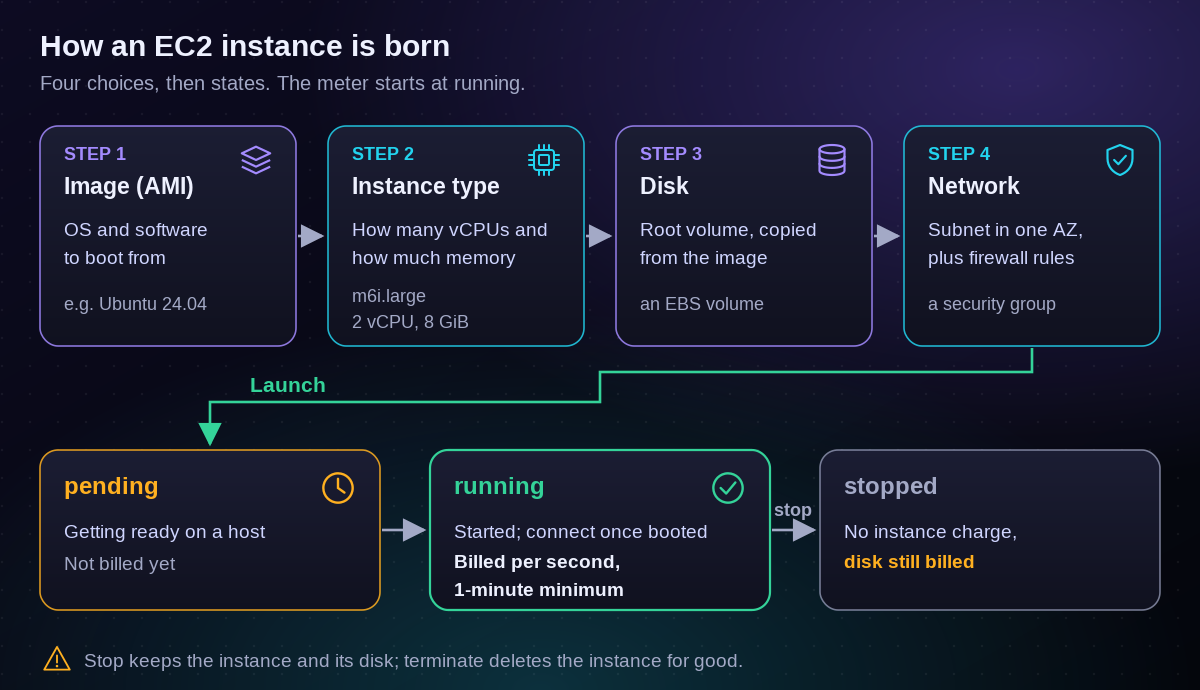
A new instance is pending while it gets ready on a host, then running. From running, EC2 bills every second, with a one-minute minimum each time it starts, busy or idle, like flat rent. A stopped instance has no compute charge, but its disk is still billed.
Containers: your app packed with what it needs
You met containers in lesson 4 as apps packaged with everything they need. That package is a container image: your app, libraries and settings, built once and run unchanged on a laptop or a cloud server.
The big difference from a VM is the kernel, the core of the operating system that controls the processor, memory and devices. Each VM boots its own kernel. Containers on one host all share the host's kernel, and each runs as an isolated process. The Kubernetes documentation calls this relaxed isolation, and it is what makes containers lightweight.
With no OS to boot, a container starts in seconds, and one host can pack many of them. The costs: isolation is weaker than between VMs, and a Linux container needs a Linux kernel underneath.
The diagram puts all three side by side. Compare what each box carries: a VM brings a whole guest OS, a container only its app and libraries, and a function only your code.
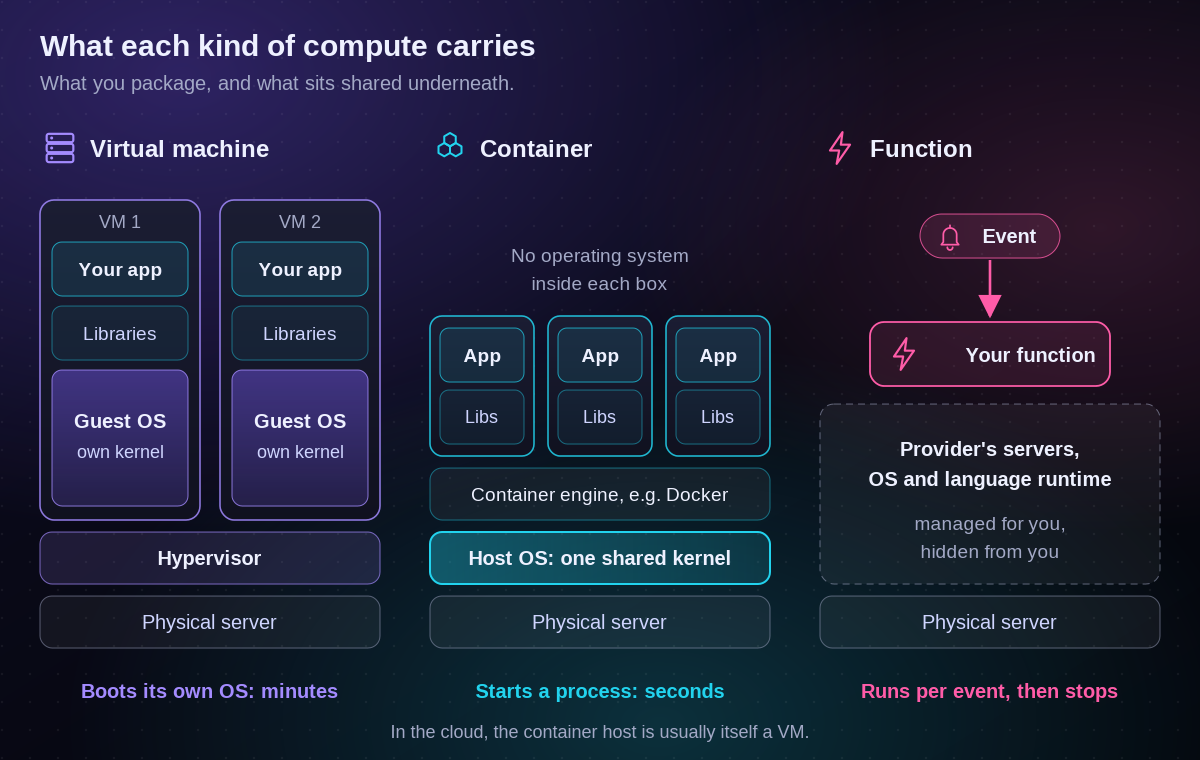
In the cloud, a container service starts, restarts and spreads your containers across hosts. AWS has Amazon ECS (Elastic Container Service) and Amazon EKS, the managed Kubernetes from lesson 4. ECS can place containers on EC2 instances that you manage, or on AWS Fargate, which runs the servers for you, pay-as-you-go. Google Cloud Run runs a container and by default can scale down to zero copies when no requests arrive.
Those EC2 hosts are VMs, as the diagram's footnote says: in the cloud, containers usually run on top of VMs, not instead of them.
Functions: code that runs only for the trip
A function is a small piece of code that the provider runs when an event calls it, such as a web request, a new file or a timer, as you saw in lesson 2. You upload only the code; the servers, OS and language runtime stay hidden.
The bill follows each run: AWS Lambda charges per request and for running time, so idle hours cost nothing. Each run is also capped, like a taxi ride: a Lambda function may run for at most 1,800 seconds (30 minutes). Azure Functions and Cloud Run functions follow the same idea. Cold starts and event sources come later in What Is Serverless?
Choosing: what am I running?
Start from the job, not the technology. The flowchart asks two questions, and most paths end in the middle.
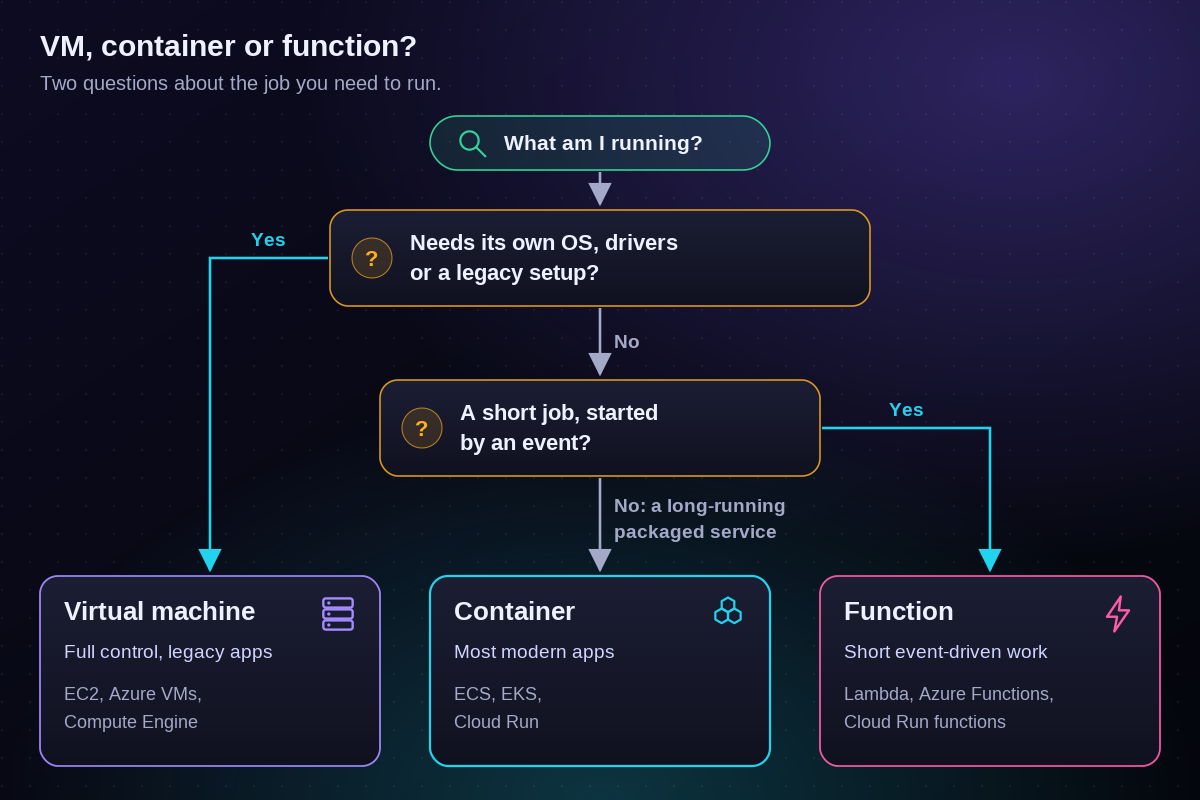
Choose a VM for full control: a specific OS version, special drivers, or legacy software, older software built to own a whole server.
Choose a container for most modern apps, such as a web shop or an API (an interface that other programs call) that runs all day. They start fast and pack densely.
Choose a function for short event-driven work, such as the photo-shrinking script. A job that runs for hours, or a busy service that never idles, fits a container better. Many systems mix all three.
Instance families and pricing in brief
A VM, or a host for your containers, needs an instance type. AWS groups types into families by their mix of vCPUs and memory. The name is a code: in c5n.xlarge, c is the family (compute), 5 the generation, n an extra capability (faster networking) and xlarge the size.
The table compares the large size of three families: the same vCPUs, and double the memory on each row.
| Family | Example | vCPU | Memory | Suits |
|---|---|---|---|---|
| Compute optimised (c) | c6i.large | 2 | 4 GiB | CPU-heavy work, such as batch jobs |
| General purpose (m) | m6i.large | 2 | 8 GiB | Balanced work, such as web servers |
| Memory optimised (r) | r6i.large | 2 | 16 GiB | Large data held in memory, such as caches |
Azure uses other letters: D-series for general purpose, F-series for compute optimised, E-series for memory optimised. You also choose how to pay:
- On-demand (the default): pay per second while running, with no commitment.
- Reserved Instances and Savings Plans: commit to one or three years of use for a discount. A Reserved Instance is a billing discount, not a physical machine.
- Spot Instances: spare EC2 capacity at a steep discount, but EC2 can take it back after a two-minute warning, so use it only for work that can stop and resume.
A common pattern: commit for the load you always run, use on-demand for the rest, and spot for interruptible batch jobs. Cost habits come later in Cloud Cost Basics.
Check yourself
A vendor's reporting tool needs one Windows Server version with a special driver installed, and runs all day. VM, container or function?
A VM: only a VM gives the tool its own operating system to install the driver in, while containers share the host's kernel and functions stop after a short run.
On the same hardware, why does a container start in seconds when a VM takes minutes?
The VM must boot a whole guest OS from its image, while the container starts as a process on a kernel that is already running.
A nightly job runs for three hours on 20 instances and can resume where it stopped. Which pricing model fits, and what is the risk?
Spot: the steep discount suits it, and if EC2 reclaims an instance after its two-minute warning, the job resumes later; a one- or three-year commitment would pay for 21 idle hours a day.