Infrastructure as Code Explained for Beginners
A teammate built your test environment last spring by clicking through the cloud provider's website: a network, two servers, a storage bucket and dozens of settings. Now you need an identical copy, and that teammate has left. Nobody wrote the settings down or knows what has changed since. Infrastructure as code prevents exactly this. This lesson explains what it is, why declarative tools beat scripts, and which tools teams use.
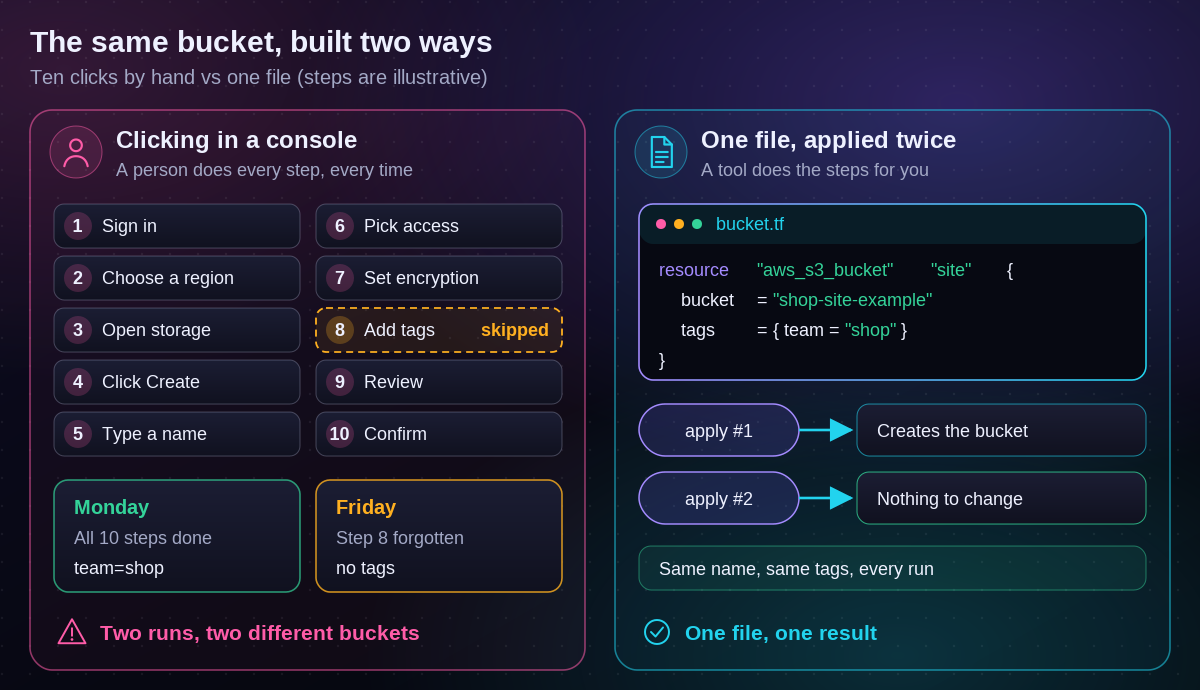
The problem with clicking in a console
The console is the provider's website, where you create things by filling in forms. Each thing you create there, such as a virtual machine, a bucket or a network, is a resource. The console is good for exploring, but once a team depends on it, four problems appear.
It is slow: every new copy means filling in every form again. It is hard to review: nobody can check your clicks before you make them. It is impossible to repeat exactly: on a busy day, people skip a step or pick another option.
And nobody knows what changed. An audit log such as CloudTrail, from lesson 12, records which call changed a setting, but not why, and it is no plan you can rebuild from.
The diagram builds one bucket both ways. Notice step 8: skipped on Friday, so the two buckets differ, while the file gives the same bucket every run.
Infrastructure as code in one definition
Infrastructure as code (IaC) means describing servers, networks and storage in text files that a tool turns into real resources. You keep the files like any other code and run the tool whenever they change.
It works because every cloud action is a call to the provider's API, the interface other programs call, as you saw with S3 in lesson 6. The console makes those calls when you click; an IaC tool makes them from your file.
Here is one bucket in Terraform's language, which lesson 16 teaches line by line. A tag, the label from lesson 13, names the team that owns it:
resource "aws_s3_bucket" "site" {
  bucket = "shop-site-example"
  tags   = { team = "shop" }
}
There is no "click Create" and no list of steps. The file only says which bucket should exist and what it should look like.
Declarative vs imperative
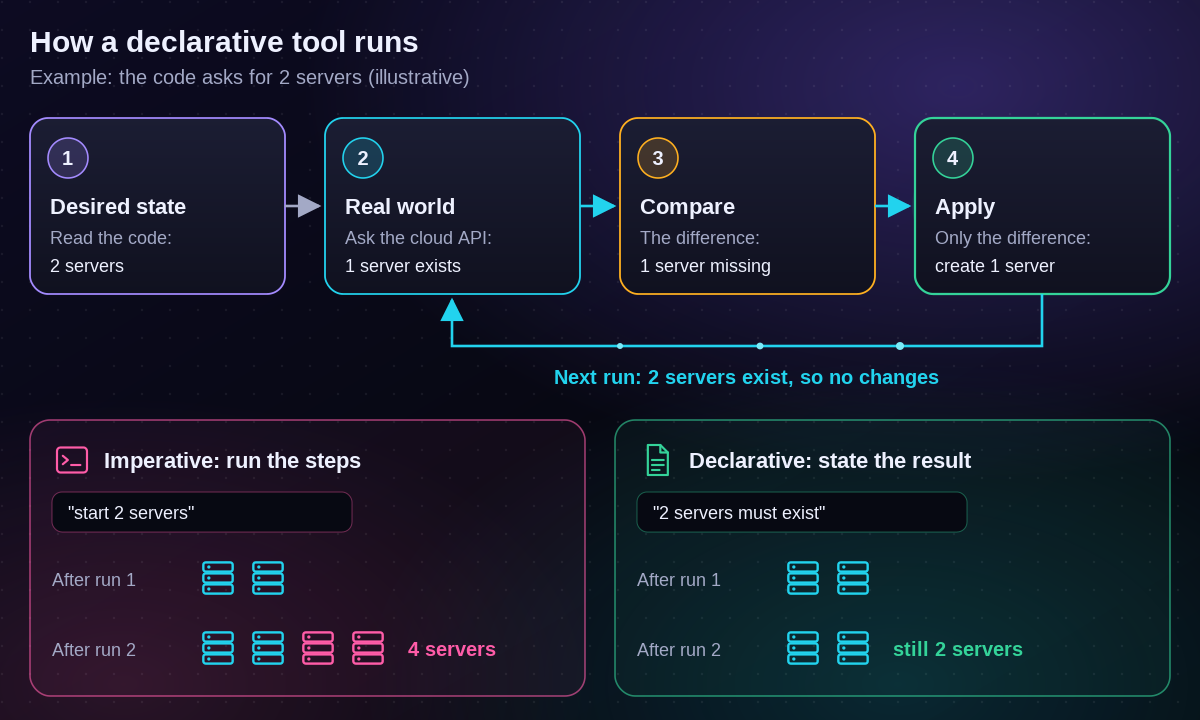
An imperative approach lists the steps to run: "start two servers". A declarative approach describes the result, called the desired state: "make sure two servers exist". The bucket file is declarative. A shell script, a file of terminal commands run one after another, is usually imperative.
Run the imperative script twice and you have four servers. Apply the declarative file twice and the tool sees that two already exist, so it does nothing. Something you can repeat without changing the result is idempotent, which is why declarative IaC is safe to re-run.
The lab's script, trimmed, makes up a new bucket name on every run, then creates it with the AWS command-line tool, pointed at a local emulator:
bucket="iac-demo-$(date -u +%Y%m%d-%H%M%S)-$RANDOM"
aws --endpoint-url=http://localhost:4566 s3 mb "s3://$bucket"
It performs a step without asking what exists. A declarative tool works in a loop instead: it reads the desired state, reads the real world through the API, compares the two and applies only the difference. In the diagram, notice the arrow back from step 4: on the next run nothing is missing, so nothing changes.
Declarative is not harmless: delete a server from the file and the tool deletes the real one. That is why Terraform shows a plan before it acts (lesson 16).
What a team gains
Version control and review. The files live in Git, a version control system that records every change: who made it, when, and a message saying why. Teammates check each change in a pull request, a proposed change they read and approve before it is merged.
Repeatable environments. The same files build a test copy and a production copy, so you test on what customers use. Differences such as server size become settings in the files.
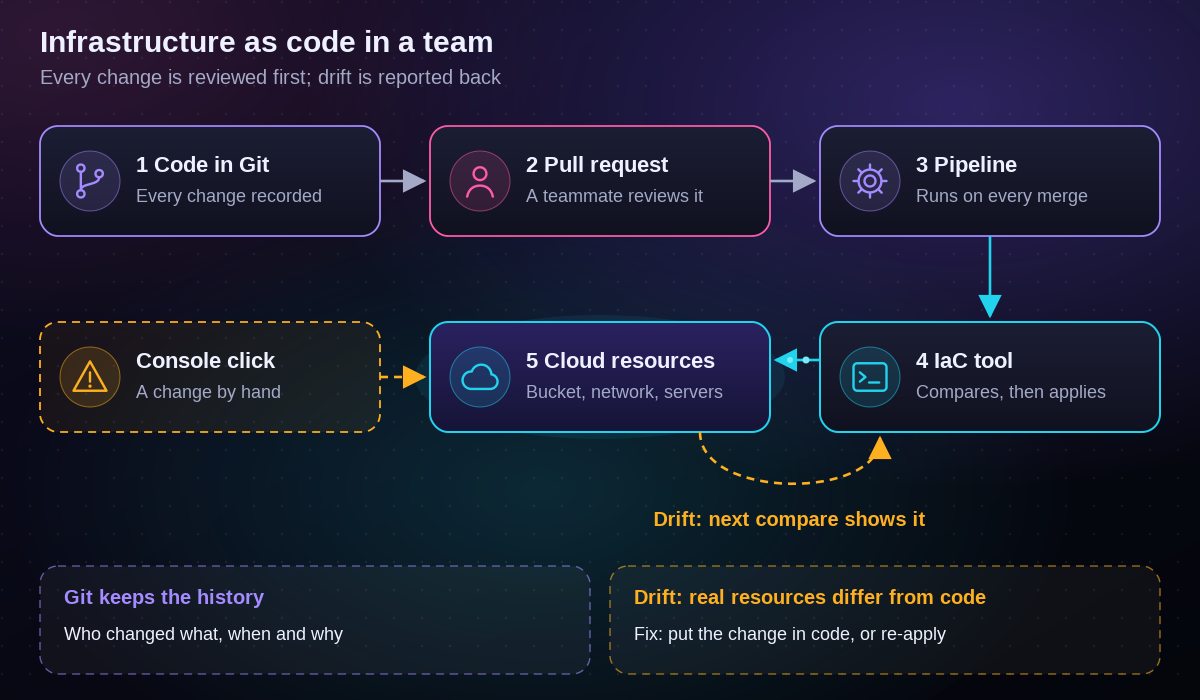
Drift detection. Drift is when real resources no longer match the code, usually after a change by hand. Terraform's plan reads the real resources first and proposes changes that make them match the code; AWS CloudFormation has a drift detection feature.
Recovery. If an environment is deleted, re-applying rebuilds what the files describe: the infrastructure, not the data inside it. A recreated database starts empty, so you still need the backups from lesson 8.
In the flowchart, a change passes review in Git, then a pipeline, an automated job that runs on every merge, hands it to the IaC tool. Notice the dashed arrows: a console click changes a resource behind the code's back, and the next comparison reports the drift.
The tool landscape
The tools differ in the language you write and the clouds they reach. Several use YAML, a plain-text format of indented names and values.
| Tool | You write | Works with | Good to know |
|---|---|---|---|
| Terraform | HCL, its own language | Many clouds, through plugins called providers | HashiCorp, now IBM; Business Source License from version 1.6 |
| OpenTofu | HCL | Terraform's providers | Open-source fork of Terraform, under the Linux Foundation |
| Pulumi | Python, TypeScript, Go, C#, Java and more | Many clouds | Its engine works out the changes your program asks for |
| AWS CloudFormation | JSON or YAML templates | AWS only | Groups resources into a stack; detects drift |
| Ansible | YAML playbooks | Servers, over SSH | Mainly configures what runs inside servers |
A fork is a copy of a project's code that another group develops from then on. OpenTofu forked Terraform after the licence change, so what you learn here mostly carries over.
Ansible does configuration management: setting up packages, files and services inside a server. It logs in over SSH, the standard secure remote login, so there is no agent (helper program) to install. A YAML playbook lists tasks in order, but most modules first check whether the desired state already exists, so re-running is usually safe. A common split: Terraform creates the servers, Ansible sets them up.
Check yourself
A pipeline runs the lab's create-bucket.sh on every merge. After ten merges, how many buckets exist, and what would a declarative tool have done?
Ten, because the script acts on every run without looking at what exists. A declarative tool would create one bucket, then find nothing to change on the other nine runs.
During an outage, someone makes a server bigger in the console. What happens on the next IaC run, and what should the team do?
The tool sees drift, since the real size differs from the code, and plans to change the server back. The team should put the new size into the code through a pull request, so code and reality agree.
Your test environment, database included, is deleted by mistake, but you have its IaC files. What does re-applying bring back, and what not?
The network, the servers and an empty database. Not the data, because the files describe resources, not their contents; only backups restore that.