Terraform Basics: Your First Infrastructure as Code
Your team lead asks you to add a storage bucket to the test environment, "in Terraform, not the console". The repository holds files ending in .tf, full of curly braces. This lesson teaches the Terraform basics you need to read and change them: the language, the four commands, how to read a plan before anything changes, and why running it twice is safe. You practise on your laptop, where Terraform writes a text file instead of a bucket.
Your first configuration in HCL
Terraform, from lesson 15, is declarative: you describe the result and it works out the steps. You write HCL, the HashiCorp Configuration Language, in .tf files. Terraform reads every .tf file in the folder you run it from as one configuration.
HCL has two building blocks. A block is a keyword, optional labels in quotes, and a body in braces. An argument sets one value in a body: name = value. Here is the lab's main.tf without its comments:
terraform {
  required_version = ">= 1.5.0"
  required_providers {
    local = {
      source  = "hashicorp/local"
      version = "2.9.1"
    }
  }
}

provider "local" {}

resource "local_file" "hello" {
  filename = "hello.txt"
  content  = var.greeting
}
The terraform block names the providers the folder needs: plugins that each talk to one API. hashicorp/local manages files on your machine, and its version is pinned so every learner gets the same one.
The provider block holds that provider's settings: the AWS provider takes a region here, such as ap-south-1 from lesson 3. The local provider needs none, so its block is empty.
The resource block describes one thing that should exist. In the diagram, notice that type and local name together form its address, local_file.hello. var.greeting is a variable, covered below.

local_file.hello, that other code uses.The workflow: init, plan, apply, destroy
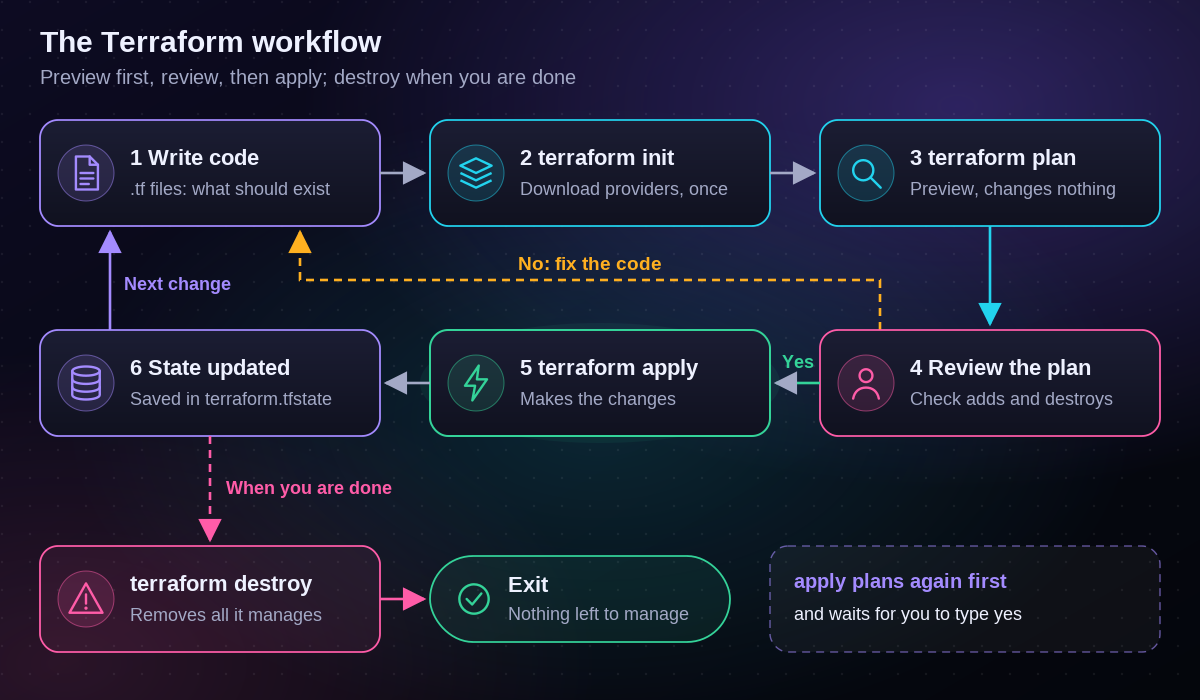
Four commands do almost all the work, each run in the folder with the .tf files.
terraform initdownloads the providers from the Terraform Registry, HashiCorp's public catalogue, into.terraform/and records their exact versions in a lock file,.terraform.lock.hcl. Run it once per folder, and again after adding a provider.terraform planpreviews the changes and makes none.terraform applyplans again, shows the plan, waits for you to typeyes, then makes the changes.terraform destroyremoves everything this configuration manages, after the same confirmation.
After an apply, Terraform records what it created in terraform.tfstate, its state file: the shopper's receipt. Lesson 18 looks inside.
In the flowchart, notice step 4: you read the plan before anything happens. If it is wrong, you fix the code and plan again, with nothing touched.
Reading a plan
A plan lists each resource with a symbol for what will happen to it, then counts the actions in a summary line:
| Symbol | Meaning | Counted as |
|---|---|---|
+ | create | 1 to add |
~ | update in place | 1 to change |
- | destroy | 1 to destroy |
-/+ | destroy, then create a replacement | 1 to add and 1 to destroy |
Here is the lab's first plan, trimmed of eight lines:
Terraform will perform the following actions:

  # local_file.hello will be created
  + resource "local_file" "hello" {
      + content              = "Hello from Terraform"
      + filename             = "hello.txt"
      + id                   = (known after apply)
    }

Plan: 1 to add, 0 to change, 0 to destroy.

Changes to Outputs:
  + file_path = "hello.txt"
(known after apply) marks a value that exists only once the resource is created, here the file's id: a hash, a fingerprint worked out from the content. The Plan: line is the summary: read it first, and stop if the destroy count surprises you.
A -/+ appears when an argument cannot change in place. The local provider cannot edit a file, so a new greeting means a new file: the plan says must be replaced, marks the changed line ~ with # forces replacement, and sums up as 1 to add, 0 to change, 1 to destroy. For a database, a replacement means a new, empty one.
Variables, outputs and references
An input variable is a named value you can change without editing the resource. The lab's variables.tf declares one with a default:
variable "greeting" {
  description = "The text Terraform writes into hello.txt"
  type        = string
  default     = "Hello from Terraform"
}
Code reads it as var.greeting. To override it for one run, pass -var 'greeting=Hi from Terraform', with no spaces around the =.
An output prints a value after apply, and whenever you run terraform output. The lab's outputs.tf prints the file's name:
output "file_path" {
  description = "The file Terraform manages"
  value       = local_file.hello.filename
}
local_file.hello.filename is a reference: resource type, local name, then an attribute, a value the resource holds. That is either an argument you set or one the provider works out, such as a hash.
References also connect resources. The lab's optional extras/receipt.tf writes a second file quoting the first file's hash:
resource "local_file" "receipt" {
  filename = "receipt.txt"
  content  = "hello.txt has SHA-256 ${local_file.hello.content_sha256}"
}
${ } puts a value into text. Because receipt uses an attribute of hello, Terraform creates hello first, unasked. In the cloud, a bucket policy refers to its bucket the same way.
Idempotency: the second apply changes nothing
As lesson 15 put it, something is idempotent when repeating it gives the same result. Run terraform apply again without changing anything, and its plan finds no difference. The diagram shows the steps inside that plan.
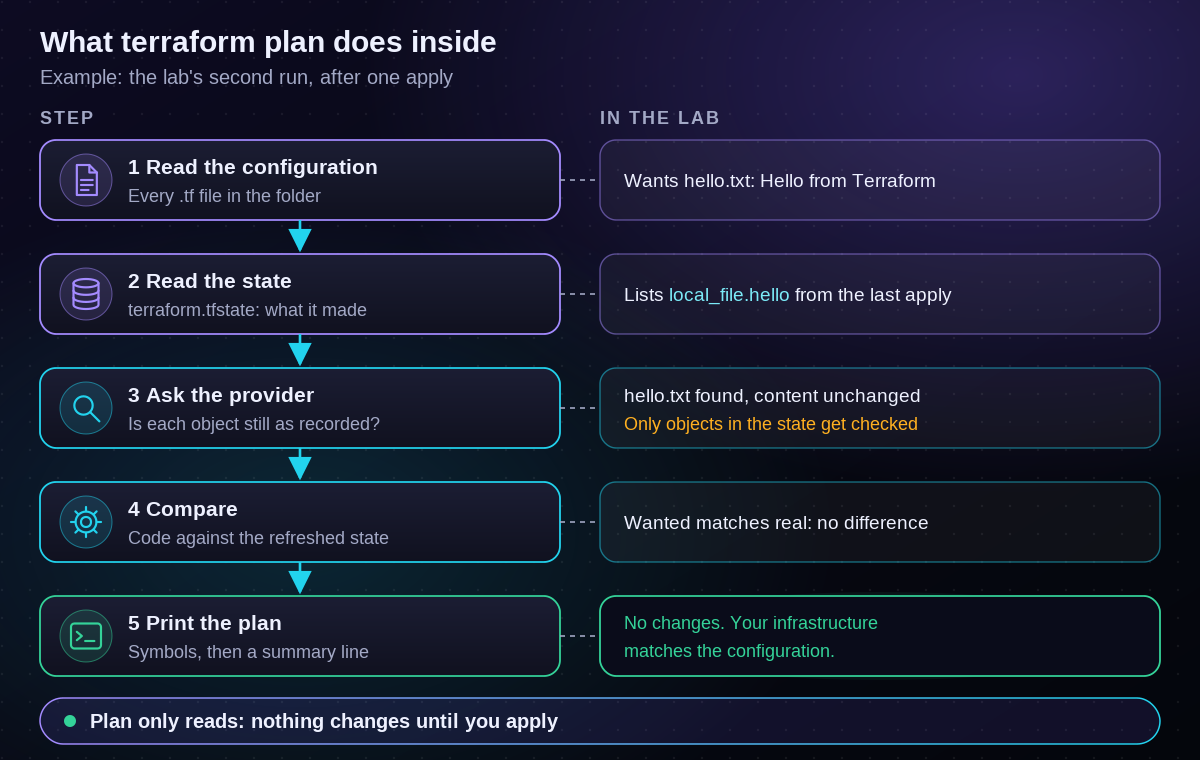
Step 3 is the refresh: for each object in the state, the provider checks the real thing. Terraform never looks at objects missing from its state, just as the shopper ignores milk you bought yourself. The second apply prints, trimmed:
local_file.hello: Refreshing state... [id=…]

No changes. Your infrastructure matches the configuration.

Apply complete! Resources: 0 added, 0 changed, 0 destroyed.
The check also catches changes made by hand. Delete or edit hello.txt and the refresh treats the file as gone, so the next plan writes it again. That is how Terraform corrects drift, a real resource no longer matching the code: the code wins.
Check yourself
You change the greeting, and the plan says 1 to add and 1 to destroy instead of 1 to change. Why?
Every argument of local_file forces replacement: the provider cannot edit a file in place, so it deletes the old one and writes a new one. A resource that can be updated in place would show ~ and 1 to change.
A teammate deletes hello.txt by hand. What does the next terraform plan show, and why?
Plan: 1 to add. The refresh finds the file missing, so Terraform plans to create it again, because the code still says it should exist.
With receipt.tf copied in and nothing applied yet, why does the plan show the receipt's content as (known after apply)?
The content includes the hash of hello.txt, which exists only once that file is written. The reference makes Terraform create hello first and fill in the receipt's content after.