Block vs Object vs File Storage in the Cloud
Your team's web shop from the last lesson now holds real data. Its database needs a fast disk, both web servers must share one folder of page templates, and sellers keep uploading product photos. Each job suits a different kind of cloud storage. This lesson explains block vs object vs file storage: how each one reads and writes data, and how to choose.
One question: how is the data read and written?
All three keep your bytes on the provider's disks; what differs is how a program asks for them. With block storage, a server reads and writes blocks, small fixed-size chunks of a raw disk, by number. With file storage, servers ask a shared service for files by path. With object storage, a program sends HTTP requests, the kind a web browser sends, to store or fetch whole objects by name.
In the diagram, count the servers each column serves.
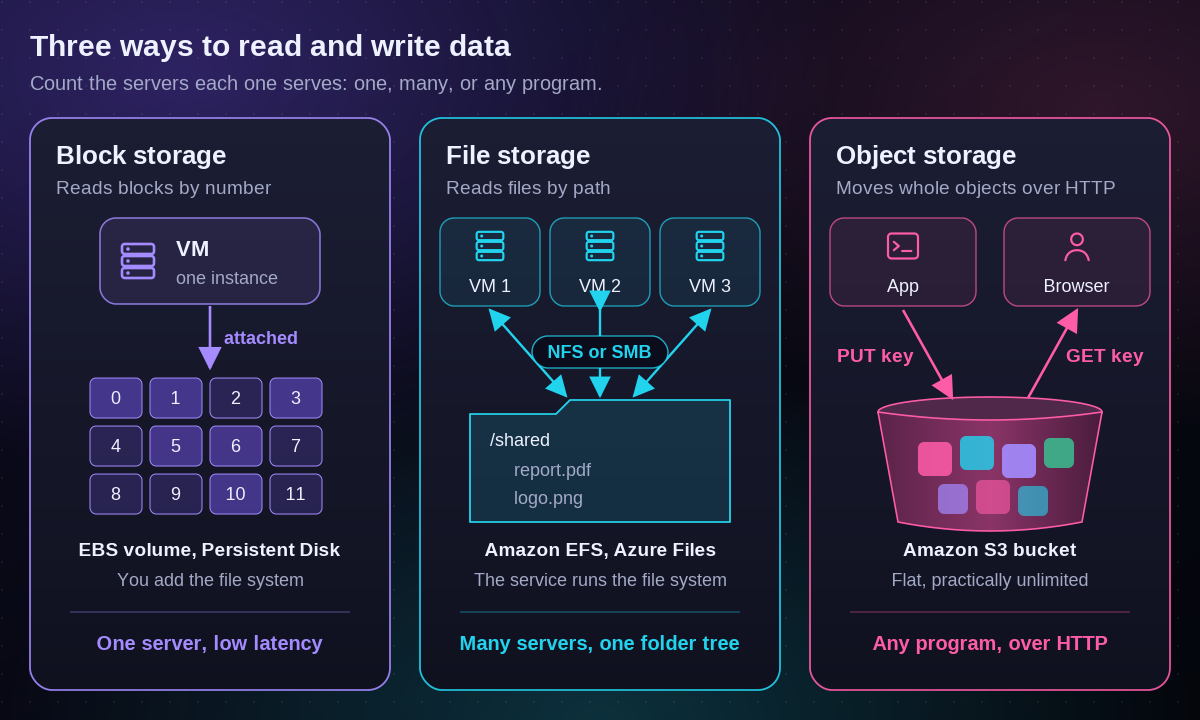
Block storage: a raw disk for one server
A block storage volume is a virtual hard drive: on AWS, an Amazon EBS (Elastic Block Store) volume, like the root volume in lesson 5. Google Cloud calls it Persistent Disk; Azure, a managed disk.
AWS says EBS volumes "behave like raw, unformatted block devices". You format one with a file system, the part of the operating system that turns numbered blocks into named files and folders, such as ext4 on Linux. Then it works like any hard drive.
A volume attaches to one instance in the same availability zone. A few special volume types allow several, but need cluster software, because ordinary file systems are not designed for two servers writing at once. With one server in charge, block storage usually has the lowest latency, the delay before a read or write completes: ideal for databases and boot disks.
The volume lives outside the server, so it can outlive the instance, and EBS copies it within its zone. For more safety, take snapshots, point-in-time copies that EBS stores in Amazon S3. You pay for the size you provision, even if it is mostly empty.
File storage: one shared folder for many servers
File storage is a shared file system that many servers mount, attaching it as a folder in their own directory tree, over the network. A classic use is shared home directories: each user's files appear on whichever server they log in to.
Servers reach it through a protocol, an agreed set of network messages: NFS (Network File System), common on Linux, or SMB (Server Message Block), the Windows standard. The file system runs on the provider's side, so your server never sees blocks; it asks for /shared/report.pdf by path.
Amazon EFS (Elastic File System) speaks NFS 4.0 and 4.1, serves many instances, containers and Lambda functions at once, and stores data across several availability zones. It grows as you add files and bills only for what you store, but does not support Windows. Azure Files offers SMB shares for Windows, Linux and macOS, and NFS shares for Linux.
Sharing costs speed: each operation crosses the network to a shared service, so a busy database belongs on a block volume.
Object storage: whole objects in a flat bucket
Object storage keeps objects in a bucket, a named container you create in a region. You met Amazon S3, Azure Blob Storage and Google Cloud Storage in lesson 4; here is how S3's ordinary general purpose buckets work.
An object has three parts: the key, its unique name in the bucket, such as photos/2026/cat.jpg; the data, its bytes; and metadata, name-value pairs describing it, some set by S3, such as Content-Length, some by you. On the luggage tag, notice that bucket plus key makes the address.
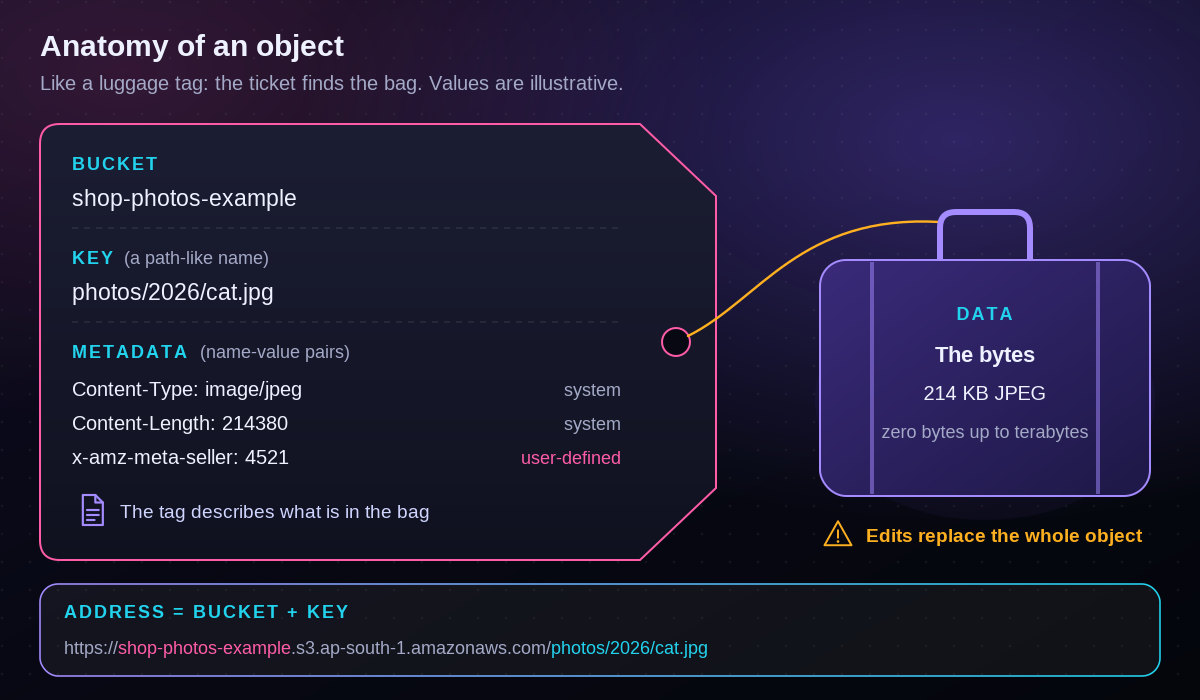
The bucket is flat: S3 has "a flat structure instead of a hierarchy like you would see in a file system". Slashes in a key are ordinary characters; the console merely shows keys sharing a prefix, such as photos/, as a folder.
Programs use S3's API, an interface other programs call, over HTTP: a PUT request uploads an object and a GET downloads it, from anywhere, if you have permission. There is no volume to size, storage is practically unlimited, and per gigabyte it usually costs less than block or file storage.
The catch: you cannot edit part of an object. To change one line, you upload the whole object again under the same key; even new metadata means copying the object. That suits photos and backups, written once and read often, not a database rewriting small pieces.
Choosing: what do I need to store?
Start from how the data is used: the flowchart asks who reads it, and how.

Choose block when one server needs its own fast disk: boot disks, and databases you run on a VM. Managed databases come in lesson 8.
Choose file when many servers share a folder, such as home directories or the shop's templates.
Choose object for files fetched by URL or API: images, backups, logs and static websites, like the one you will host in the capstone.
Durability and cost: storage classes and lifecycle rules
Durability is the chance that stored data is not lost. S3 Standard is designed for 99.999999999 percent (eleven nines) a year, keeping data in at least three availability zones. Availability, the chance you can reach the data right now, is a different number: designed for 99.99 percent.
A storage class is a price tier. Colder classes, for rarely read data, cost less to store per gigabyte each month but charge more, or make you wait, to read, and most have a minimum charge: delete an object sooner and you still pay for the minimum. All four below share the eleven-nines design.
| Storage class | Getting data back | Minimum storage charge |
|---|---|---|
| S3 Standard | Milliseconds | None |
| S3 Standard-IA (Infrequent Access) | Milliseconds | 30 days |
| S3 Glacier Flexible Retrieval | Minutes to hours, after a restore | 90 days |
| S3 Glacier Deep Archive | Hours, after a restore | 180 days |
A lifecycle rule moves ageing objects to colder classes, or deletes them. This one, adapted from an S3 documentation example, moves keys starting with logs/ to Standard-IA after 30 days and to Glacier Flexible Retrieval (written GLACIER) after 90, then deletes them after 365.
{
  "Rules": [
    {
      "ID": "age-out-logs",
      "Filter": { "Prefix": "logs/" },
      "Status": "Enabled",
      "Transitions": [
        { "Days": 30, "StorageClass": "STANDARD_IA" },
        { "Days": 90, "StorageClass": "GLACIER" }
      ],
      "Expiration": { "Days": 365 }
    }
  ]
}
S3 counts the days from each object's creation and will not move objects into Standard-IA before day 30. You will create buckets without an AWS account in the LocalStack lesson.
Check yourself
Two web servers must both write to the same folder of uploads. Why not share one EBS volume, and what fits instead?
File storage such as Amazon EFS: an ordinary EBS volume attaches to one instance and its file system is not built for two writers, while a file share runs one file system for every server.
A program appends a line every second to a 2 GB log file kept in S3. Why is that a poor fit?
An object cannot be edited in part, so every new line means uploading all 2 GB again; write batches of lines as new small objects instead.
Monthly backups must be kept a year and are read only in emergencies. Why might Glacier Deep Archive suit them, and what do you give up?
It is the cheapest class to store in, with the same eleven-nines design; but each read needs a restore taking hours, and deleting before 180 days still costs the minimum.