What Is Cloud Computing? Renting Computers, Explained
Your college club is putting its festival website online. Most of the year a handful of people visit it; in festival week, thousands arrive at once. A computer big enough for that week would sit idle all year, and a small one would crash when it matters. Someone says "just put it on the cloud". This lesson answers what is cloud computing: where the computers really are, what makes a service "cloud", and what you gain and give up.
The cloud is other people's computers
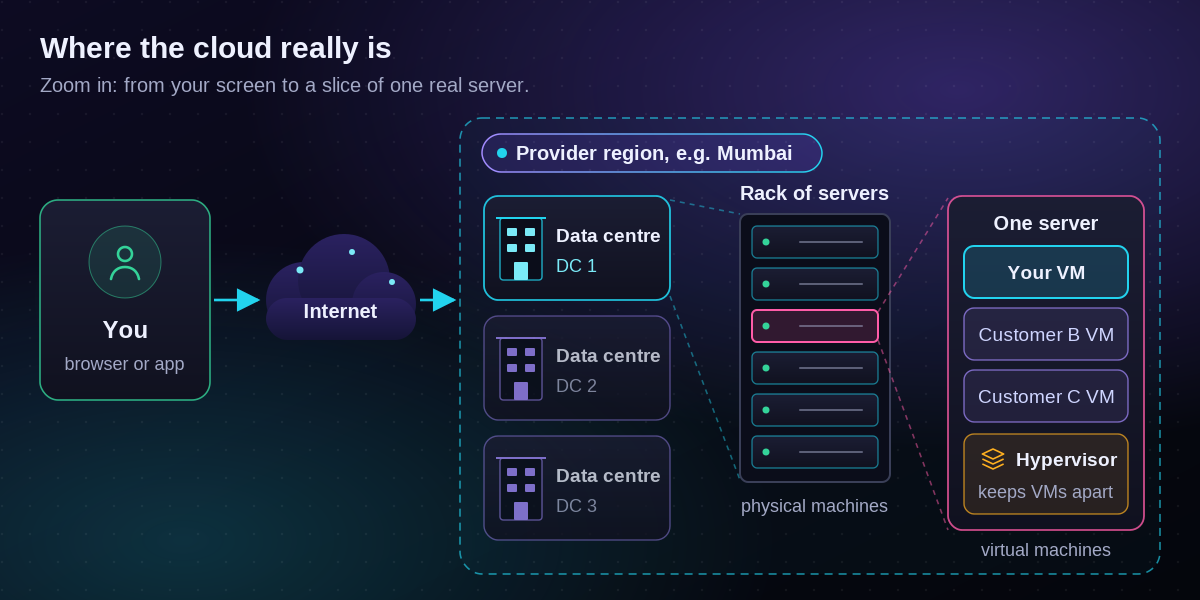
A server is a computer that serves other computers over a network: it sends web pages, stores files or runs an app. It is built to run day and night, usually with no screen or keyboard.
Cloud providers such as Amazon Web Services (AWS), Microsoft Azure and Google Cloud fill data centres, large buildings with backup power, cooling and fast network links, with thousands of servers. A group of data centres in one area, such as Mumbai, is called a region, explained fully in a later lesson, Cloud Regions and Availability Zones Explained.
You rarely rent a whole physical server. Software called a hypervisor splits one into several virtual machines (VMs): computers made of software, each with its own share of processor, memory and disk, and its own operating system, the base software such as Windows or Linux. Other customers' VMs may share the same machine, kept apart by the hypervisor.
Five ideas that make it cloud
Hosting companies have rented out computers for decades, so what makes it cloud? A 2011 definition of cloud computing from the US National Institute of Standards and Technology (NIST) names five essential characteristics:
- On-demand self-service: you create a server yourself, from a web page or a command, without asking a person.
- Broad network access: you reach it over the network with ordinary tools such as a browser.
- Resource pooling: many customers share one large pool of hardware; you pick a region, not the exact machine.
- Rapid elasticity: you add capacity when demand rises and give it back when it falls, often within minutes.
- Measured service: the provider meters what you use, such as server hours or gigabytes stored, and bills you from those numbers.
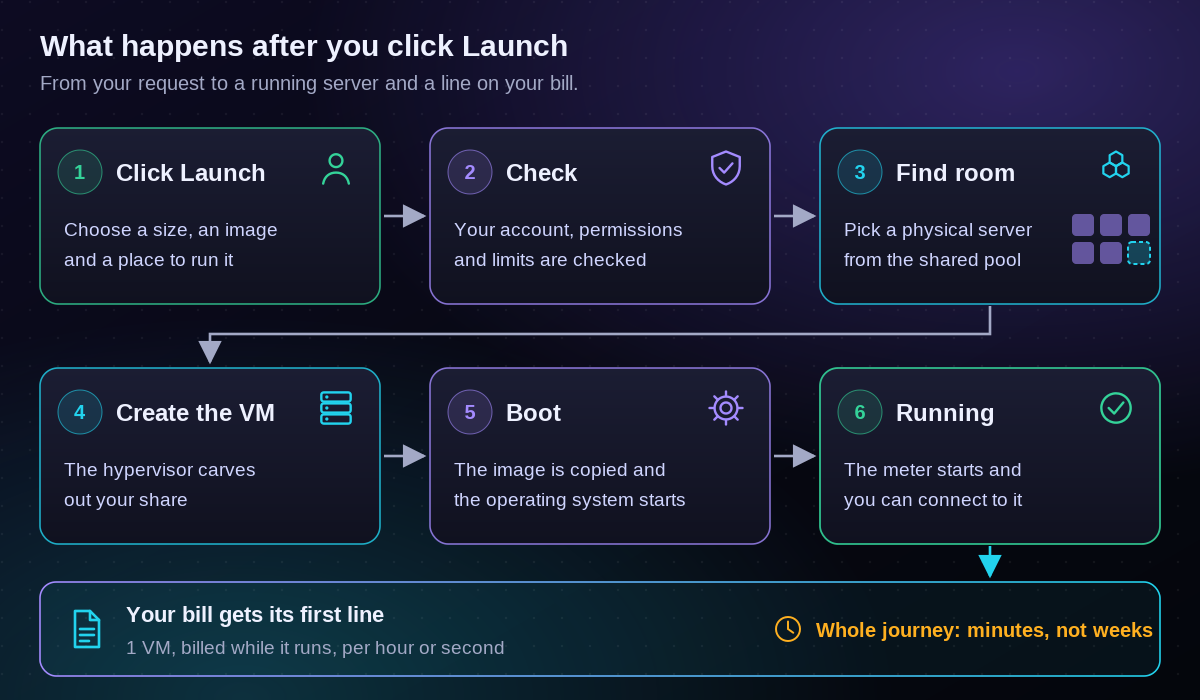
If you must email a salesperson and wait a week for a server, that is ordinary hosting, not cloud. The flowchart shows several of the five at work. An image there means a saved copy of a disk with an operating system already installed, which the provider copies to start your VM.
What changes: how you pay and how long you wait
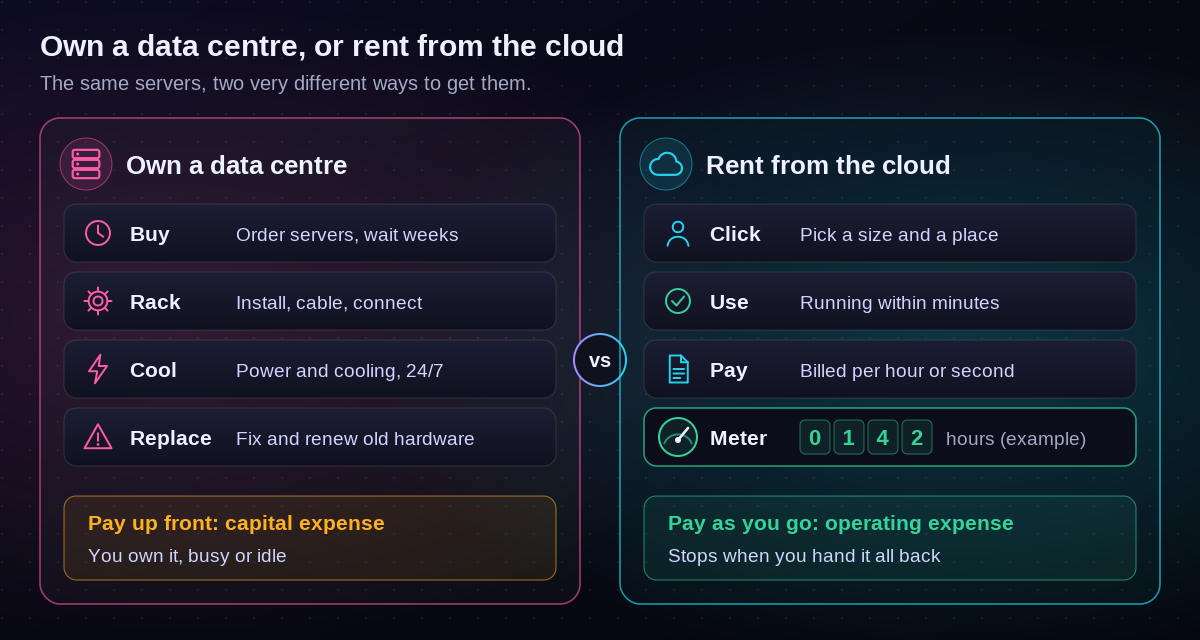
Buying servers is a capital expense (CapEx): a large up-front purchase of something you keep for years, like a delivery van. The money is spent on day one, whether the servers end up busy or idle.
The cloud turns that into an operating expense (OpEx): a running cost paid as you go, like rent or electricity. A small team can start without buying anything, and a failed project stops costing money once you delete what it used.
Waiting changes too. A physical server must be ordered, delivered, installed and connected, which often takes weeks. A cloud server is usually running minutes after you ask, so the festival site can grow for one week and shrink afterwards.
The trade-offs
The gain is the work you stop doing. Someone must rack servers (bolt them into tall metal frames), cable them, swap failed disks and update their firmware, the low-level software built into the hardware. In the cloud the provider does that, so your team can work on what users see.
You give up some control. You choose from the provider's server sizes, it decides when its hardware is maintained, and a fault in its data centre can take your service down. Relying on one provider's services also makes leaving harder later, which is called lock-in.
You can also overspend: a forgotten test server keeps billing all month. Surprise costs, such as data sent out to the internet, come later in Cloud Cost Basics, and the later lesson on the shared responsibility model covers what you must still secure yourself.
Public, private and hybrid cloud
A public cloud is run by a provider for anyone who signs up, on hardware shared by many customers. AWS, Azure and Google Cloud are public clouds. A typical user is a startup that owns no servers and wants to start small.
A private cloud gives the same self-service and pooling to one organisation only, in its own data centre or run for it by another company. A typical user is a bank or a government department with strict rules about where data lives, often building it with software such as OpenStack or VMware.
A hybrid cloud connects a private cloud, or loosely a company's own data centre, with a public cloud so work and data can move between them. A typical user is a hospital that keeps patient records on its own servers but runs its website in a public cloud. NIST also lists a rare fourth model, the community cloud.
Check yourself
A firm emails a hosting company, waits three days for a server and pays a fixed yearly fee. Which cloud ideas are missing?
On-demand self-service, rapid elasticity and measured service: a person has to act, capacity cannot change quickly, and the fee ignores use, so this is hosting, not cloud.
You forget a test server in the cloud for a month and nobody uses it. Why is there still a bill?
It is metered by the time it runs, not by how hard it works, so it costs the same per hour idle as busy until you delete it.
A hospital must keep patient records on its own servers but needs extra computing for a three-month project. Which kind of cloud fits?
Hybrid cloud: the records stay on its own servers, and the project rents public cloud capacity and hands it back when done, so it never buys hardware for a three-month job.
Go deeper
- AWS Emulator on Apple Silicon: ARM64 Setup for M-Series Macs: where this course ends up, running imitation AWS services on your own laptop with no account or bill.