The Cloud Shared Responsibility Model Explained
A news story says your company's customer files "leaked from the cloud", and your manager asks whether Amazon was hacked. Nobody broke into Amazon: your own team left a storage bucket readable by anyone. The shared responsibility model says whose job it was to stop that. This lesson shows what the provider secures, what you secure under IaaS, PaaS and SaaS, and what an audit can prove.
Security of the cloud, security in the cloud
The shared responsibility model is the split of security work between a cloud provider and you, its customer. AWS sums it up in two phrases: the provider is responsible for security of the cloud, and you are responsible for security in the cloud.
Security of the cloud means, in AWS's words, "protecting the infrastructure that runs AWS services": the landlord's building. That covers data centres with their guards and power, the servers, disks and network, and the hypervisor that keeps customers' VMs apart, as in lesson 1. You cannot touch any of it, so you could not secure it if you tried.
Security in the cloud is everything you put there and every setting you choose: your data, who may reach it, and how each service is configured. As AWS puts it, "your responsibility is determined by the AWS service that you use". Microsoft Azure draws the same line: "For all cloud deployment types, you own your data and identities."
How the line moves with IaaS, PaaS and SaaS
As lesson 2 showed, each service model hands a different number of layers to the provider. Every layer handed over is a security job handed over, so the line moves with the model.
IaaS, such as Amazon EC2: you own the guest operating system, the OS inside your VM, with its updates and security patches. The software you install, the security groups of lesson 7 and the IAM roles attached to your instances are yours too.
PaaS and managed services, such as Heroku or the Amazon RDS databases of lesson 8: the provider patches the OS and platform beneath your code. Your code, its libraries, the settings, your data and access stay yours.
SaaS, such as Gmail: the provider runs and patches the whole application. You mostly manage users and data: who has an account, whether they use MFA, and what they store and share.
In the diagram, notice that the line rises from IaaS to SaaS, but the top two rows never change colour. You always classify your data, labelling how sensitive each kind is, and you always decide who gets in.
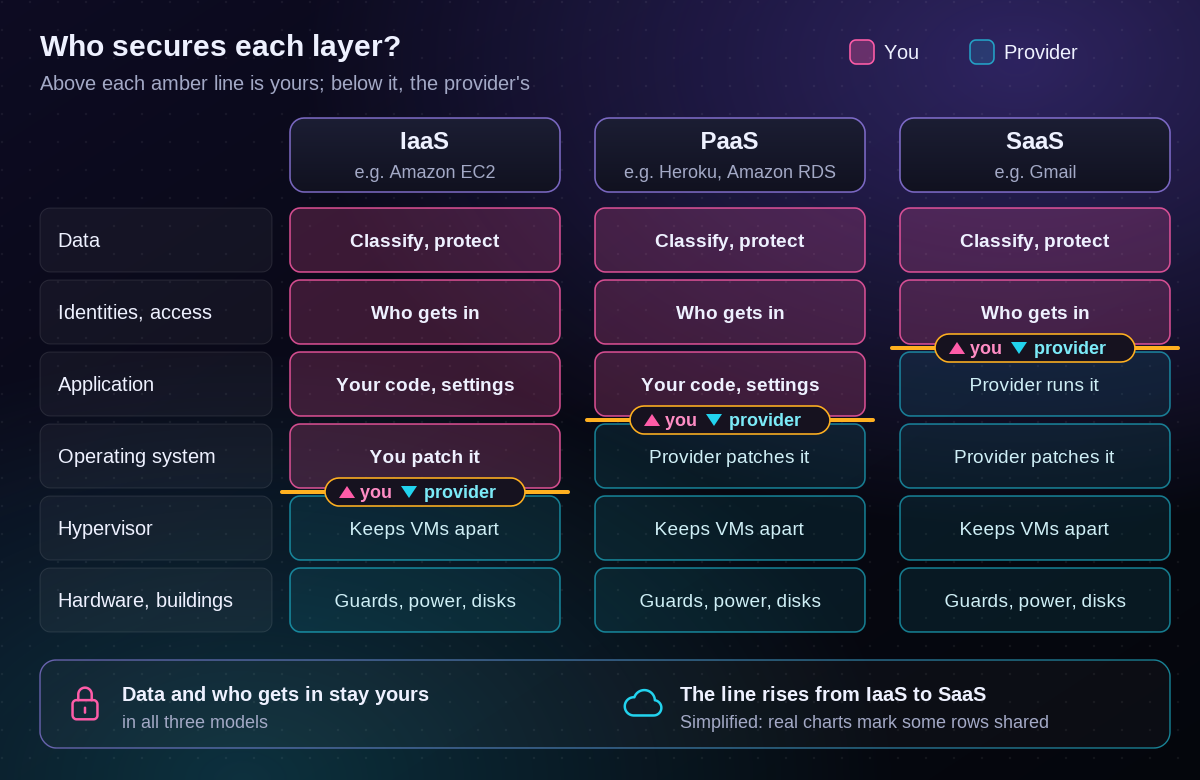
Real charts add detail: Microsoft's marks some layers shared, such as network controls in PaaS.
Your duties in practice
Whatever the model, the same five jobs keep landing on you:
- Identity and access: users, roles, MFA and least privilege, as in lesson 11.
- Encryption choices: encryption at rest stores data scrambled, unreadable without a key. Since 5 January 2023, S3 encrypts new objects with keys it manages (SSE-S3), or with keys you control in AWS KMS (Key Management Service) if you choose. An EBS volume is encrypted only if you ask, per volume or with the per-Region "encryption by default" setting.
- Network rules: security groups, network ACLs and private subnets decide who can reach a server at all.
- Patching: the guest OS of every VM you run, plus your own code and its libraries wherever you bring code.
- Backups the service does not take: EBS snapshots are yours to schedule, and S3 Versioning, which keeps older copies of objects, is off until you enable it. RDS backs up automatically, but you choose how long to keep the backups.
The provider does not undo your mistakes: delete an object from a bucket without versioning, and S3 has done what you asked. The object is gone.
Five responsibilities never move. In the checklist, notice the last one: accountability, answering to your customers and regulators, stays with you even for work the provider did.
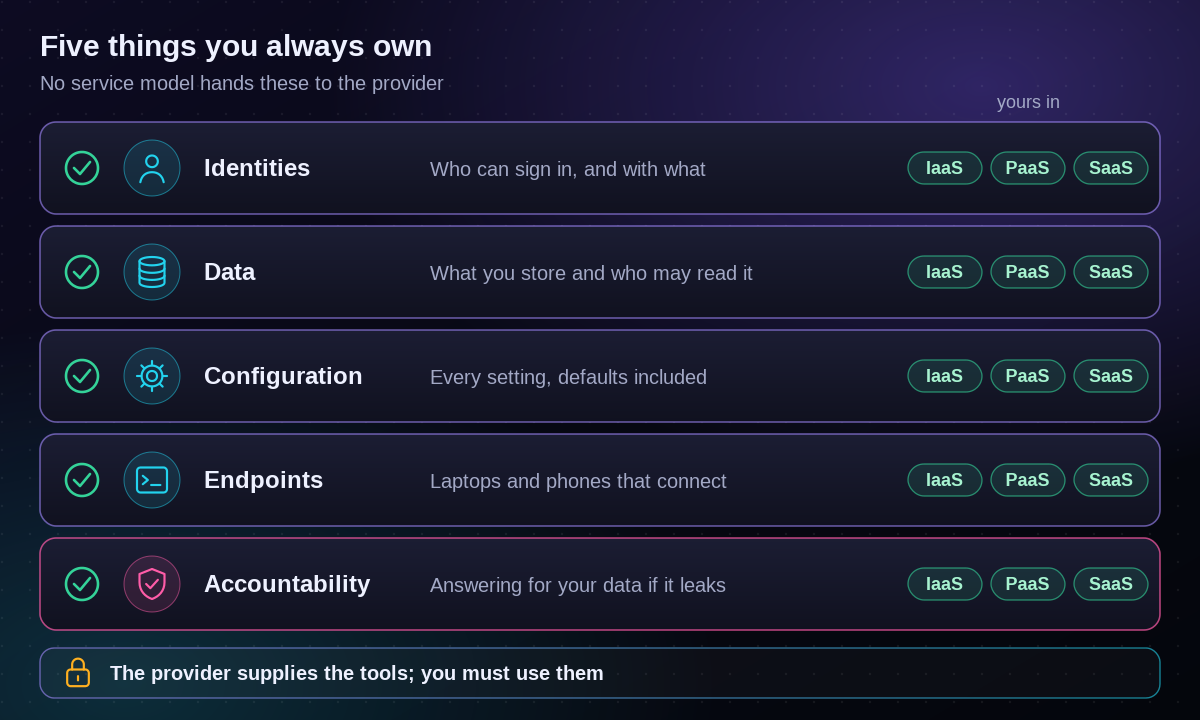
An endpoint here is a device people use to reach the cloud, such as a laptop or phone, not a service's web address, which the word can also mean. If a laptop is infected, an attacker can act with its owner's valid sign-in.
A public bucket is your misconfiguration
Back to the news story. Your team serves product photos from one S3 bucket, so it switches off Block Public Access: four S3 settings that stop a bucket being made public, all on by default for a new bucket. Then it adds this bucket policy (the bucket name is illustrative):
{
  "Version": "2012-10-17",
  "Statement": [
    {
      "Effect": "Allow",
      "Principal": "*",
      "Action": "s3:GetObject",
      "Resource": "arn:aws:s3:::shop-files-example/*"
    }
  ]
}
In a bucket policy, Principal names who the statement covers, and * means everyone, including people not signed in to AWS. Months later, someone saves customer invoices in the same bucket, and anyone who learns an invoice's address can download it.
Nothing in AWS's half failed: no data centre was entered, and S3 did exactly what the policy said. The policy, the disabled setting and mixing photos with invoices were all configuration. This is a customer misconfiguration, not a provider breach.
The fix is yours too: keep public files in a bucket of their own, and leave Block Public Access on everywhere else. With its BlockPublicPolicy setting on, S3 rejects any bucket policy that allows public access. An account with no public files can turn it on account-wide; S3 applies the most restrictive combination of account and bucket settings.
The flowchart finds the owner of any problem by asking where it lives. Notice the note on the right: an unpatched OS is your configuration on EC2 but part of the service on RDS.
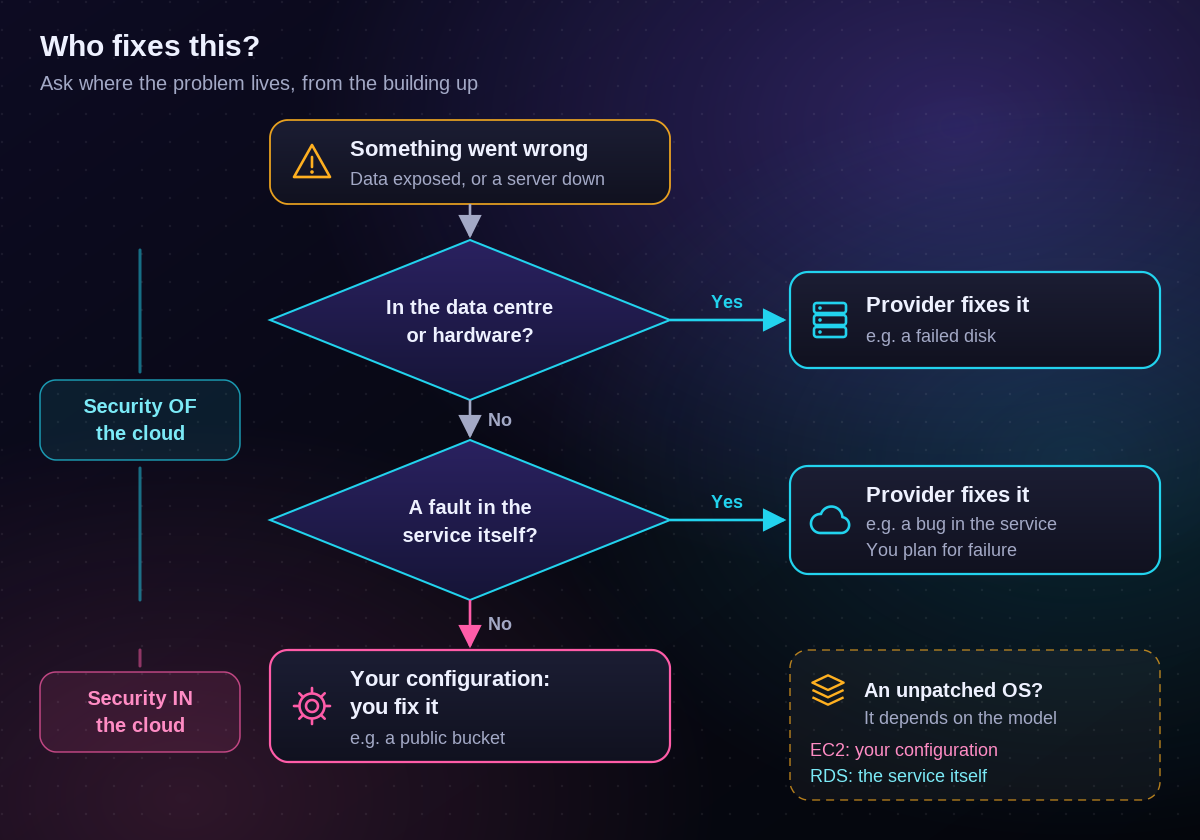
Even the provider's failures leave you a job. AWS replaces a failed disk, but spreading your servers across the availability zones of lesson 3, so you survive one failing, is yours.
Compliance: their audit covers their half
Compliance means showing an auditor, customer or regulator that you follow a set of security rules from a standard or a law. An audit report is an independent auditor's written finding on how well the rules are met.
Third-party auditors assess AWS services under programs such as SOC (System and Organization Controls), PCI DSS for card payments, FedRAMP for US government use and HIPAA for US health data. You can download their reports from AWS Artifact.
Those reports cover the provider's controls: its buildings, hardware, staff and processes. They say nothing about your bucket policies, your patching or who holds admin rights. In AWS's words, "your compliance responsibility when using Amazon S3 is determined by the sensitivity of your data", along with your company's goals and the law.
So you gather evidence for your half: access reviews, change history, logs from AWS CloudTrail, which records the API calls made in your account, and configuration checks from AWS Config, which tests your resources' settings against rules you choose. Before storing regulated data, check that the service is in scope: AWS notes that "not all AWS services are HIPAA eligible".
Check yourself
A serious Linux flaw is announced. Who installs the fix on your EC2 web server, and who on the server under your RDS database?
You patch the EC2 server, because in IaaS the guest OS is yours. AWS patches the RDS host, because a managed service runs its own OS, in the maintenance window you set.
An auditor asks how your customer data is protected, and a teammate sends AWS's SOC report. Why is that not enough?
The report covers AWS's controls only. It says nothing about your IAM, bucket settings or patching, so you need evidence for your half.
Product photos and invoices share one bucket whose policy lets "Principal": "*" read every object. Who must fix it, and how?
You, because the policy is your configuration and S3 enforced it as written. Move the invoices to a private bucket with Block Public Access on, so only the photos stay public.