What Is Serverless? Functions and Events Explained
Your web shop needs one small job: each time a seller uploads a product photo, make a thumbnail. It takes a second, a few hundred times a day, yet a VM kept for it would bill around the clock while it mostly waits. So what is serverless, and how does it run that job with no server of yours waiting? This lesson covers functions, the events that call them, their limits, and when to choose them.
Serverless still has servers
Serverless is a way of running code in which the provider runs every server and you never see one. The servers still exist; what disappears is your work on them: you do not provision them (choose and start machines), patch them, or decide how many to run.
As lesson 2 showed, the provider also handles scaling: if a hundred events come at once, it runs many copies of your code side by side, up to your account's limits. When none come, nothing runs.
That changes the bill. A VM, as you saw in lesson 5, bills every second it runs, busy or idle. AWS Lambda bills per request and per millisecond of running time, so by default idle time costs nothing.
Functions as a service: event in, result out
The usual form of serverless is functions as a service (FaaS): you upload a function, a small piece of code that does one job. The main services are AWS Lambda, Azure Functions and Google Cloud Run functions (formerly Cloud Functions).
An event is a message saying that something happened, such as "a file arrived", with the details as data. On Lambda it is a JSON document (text made of named fields), which Python receives as a dict.
The handler is the function in your code that the platform calls with each event. A Lambda handler in Python takes two arguments and returns a result:
def lambda_handler(event, context):
    name = event["name"]
    return {"greeting": "Hello, " + name}
The context argument describes this invocation (one call of the function) and its environment. The handler setting names the file and function to call: app.lambda_handler if this code is in app.py. If the caller waits for an answer, Lambda sends your return value back as JSON; if nobody waits, it is discarded.
Event sources: what calls your function
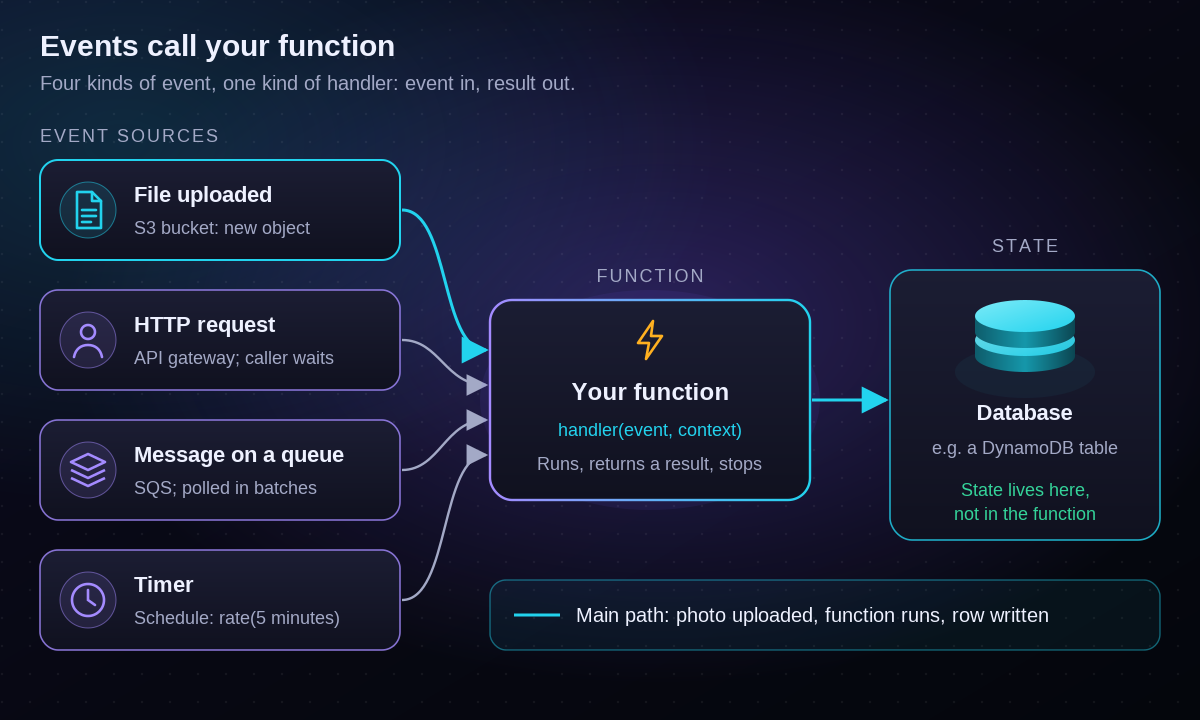
An event source is the service that produces events and calls your function. Azure calls it a trigger, and each Azure function has exactly one. A source calls synchronously when it waits for the result, and asynchronously when it hands over the event and moves on. Four are common:
- HTTP request: an API gateway is a managed front door for web requests. Amazon API Gateway turns each request into an event, calls the function synchronously, and turns the
statusCodeandbodyyou return into the HTTP response. - File upload: Amazon S3 calls the function asynchronously, with an event naming the bucket and the object's key. Save thumbnails in a second bucket: writing to the triggering bucket makes the function call itself in a loop.
- Queue message: a queue, such as Amazon SQS, holds messages until a worker takes them. Lambda polls it (keeps asking for messages), hands your function batches of up to 10 by default, and deletes them once it succeeds. A failed batch is retried, so your code must cope with seeing a message twice.
- Timer: an Amazon EventBridge schedule calls the function at set times, such as
rate(5 minutes)orcron(15 10 * * ? *)for 10:15 UTC each day.
Follow the cyan path, and notice where the data ends up.
Cold starts, time limits and statelessness
Your function runs in an execution environment: an isolated, short-lived space holding your code, a language runtime and some memory. The flowchart follows one invocation; notice that only one branch pays for setup.
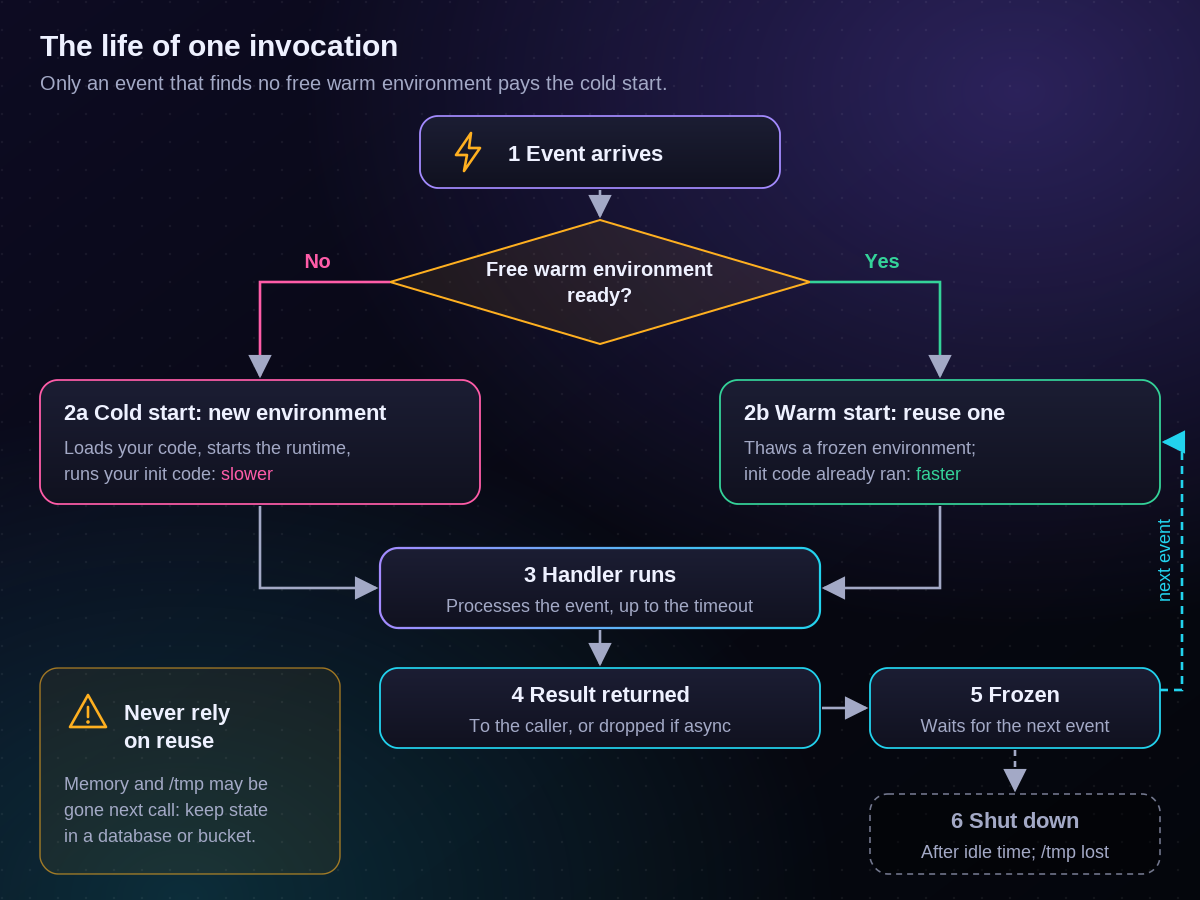
A cold start happens when no free environment exists. Lambda creates one, loads your code, starts the runtime and runs your init code, the code outside the handler, such as opening a database connection. Only then does the handler run, so that first call is slower.
When the handler returns, Lambda freezes the environment. If another event arrives soon, Lambda thaws and reuses it: a warm start, with init already done. After a while with no calls, it is shut down.
If a second event arrives while the first is still running, Lambda starts another environment, so a sudden burst brings a burst of cold starts. Provisioned concurrency keeps a set number of environments initialised in advance, but you pay for them even when idle.
Each run also has a timeout, after which Lambda stops it: 3 seconds by default and at most 1,800 seconds (30 minutes) since November 2026; many guides still give the earlier limit of 15 minutes. A two-hour video conversion does not fit; run it in a container or on a VM.
Finally, functions are stateless. State is data that must outlive one call, such as a shopping cart or a counter. A warm environment keeps its memory and its /tmp folder, but AWS warns you not to assume reuse: the next event may land in a brand-new environment. Keep state in a database, such as DynamoDB from lesson 8, or in object storage.
When to choose serverless, and when not to
The chart compares the two bills as traffic grows. The break-even point is the traffic at which both cost the same; it has no numbers, because it depends on your prices and workload. Notice that the VM line stays flat only until the VM is full.
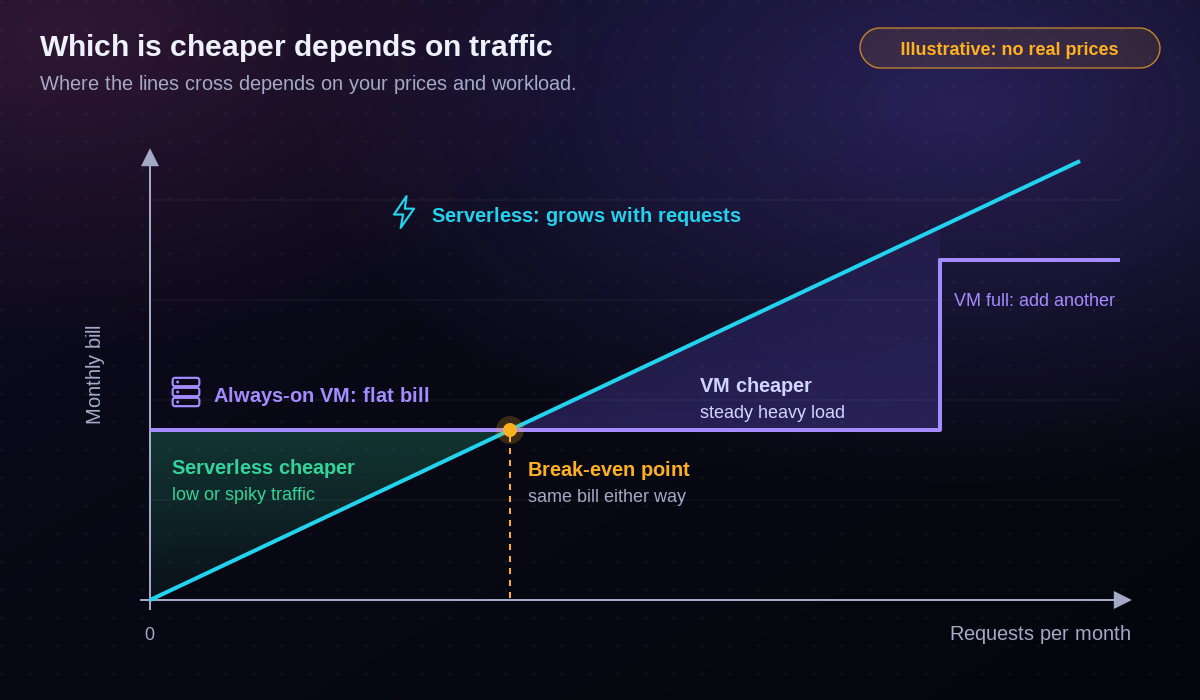
Choose serverless for spiky or low traffic, where a VM would sit idle between bursts. It also suits glue code, small pieces that connect services: make a thumbnail on upload, process a queue message, run a nightly clean-up.
Avoid it for steady heavy load, which sits past the break-even point, so an always-busy VM or container costs less. Avoid it for long-running tasks that exceed the timeout. And avoid it where latency, the time taken to answer a request, has a strict limit on every call, because cold starts would break it.
VMs can also scale with traffic: see Cloud Autoscaling Explained, the next lesson.
Check yourself
Your function counts page views in a global variable. It looks right in testing, but in production the count jumps around and drops back to 1. Why?
The variable lives in one execution environment: busy traffic spreads calls over several, and idle ones shut down, taking their counts with them. Store the counter in a database.
An API answers quickly most of the day, but the first request after a quiet night is much slower. What is happening, and what helps?
A cold start: no warm environment was left, so the platform had to create one and run your init code first. Provisioned concurrency keeps environments ready, at the price of paying for them while idle.
A service handles a steady, heavy stream of requests all day, every day. Why might a VM or container beat a function?
It sits past the break-even point: serverless charges for every request, while a busy VM's flat bill covers them all, with no idle hours to save.