Well-Architected Cloud: Six Pillars for Beginners
Your team's shop website passed every test before launch. Then a data centre fault takes it offline for an afternoon, an old access key leaks, and the bill doubles. Each failure came from a check nobody made. This lesson explains what makes a cloud design well-architected: the six pillars of the AWS Well-Architected Framework, what each one asks, how they trade off, and how teams run a review.
What the framework is
The AWS Well-Architected Framework is AWS's published guide to judging a cloud design. It groups its advice into six pillars, the areas of quality a design must get right. Each pillar has design principles, general rules for good design, and review questions. Under every question sits a list of best practices, the concrete things a good answer includes.
You apply it to one workload at a time: the resources and code that together deliver one piece of business value, such as your shop's web servers, database and storage.
In a recent version, the six pillars hold 57 questions between them, from 5 for Performance Efficiency to 13 for Reliability. A lens adds questions for one kind of workload, such as machine learning. Microsoft's Azure Well-Architected Framework and the Google Cloud Well-Architected Framework give similar guidance, so the ideas carry across clouds; this lesson uses AWS's version.
The diagram shows the six pillars holding up one workload, with the inspector's matching check under each. Notice that every pillar carries part of the roof, so neglecting any one puts the whole workload at risk.

Operational Excellence and Security
Operational Excellence is about running the workload well and getting better at it over time. In practice, you deploy through automation instead of by hand, make small changes that are easy to undo, watch the workload's health, and learn from every incident. Its questions include "How do you mitigate deployment risks?" and "How do you manage workload and operations events?"
A core habit is the runbook, a written, step-by-step procedure for a routine task such as restarting a stuck service. With one, the engineer woken at 2 am follows tested steps instead of guessing, and the steps can later become a script, as From Runbook to Robot describes.
Security is about protecting data, identities and infrastructure. It builds on what you already know: least privilege and roles from lesson 11, and your half of the shared responsibility model. Its questions include "How do you manage identities for people and machines?" and "How do you protect your data at rest?", meaning stored data.
Reliability and Performance Efficiency
Reliability is the workload's ability to do its job correctly and consistently, and to recover when part of it fails. You have met its tools already: spreading across availability zones (lesson 3), a Multi-AZ database standby (lesson 8) and auto scaling groups that replace unhealthy instances (lesson 10).
Its questions go further than "is there a spare?": "How do you back up data?", "How do you test reliability?" and "How do you plan for disaster recovery (DR)?" Disaster recovery means getting the workload back after a large failure, such as losing a whole region. A backup you have never restored is a hope rather than a plan.
Performance Efficiency means using cloud resources efficiently to meet demand, and keeping that true as demand and technology change. Its best practices include choosing the right compute option for the workload, as in lesson 5, collecting metrics, rightsizing and scaling dynamically.
That last part is easy to miss: an instance type that fitted at launch may be too small a year later, or a newer type may do the same work for less. Hence the question "What process do you use to support more performance efficiency?"
Cost Optimization and Sustainability
Cost Optimization means delivering the workload's business value at the lowest price that still meets its needs. In practice, it is the habits from lesson 13: tagging, budgets, rightsizing and choosing pricing models. Its questions include "How do you decommission resources?" (shut down and delete what is no longer needed) and "How do you plan for data transfer charges?"
Sustainability, the sixth pillar, was added in 2021. It is about reducing your workload's environmental footprint: the energy and hardware it needs. Its best practices include "Use the minimum amount of hardware to meet your needs", "Remove unneeded or redundant data", and choosing a region with sustainability goals in mind as well as business needs.
AWS describes it as a shared responsibility, like the security split in lesson 12. AWS is responsible for sustainability of the cloud, such as efficient data centres, and you for sustainability in the cloud: how much you deploy and how fully you use it.
These two pillars often agree. A dev server switched off at night lowers both the bill and the energy used, and deleting logs nobody reads saves storage cost and the disks behind it.
Trade-offs between pillars
A trade-off is a choice that improves one pillar at the expense of another. You cannot max out all six at once, so the right design depends on what the workload is for: a payment service may pay for extra reliability, while a test environment may give some up to save money.
The grid shows four common choices and their effect on four pillars. Spot instances, from lesson 13, are spare capacity at a discount that AWS can reclaim. Notice that no row is better everywhere: each choice has a price, and a good design pays it on purpose.

Security and Operational Excellence are missing from the grid on purpose. The framework says these two are generally not traded off against the others: you do not switch off encryption or monitoring to save money.
How a team runs a review
A Well-Architected review is a working session in which the team answers each pillar's questions about one workload and notes where its answers fall short of the best practices. It is not an audit with a pass mark: it finds your biggest risks.
AWS's Well-Architected Tool, in the AWS console, records the answers and gives each question a high, medium or no risk rating. You then pick the few high risks that matter most, list their fixes in an improvement plan, and save a milestone, a record of the review's state at that moment, so the next review can show progress.
The flowchart shows the loop. Notice the arrow from step 5 back to step 2: after fixing the top risks, or after a big change, you answer the questions again and pick the next few.
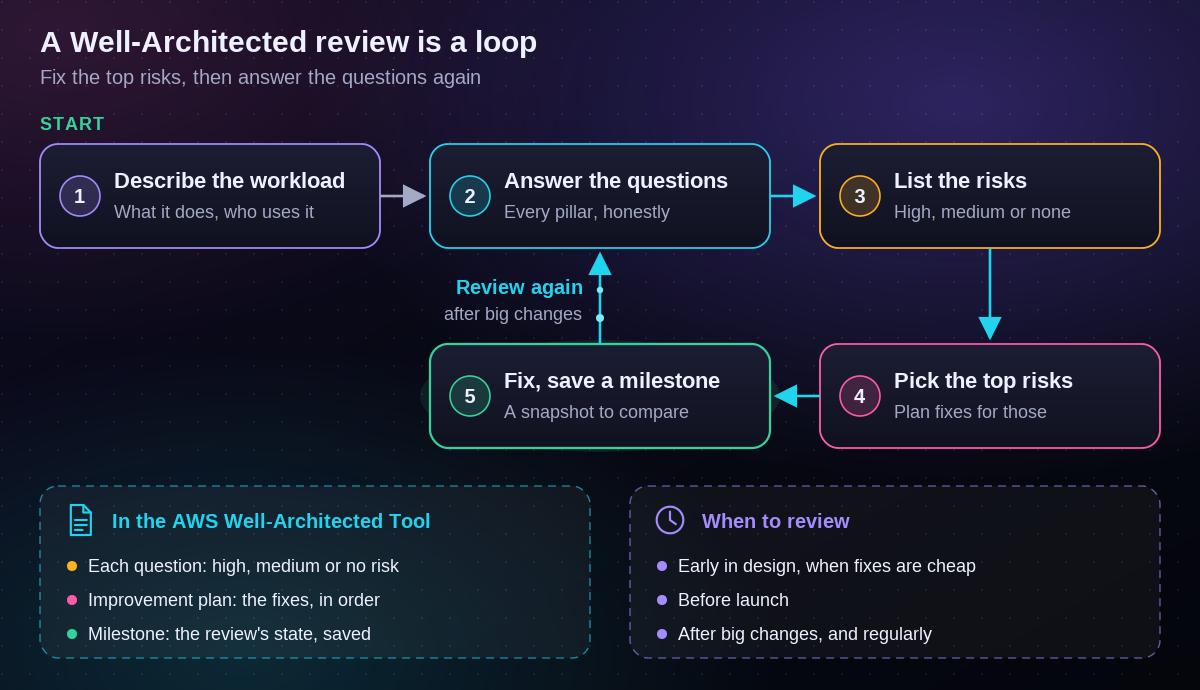
Teams usually review early in design, when changes are cheap, again before launch, and after major changes.
Check yourself
Your shop runs in two availability zones with a Multi-AZ database, but nobody has ever restored a backup. Which pillar is at risk, and why doesn't the standby cover it?
Reliability. The standby copies every change, including an accidental delete, so only a tested backup brings lost data back; "How do you back up data?" and "How do you test reliability?" would both flag it.
To cut the bill, a teammate proposes running the checkout servers on Spot instances. Which pillars does that move, and is it a good trade?
Cost improves, but Reliability suffers: Spot capacity can be reclaimed after a two-minute warning, even mid-checkout. That trade suits interruptible batch jobs, not a checkout that must stay up.
A first review finds 14 high risks, and the team plans to fix all of them before the next release. What does the review loop suggest instead, and why?
Fix the few high risks that matter most, save a milestone and review again: small batches of fixes ship sooner, and the next review shows which risks are now on top.