Cloud Cost Basics: Why the Bill Surprises Everyone
Your team's first month in the cloud ends, and the bill is almost twice the estimate, though most servers sat idle. This lesson explains cloud cost: what the meter measures, how pricing models change the rate, where the classic surprises hide, and which habits keep a bill predictable.
The meter: time, size and distance
A cloud bill grows with how long a resource exists, how big it is and how much data it moves, not with whether anyone used it. As lesson 5 showed, a running EC2 instance is billed per second, busy or idle.
Most bills come from five cost drivers, the kinds of usage a provider charges for. A GB-month is one gigabyte stored for one month, so 60 GB kept for half a month counts as 30 GB-months.
| Cost driver | Billed by | Examples |
|---|---|---|
| Compute | Seconds or hours running | EC2 instances, busy or idle |
| Storage | GB-months | EBS volumes by provisioned size, S3 objects |
| Data transfer | GB moved | Out to the internet, between AZs or regions |
| Requests | Number of calls | S3 PUT and GET requests, Lambda invocations |
| Managed service fees | Hours, plus usage | NAT gateway hours and gigabytes processed |
Two drivers fool people. Storage is metered over time, so forgotten data costs every month, and a block volume is billed for its provisioned size, as lesson 6 noted. Data transfer is lopsided: data coming in from the internet is usually free, while data going out is charged per gigabyte. Even inside the cloud, AWS charges for traffic between availability zones in both directions, as lesson 3 explained.
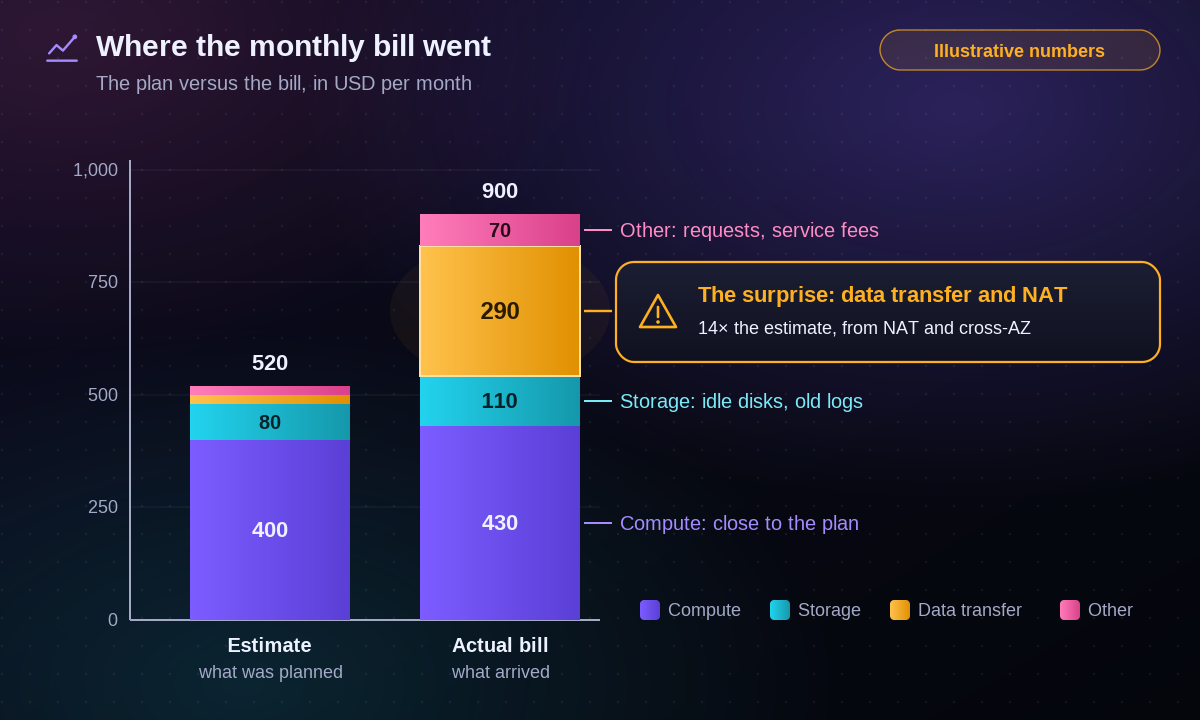
The illustrative chart compares a first bill with its estimate. Notice that compute barely moved: the jump is in data transfer.
Pricing models: commit, or accept interruptions
How you buy an instance changes its hourly rate. Lesson 5 introduced the three models; here is what each means for the bill.
- On-demand: the full rate, billed per second on EC2, with no commitment: the right default while you learn what you need.
- Savings Plans and Reserved Instances: a Savings Plan commits to a steady spend in US dollars per hour; a Reserved Instance commits to one instance configuration, such as an instance type. Both cut the rate for one or three years, and you pay the commitment every hour, used or not.
- Spot: spare EC2 capacity at a steep discount. EC2 sets its price, which moves gradually with long-term supply and demand, and can reclaim the instance after a two-minute warning.
So commit only to steady load you will run for the whole term, and only after removing waste: a plan sized to oversized servers locks the waste in. Put interruptible batch work on spot.
Classic surprises
Forgotten idle servers. A demo instance never stopped is billed every second, at 90 percent CPU or 1 percent. Stopping it ends the compute charge; its EBS disk is billed until deleted.
Unattached disks. An unattached disk is a volume no longer attached to any server. AWS's documentation says that after you detach one "you are still charged for volume storage", and that "you must delete a volume to avoid incurring further charges".
NAT gateway and cross-AZ charges. The NAT gateway from lesson 7 is billed for "each hour that your NAT gateway is available" and for "each Gigabyte of data that it processes". Private servers pulling large files from S3 through it pay per gigabyte, plus cross-AZ charges if the gateway sits in another zone.
AWS advises keeping resources in their NAT gateway's AZ, and using a VPC endpoint, a private route from your VPC straight to a supported AWS service such as S3, so that traffic skips the gateway.
Logs growing forever. By default, CloudWatch Logs, AWS's log service, keeps log data "indefinitely", so every debug line stays stored and billed. Set a retention period on each log group, and age out logs in S3 with a lifecycle rule like lesson 6's.
Habits that keep the bill sane
Tag everything
A tag is a key-value label, such as team=shop or env=dev, that you attach to a resource. On AWS, a tag splits cost reports as a cost allocation tag only after you activate it in the billing console, the part of the AWS console for bills and payments; it can take up to 24 hours to appear. Agree on a few required tags and put them on every new resource.
Set a budget and an alert
A budget is a spending limit for a period, such as 500 US dollars a month; an alert is a message sent when spend crosses a share of it. Notice that the diagram's alert fires at 80 percent, with time left to act.

In AWS Budgets, this is that alert in the format of the AWS CLI's create-budget example. The budget itself is defined separately, as a COST budget with a MONTHLY time unit and a 500 USD limit.
[
  {
    "Notification": {
      "NotificationType": "ACTUAL",
      "ComparisonOperator": "GREATER_THAN",
      "Threshold": 80,
      "ThresholdType": "PERCENTAGE"
    },
    "Subscribers": [
      { "SubscriptionType": "EMAIL", "Address": "cloud-team@example.com" }
    ]
  }
]
With FORECASTED instead of ACTUAL, you are warned when AWS forecasts you will pass the threshold. A subscriber is an email address or an Amazon SNS topic, a channel that passes messages to other tools. Use a shared address: on its own, an alert only warns and switches nothing off.
Read the billing dashboard
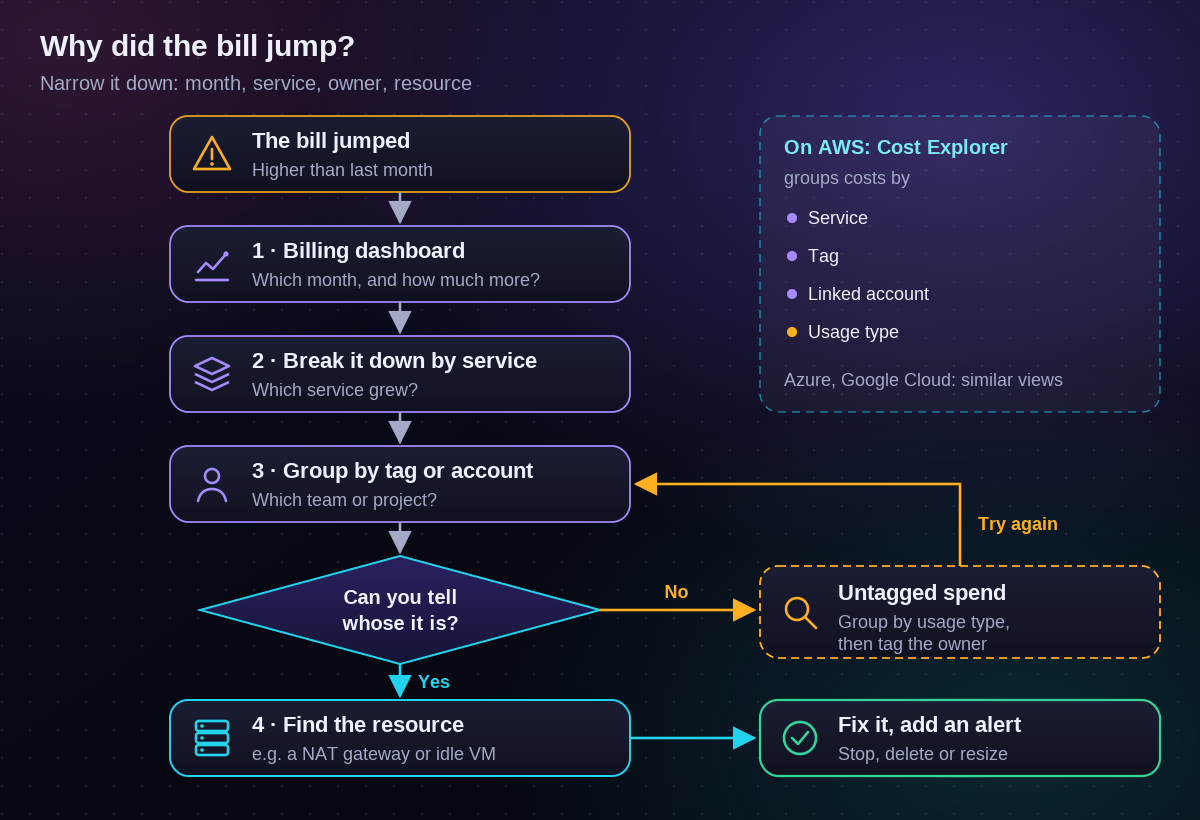
When a bill jumps, start at the billing dashboard, the billing console's summary page, then narrow down by service, owner and resource. AWS Cost Explorer charts past spend grouped by service, tag, linked account (one of several accounts billed together) or usage type. Notice the loop: untagged spend sends you back to tag it.
Switch off and rightsize
A dev server on for 12 hours each weekday runs 60 of the 168 hours in a week, cutting its compute charge by about 64 percent; its disks are still billed. For an Auto Scaling group, the scheduled scaling from lesson 10 can drop it to zero each evening and restore it each morning.
Rightsizing means matching a resource's size to what it really uses: a server whose CPU and memory both stay low can usually move to a smaller type. AWS Compute Optimizer analyses utilisation metrics and recommends changes. Rightsize first, then commit.
FinOps: everyone owns the bill
Engineers launch resources, finance pays the invoice and product managers weigh features against their cost, so no one sees the whole bill. FinOps is the practice of sharing that responsibility.
The FinOps Foundation calls it a discipline and cultural practice in which engineering, finance, technology and business teams collaborate on data-driven spending decisions, each owning their own cloud usage. Like the shared responsibility model, it makes clear whose job each part is.
Its three repeating phases are Inform (make spend visible), Optimize (cut waste, choose pricing models) and Operate (make it routine with budgets and reviews). Cost optimisation returns as a pillar in the next lesson.
Check yourself
Over a long weekend, a dev server's CPU stays at 1 percent. Does it cost less than on a busy weekday, and what would cut its cost?
No: a running instance is billed per second, busy or idle. Stopping it out of hours ends the compute charge; its disk is still billed.
Your team buys a three-year Savings Plan sized to today's servers, then rightsizes half of them. Why was that the wrong order?
The commitment is paid every hour, used or not, so the smaller servers leave part of it unused. Rightsizing first sizes it to real need.
Users are unchanged, but data transfer tripled after private servers began copying large files from S3 through a NAT gateway in another AZ. Which charges grew, and what is one fix?
NAT gateway processing per gigabyte, and cross-AZ transfer. A VPC endpoint for S3 sends that traffic straight to S3, so it no longer passes through the NAT gateway or crosses zones.
Go deeper
- Navigating Cloud FinOps: Tools and Strategies for Financial Efficiency: a tour of cloud and third-party FinOps tools for putting these habits into practice.