IaaS vs PaaS vs SaaS vs Serverless, Explained
You check Gmail, a student team puts its website on Heroku, and a startup engineer updates Linux on servers rented from Amazon Web Services (AWS). All three use the cloud, yet they do very different amounts of work. This lesson explains IaaS vs PaaS vs SaaS (infrastructure, platform and software as a service), plus serverless: what you manage in each, and how to choose.
The layers behind every app
Every app on a server sits on a stack of layers, and someone must install, update and repair each one. From the bottom up:
- Hardware: the physical servers, disks and network.
- Virtualisation: the hypervisor that splits a server into virtual machines (VMs), as you saw in What Is Cloud Computing?
- Operating system (OS): base software such as Linux or Windows.
- Runtime: the engine that runs code in a language such as Python, plus ready-made code it relies on.
- Application: the program itself, such as an online shop.
- Data and users: what the app stores and who may sign in.
Each model draws a line across the stack: the provider looks after everything below it, and you everything above. Watch the line rise from left to right.
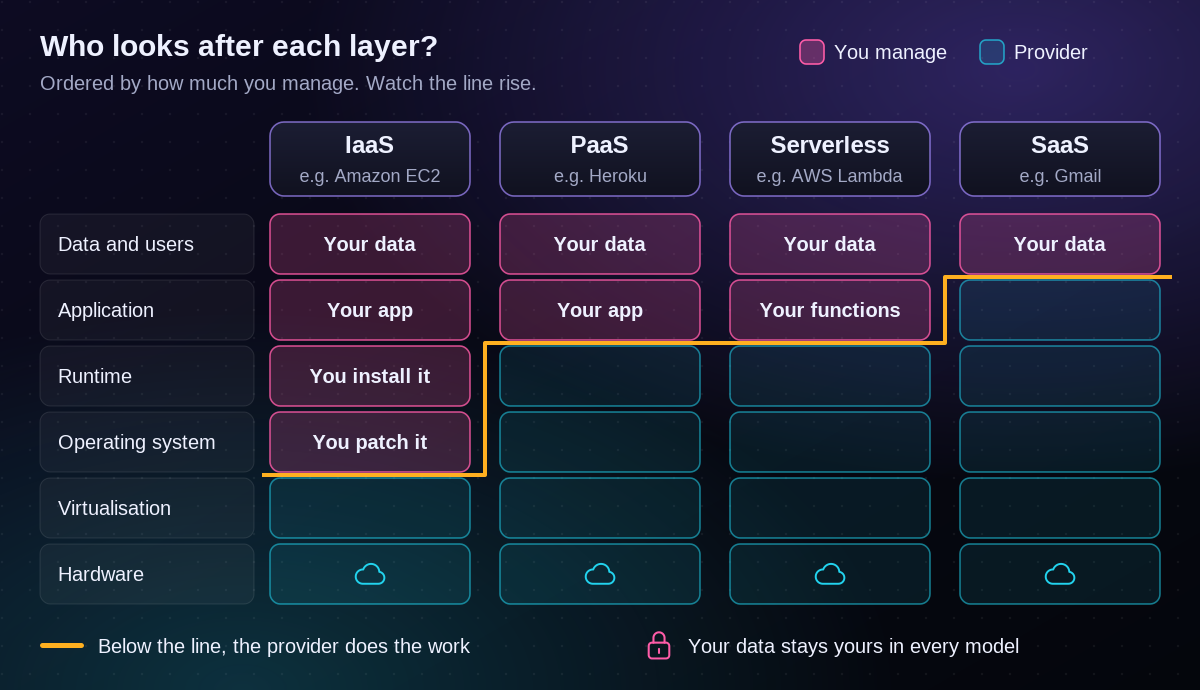
IaaS: rent the machine, run the rest
Infrastructure as a service (IaaS) rents you the bottom of the stack: virtual machines, storage and networks. The provider runs the hardware and the hypervisor. From the operating system up, the work is yours.
The best-known example is Amazon EC2 (Elastic Compute Cloud). You pick a VM size and an image, a saved disk with an OS installed, and the VM runs within minutes. Then patching the OS (installing updates that fix security flaws), adding software, choosing which network traffic may reach the VM and backing it up are your jobs.
That is cooking at home in a rented flat: the landlord keeps the oven working, and all the cooking is yours.
IaaS fits when you need that control, such as software that only runs on one OS version or an old application that expects a server of its own.
PaaS and serverless: bring only your code
PaaS: the platform runs your app
Platform as a service (PaaS) moves the line up. You hand over your code, and the platform builds it, runs it and keeps the OS and runtime patched.
It also handles scaling, adding copies of your app when more visitors arrive: you set how many, or rules for adding them.
Examples are Heroku, Google App Engine and AWS Elastic Beanstalk. Elastic Beanstalk is a halfway case: it runs your app on EC2 VMs in your account and lets you choose when platform updates happen.
This is take-and-bake: the shop has done most of the work. The match is how much you hand over, not which step: the provider always takes over layers from the bottom up.
The price is choice: you get only the languages and versions the platform supports, and cannot install what you like underneath.
Serverless: code that runs only when called
Serverless goes further. Its usual form is functions as a service (FaaS): you upload small pieces of code called functions, each doing one job, such as shrinking a photo. The provider runs a function only when an event calls it, such as a web request, a new file or a timer.
Serverless does not mean there are no servers; you just never see, size, patch or scale them. If a thousand events arrive, the provider runs many copies at once, up to your account's limits. If none arrive, nothing runs.
With AWS Lambda, Amazon's serverless service, you pay per request and per millisecond of running time, so by default an unused function costs nothing to run. A PaaS app usually keeps a copy running, and billing, while it waits.
Its catches, such as a slower first call and a time limit per run, come later in What Is Serverless?
SaaS: just use the finished software
Software as a service (SaaS) is the finished product: the provider runs the whole stack, and you use it in a web browser or an app. Gmail, Salesforce (software for managing customers) and Zoom are SaaS.
You install nothing, write no code and change only the settings offered. What stays yours is your data and users: what you store and who has an account. The later lesson on the shared responsibility model covers that split.
In the pizza table, delivery matches SaaS: a finished pizza from someone else's menu. Dine out matches serverless only on paying per dish, since diners bring no recipe. Serverless leaves you the same layers as PaaS but takes scaling off you too, so it sits between PaaS and SaaS.

Choosing: more control means more work
The rule is short: the more control you keep, the more work you keep. Every layer you manage is one you can tune, and one you must patch, watch and fix.
The flowchart turns that rule into three questions. Answer them per job, such as email or a website, not once for a whole company.

Then match the answer to your team's skills. A team where nobody has run Linux servers will struggle with IaaS patching. A few developers usually move fastest on PaaS or serverless, and a team that just needs a tool should pick SaaS.
Many organisations mix all four: Gmail for email, a website on a PaaS, photo resizing on serverless and an old billing system on VMs.
Check yourself
A tool your team needs only runs on one Linux version with changed OS settings. Why IaaS and not PaaS?
Only IaaS hands you the operating system. A PaaS chooses and patches the OS for you, so you cannot change it.
An app makes a thumbnail each time someone uploads a photo, a few times a day. Why might serverless beat PaaS?
It is a short job set off by an event, and serverless bills per run, so idle hours cost nothing; a PaaS app usually runs, and bills, all day.
Your company uses Salesforce, and a former employee whose account was never closed copies customer data. Whose job was preventing that?
Your company's: in SaaS the provider runs the whole stack, but your users and data stay yours to manage, including closing accounts when people leave.
Go deeper
- Navigating Cloud FinOps: Tools and Strategies for Financial Efficiency: each model is billed differently; this post covers tools for tracking and cutting cloud costs.