Managed Databases in the Cloud: RDS and Friends
Your web shop keeps its orders in PostgreSQL on a VM in a private subnet, as in the VPC lesson. Then a PostgreSQL security fix comes out, the disk is filling up, and nobody has ever tested last night's backup. This lesson explains managed databases: what the provider runs for you, the main services, how failover and read replicas work, and what stays your job.
What a managed database runs for you
A database engine is the software that stores data and answers queries, such as PostgreSQL or MySQL. A managed database is a cloud service that runs the engine for you, on servers you never log in to. Your app still sends the same SQL (Structured Query Language, the language of relational databases).
On AWS, the best-known one is Amazon RDS (Relational Database Service). To provision a DB instance, a database server RDS runs for you, you choose an engine, version, size, storage and subnets. Minutes later you get an endpoint, the DNS name your app connects to.
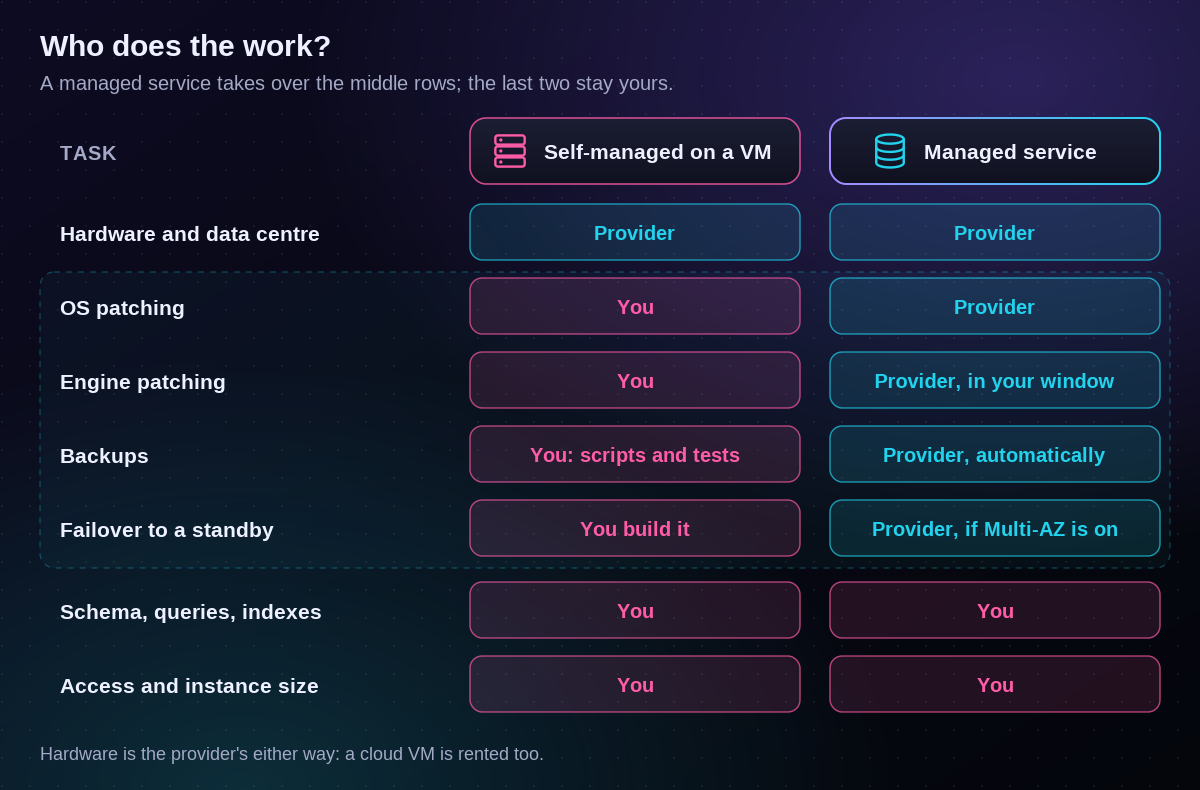
Each instance has a weekly maintenance window, 30 minutes by default at a time you can choose, when RDS updates the hardware, operating system and engine. With auto minor version upgrade on, it also applies new minor versions, the fix releases within a major version such as 16. These upgrades cause some downtime.
Each day, RDS also takes a snapshot of the storage volume, a point-in-time copy as in lesson 6. You keep these automated backups for 0 to 35 days; 0 turns them off.
RDS uploads the transaction logs, the engine's record of every change, to Amazon S3 every five minutes. Snapshots plus logs give point-in-time recovery: a restore to any moment in the retention period, such as just before someone deleted a table. It creates a new DB instance, which your app must then use.
RDS also sends metrics, such as CPU use and free storage, to Amazon CloudWatch, AWS's monitoring service, where you can set alerts.
In the table, notice which rows change hands, and which never do.
The family: relational, NoSQL and cache
A relational database stores data in tables of rows and columns, linked by shared values called keys, and answers SQL. Most managed databases are relational:
| Service | Cloud | Engines |
|---|---|---|
| Amazon RDS | AWS | Including MySQL, PostgreSQL, MariaDB, Oracle, SQL Server |
| Amazon Aurora | AWS | Its own, MySQL- or PostgreSQL-compatible |
| Cloud SQL | Google Cloud | MySQL, PostgreSQL, SQL Server |
| Azure SQL Database | Azure | SQL Server |
Aurora rebuilt the storage underneath: it writes six copies of your data across availability zones. As lesson 4 showed, Azure offers PostgreSQL and MySQL as separate services.
A key-value database stores each item under a unique key and fetches it by that key, like a dictionary. A document database stores each item as a document in a format like JSON (named fields that can nest), and items may differ in fields. Both are often called NoSQL.
Amazon DynamoDB does both: each item has a primary key, and its attributes can hold nested lists and maps. You pick no server size; you pay per request, or for the read and write capacity you set. Azure Cosmos DB is a document database that can also speak the MongoDB and Cassandra APIs.
An in-memory cache keeps copies of often-read data in memory (RAM), far faster than disk. Amazon ElastiCache runs the Valkey, Redis or Memcached engines. Your app checks the cache first and asks the database only on a miss, so a cache speeds a database up rather than replacing it.
High availability: a standby is not a read replica
High availability means the database keeps working when a server or zone fails, which needs a copy of your data in a second zone. RDS offers two kinds of copy, and they solve different problems.
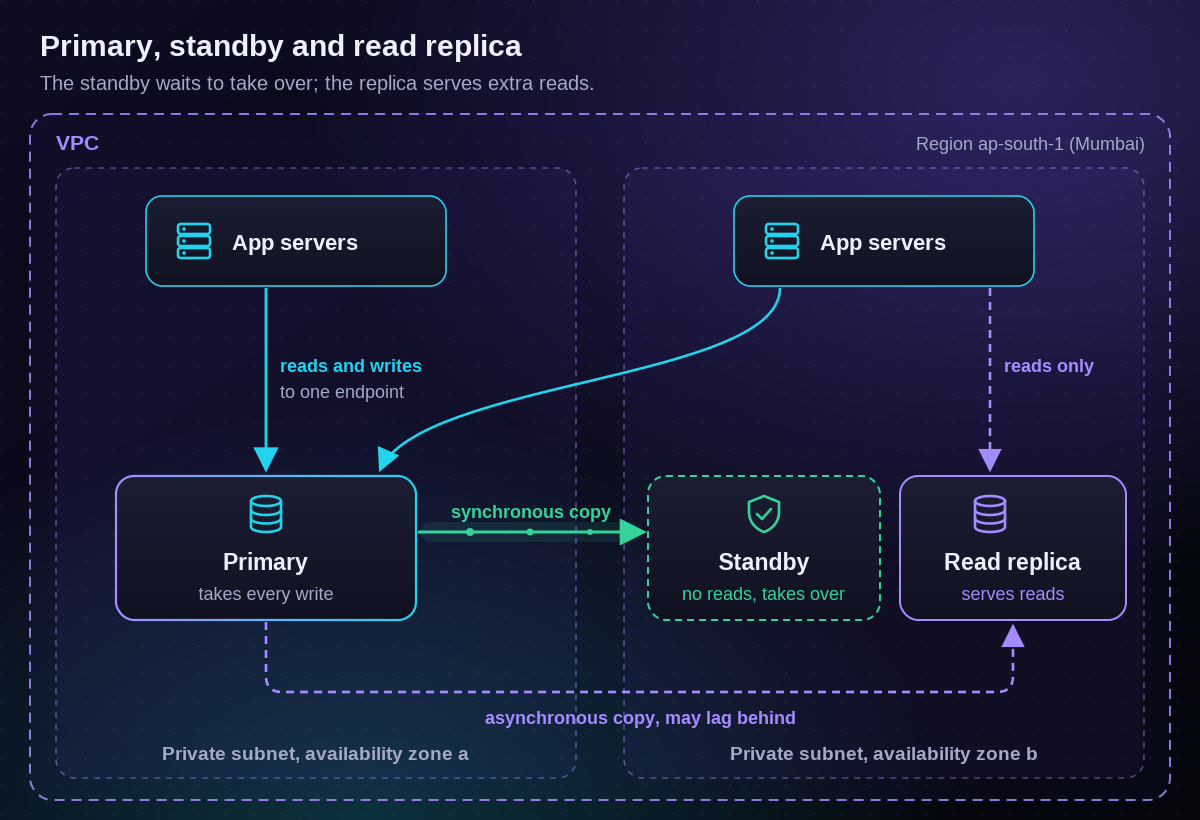
An optional Multi-AZ deployment pairs your primary, the instance your app uses, with a standby in another zone, updated by synchronous replication: each write reaches the standby before it is committed (confirmed as saved), so the standby holds every committed change. The standby serves no reads; it waits to take over.
A read replica is a read-only copy updated by asynchronous replication: the primary confirms each write first and sends it on afterwards. So a replica can lag, which CloudWatch shows as ReplicaLag. Your app sends some reads to the replica's own endpoint, easing the primary's load.
The standby is insurance; the replica is extra capacity. A replica never takes over by itself, but you can promote it into a standalone database that accepts writes, even in another region. Aurora blurs the line: its replicas serve reads and are its failover targets.
In the diagram, compare the solid synchronous arrow to the standby with the dashed one to the replica.
Failover, step by step
Failover is the switch from a failed primary to its standby. RDS starts it itself when, for example, the primary's host, storage or network fails. Maintenance uses it too: RDS patches the standby, fails over, then patches the old primary.
Follow the steps and notice that the endpoint's name never changes; only the address behind it does.
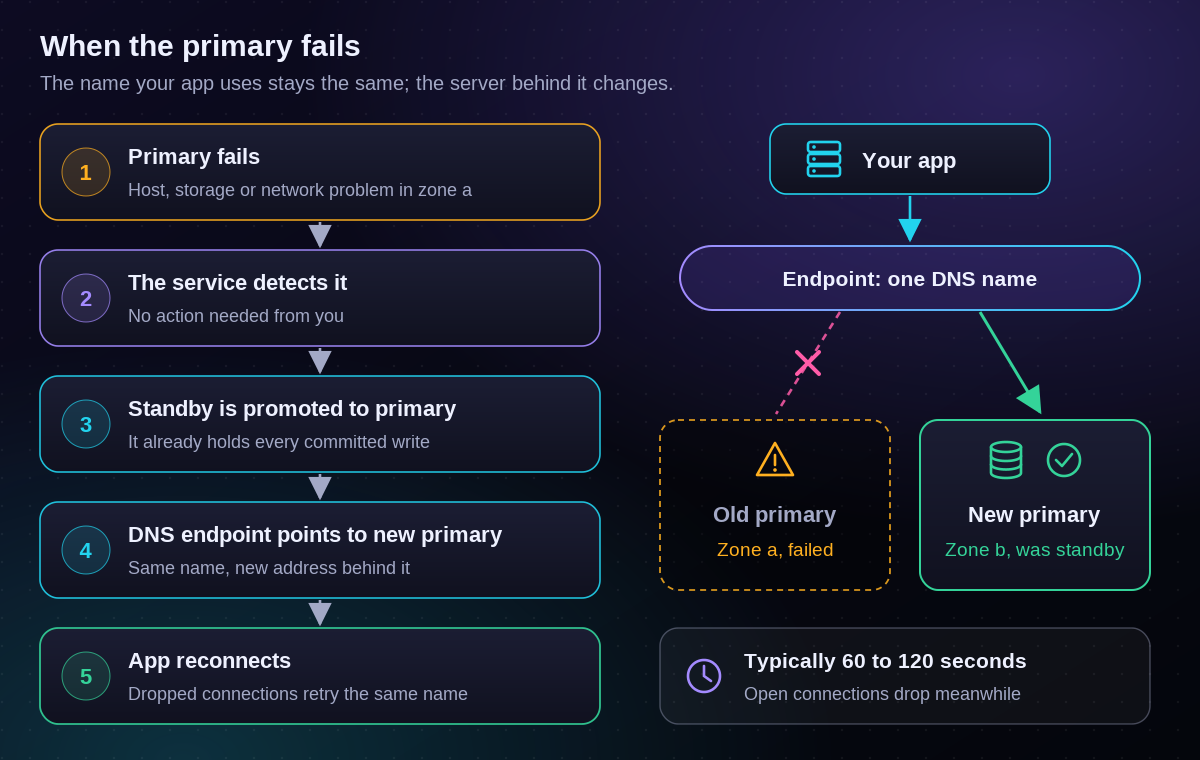
Failover typically takes 60 to 120 seconds. Open connections drop, so your app must retry, and must not cache the DNS answer for long: AWS advises Java apps to keep it 60 seconds or less.
What you still own
A managed service runs the database, not your data model. The schema, the tables, columns and data types you define, is yours to design.
So are queries and indexes. An index is a sorted lookup structure on one or more columns that lets the engine find rows without reading the whole table. The service will not add one for your slow query; AWS lists query tuning as your job.
Access control is yours: the database users and their permissions, private subnets, the publicly accessible setting left off, and a security group admitting only the app servers' group, as in lesson 7. Cloud-wide permissions come in Cloud IAM Explained.
You also choose the instance class (CPU and memory), storage and whether to pay for Multi-AZ: too small and queries queue, too big and you pay for idle capacity. And you start major version upgrades, such as 16 to 17, yourself, because they can break existing apps.
Trade-offs: price, access and locked settings
For the same CPU and memory, a managed instance costs more per hour than a plain VM, and Multi-AZ adds a standby that serves no reads. That premium pays for the work in the table.
You also lose access. RDS allows no SSH (Secure Shell, remote login) to the host, and restricts some system tables and procedures that need advanced privileges.
Engine settings live in a parameter group, a named set of configuration values attached to the instance, not a file you edit, and some cannot be changed. If you need the server itself, RDS Custom gives full database and OS access, or you run the engine on a VM.
Check yourself
Heavy evening reports slow your database, and a teammate suggests turning on Multi-AZ. Will it help?
No: the standby serves no reads. Point the reports at a read replica's endpoint instead, which takes that load off the primary.
At 14:05 someone deletes every order by mistake. Why does the Multi-AZ standby not save you, and what does?
Synchronous replication copied the delete to the standby at once, so it lost the rows too. Point-in-time recovery restores a new instance as of 14:04 from snapshots and transaction logs.
After moving to RDS, a query that reads a million rows is still slow. Whose job is the fix?
Yours: the provider runs the engine, but queries and indexes belong to your schema, so you add an index on the filtered column or pick a bigger instance class.