Terraform State and Modules Explained, Hands-On
Your team's Terraform folder repeats the same bucket code for dev and for prod, next to a file called terraform.tfstate that the README says never to commit. This lesson explains Terraform state and modules: how state maps code to real resources, how teams share it safely, the commands that read it, and how a module turns two copies into one folder.
What the state file records
As lesson 16 showed, Terraform writes its state after every apply. By default it is a JSON file, terraform.tfstate, in your folder, with the previous copy kept as terraform.tfstate.backup.
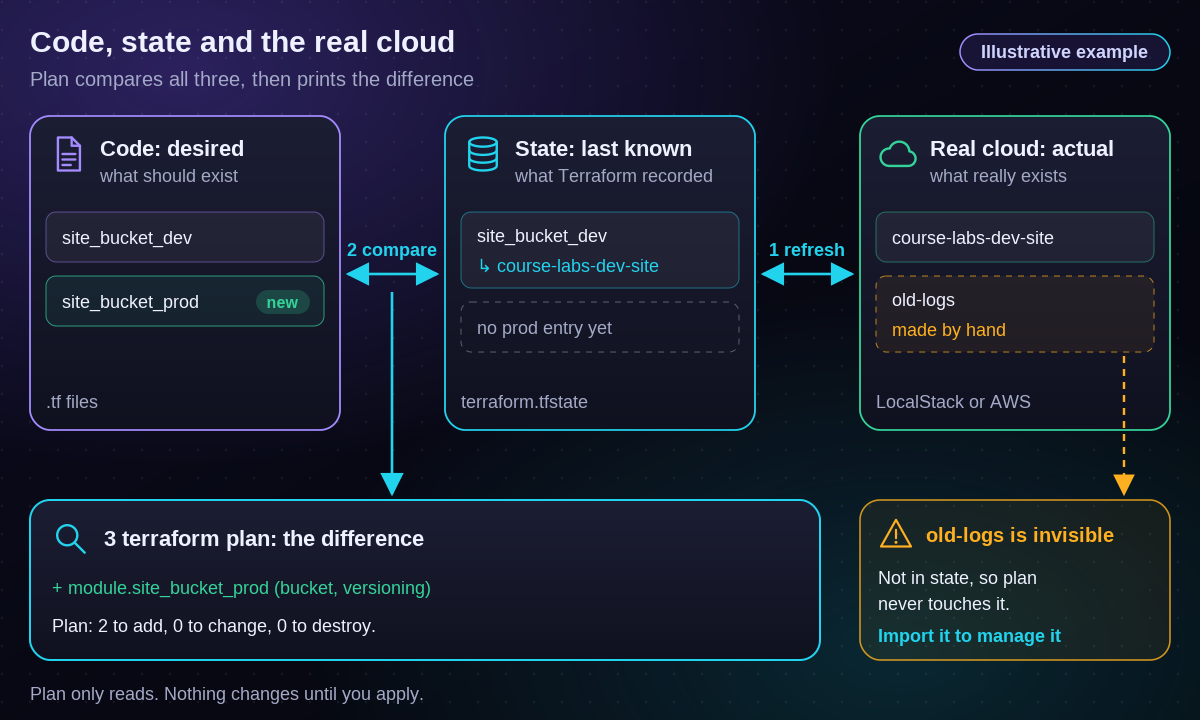
Its main job is a mapping: each resource address in your code is bound to one real object, such as aws_s3_bucket.lab to the bucket course-labs-demo-bucket in lesson 17. It also caches every attribute the provider reported, records dependencies, and keeps a serial, a number that goes up with every change. An excerpt from this lesson's lab, heavily trimmed:
{
  "version": 4,
  "serial": 5,
  …
  "resources": [
    {
      "module": "module.site_bucket_dev",
      "type": "aws_s3_bucket",
      "name": "this",
      …
          "attributes": {
            "bucket": "course-labs-dev-site",
            "id": "course-labs-dev-site",
…module, type and name make up the address; id is the real bucket. The serial, 5, is illustrative. In the diagram, notice that the refresh, lesson 16's check of each real object, looks only at objects the state lists, so a bucket made by hand stays invisible to the plan.
Secrets in state: never edit it, never commit it
State stores attributes in plain text, secrets included. If your code creates a managed database (lesson 8) with a password, the password is in the file. Marking a value sensitive only hides it from Terraform's screen output: anyone who can read the state can still read the secret.
Never commit it to Git, which keeps every version forever; the lab's .gitignore excludes *.tfstate and *.tfstate.*. Never edit it by hand, as HashiCorp's documentation warns: one wrong ID and Terraform loses track of a resource. The terraform state commands change it safely.
Remote state and locking
A local file works while only you run Terraform. In a team, each laptop's copy would differ, so a teammate's plan would miss the bucket you just created and try to create it again.
A backend is where Terraform keeps state. The default local backend writes the file into your folder; a remote backend uses a shared store, such as an S3 bucket or HashiCorp's HCP Terraform service. You declare it in the terraform block and run terraform init again, which offers to move your existing state there:
terraform {
  backend "s3" {
    bucket       = "acme-terraform-state"
    key          = "shop/prod/terraform.tfstate"
    region       = "ap-south-1"
    use_lockfile = true
  }
}
The bucket name is illustrative; the lab keeps local state. key is the state's object name, so one bucket can hold many states. HashiCorp recommends turning on versioning for the bucket, so you can recover an older state.
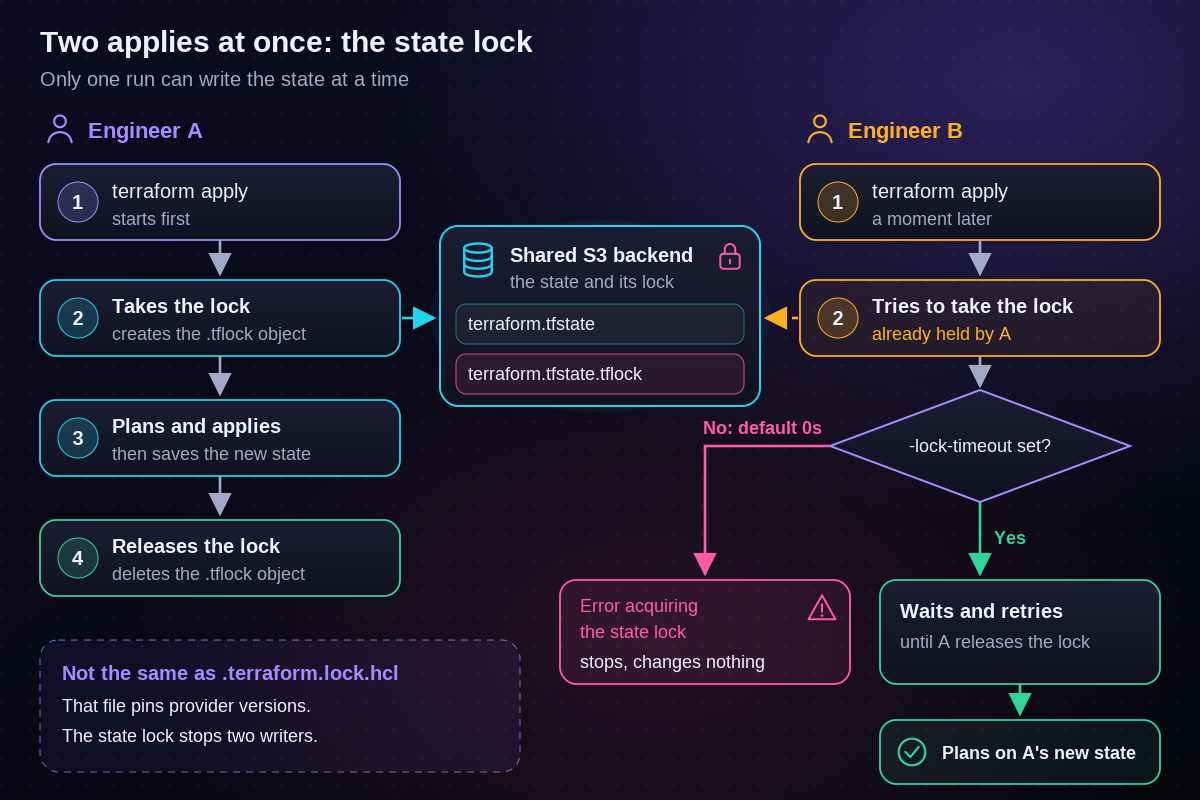
Sharing brings a risk: two people applying at once both read the same state and both write a new one, and the second write erases the first one's record. A state lock prevents this. With use_lockfile = true, Terraform creates a lock object, the key plus .tflock, before any command that could write state, and deletes it afterwards. Older setups used a DynamoDB table, now deprecated.
In the flowchart, notice engineer B. By default Terraform does not wait: B gets Error acquiring the state lock, which names who holds it, and nothing changes. With -lock-timeout=5m, B retries for up to five minutes, then plans on A's new state.
Reading the state: list, show and import
You rarely open the file itself. terraform state list prints every resource address in the state, root module first, then modules, alphabetically. terraform state show prints everything recorded for one address. From the lab, trimmed:
$ terraform state list
module.site_bucket_dev.aws_s3_bucket.this
module.site_bucket_dev.aws_s3_bucket_versioning.this
module.site_bucket_prod.aws_s3_bucket.this
module.site_bucket_prod.aws_s3_bucket_versioning.this
$ terraform state show module.site_bucket_dev.aws_s3_bucket.this
# module.site_bucket_dev.aws_s3_bucket.this:
resource "aws_s3_bucket" "this" {
    arn                         = "arn:aws:s3:::course-labs-dev-site"
    bucket                      = "course-labs-dev-site"
    force_destroy               = true
    …
}
terraform import works the other way round: it adopts an existing object, such as a bucket someone made in the console, by recording it in state. You first write a matching resource block, then run, for example, terraform import aws_s3_bucket.logs old-logs. An import block in your code does the same during plan and apply, so the import gets reviewed like any change.
Modules: a reusable folder of code
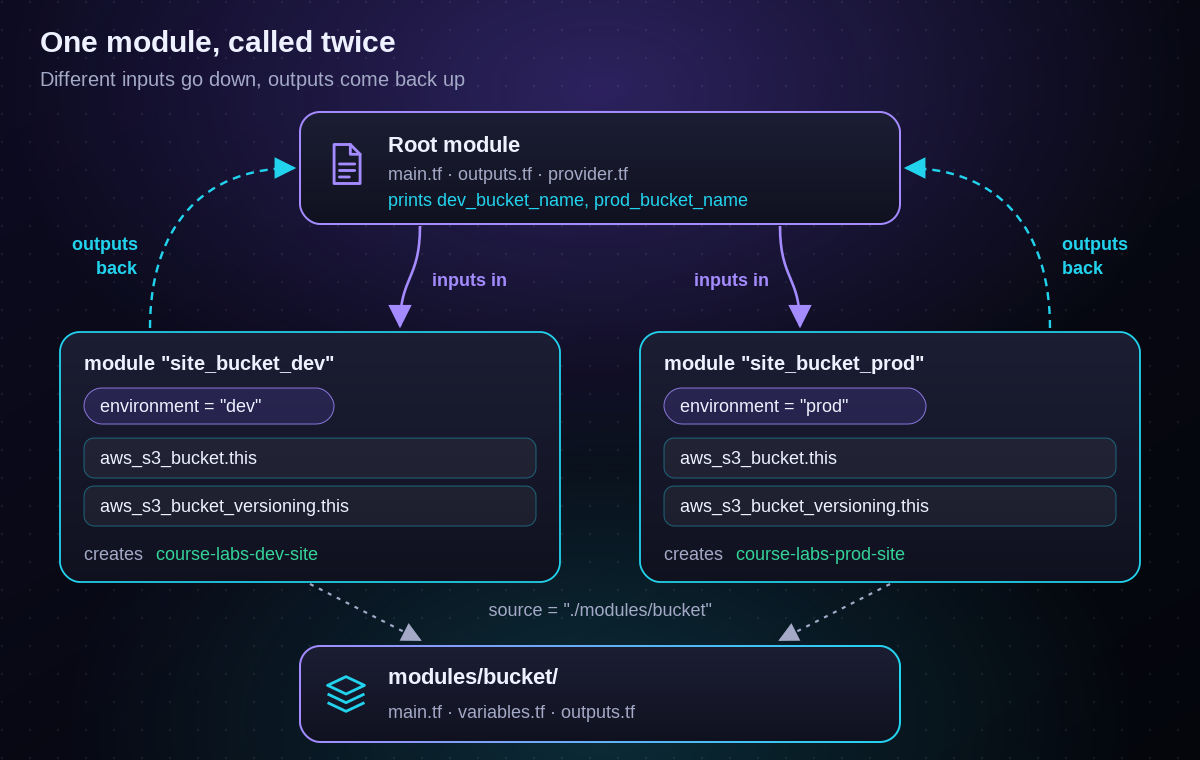
A module is a folder of .tf files. The folder you run Terraform in is the root module; one it calls with a module block is a child module. A child module takes input variables and hands back outputs; the caller cannot reach its resources directly.
The lab's modules/bucket is the shelf kit: a bucket plus versioning, which keeps older copies of each object when it is overwritten or deleted. Its main.tf, without comments and its terraform block:
resource "aws_s3_bucket" "this" {
  bucket        = "${var.project}-${var.environment}-site"
  force_destroy = true
}

resource "aws_s3_bucket_versioning" "this" {
  bucket = aws_s3_bucket.this.id
  versioning_configuration {
    status = "Enabled"
  }
}
Its variables.tf declares environment, with no default, so every caller must set it, and project, defaulting to course-labs. Its outputs.tf returns the bucket's name and ARN, from lesson 11. It has no provider block: it inherits the root module's.
Refactor the repeated buckets into a module
Before the refactor, the root main.tf held both resources twice, for dev and prod, differing only in names, so a fix in one copy could miss the other. Now each environment takes four lines:
module "site_bucket_dev" {
  source      = "./modules/bucket"
  environment = "dev"
}

module "site_bucket_prod" {
  source      = "./modules/bucket"
  environment = "prod"
}
source is the module's folder; a local path starts with ./ or ../. The root reads results as module.<name>.<output>, so its outputs.tf prints module.site_bucket_dev.name as dev_bucket_name. After adding a module block or changing a source, run terraform init to install it.
In the tree, notice that both calls point at one folder: change the kit once, and the next plan updates both environments.
The refactor also changes each address, say from aws_s3_bucket.dev to module.site_bucket_dev.aws_s3_bucket.this. Left alone, Terraform would plan to destroy and recreate buckets that already exist; a moved block, with from and to set to the old and new address, says they are the same object. Real teams often go further and give each environment its own root folder and state, so a mistake in dev cannot touch prod.
Check yourself
You rename aws_s3_bucket.site to aws_s3_bucket.web. Why does the plan want to destroy the bucket and create a new one?
The state binds the real bucket to the old address, which now has no code, so it is destroyed; the new address has no state entry, so it is created. A moved block from old to new turns this into a rename.
Two engineers share state in S3 without use_lockfile and apply at the same moment. What can go wrong?
Both read the same state and both write a new one, so the second write erases the first one's record. Terraform forgets a resource that really exists, and the next plan may try to create it again.
You fix a mistake in modules/bucket/main.tf. Why does the next plan show changes for dev and prod?
Both module blocks use the same source folder, so both build their resources from the changed code: fix the kit once, and every shop gets the fix.